

Contents
Android 17 Beta 1 Unveils Enhanced Shortcut Customization and More
The highly anticipated first beta version of Android 17 is now available, giving users a glimpse into the significant updates coming to Google’s operating system. Among its various improvements, this release notably focuses on making smartphone shortcut creation and management much easier and more intuitive. Let’s delve into what this exciting update brings to the table.
Customizing Shortcuts in Android 17’s Pixel Launcher
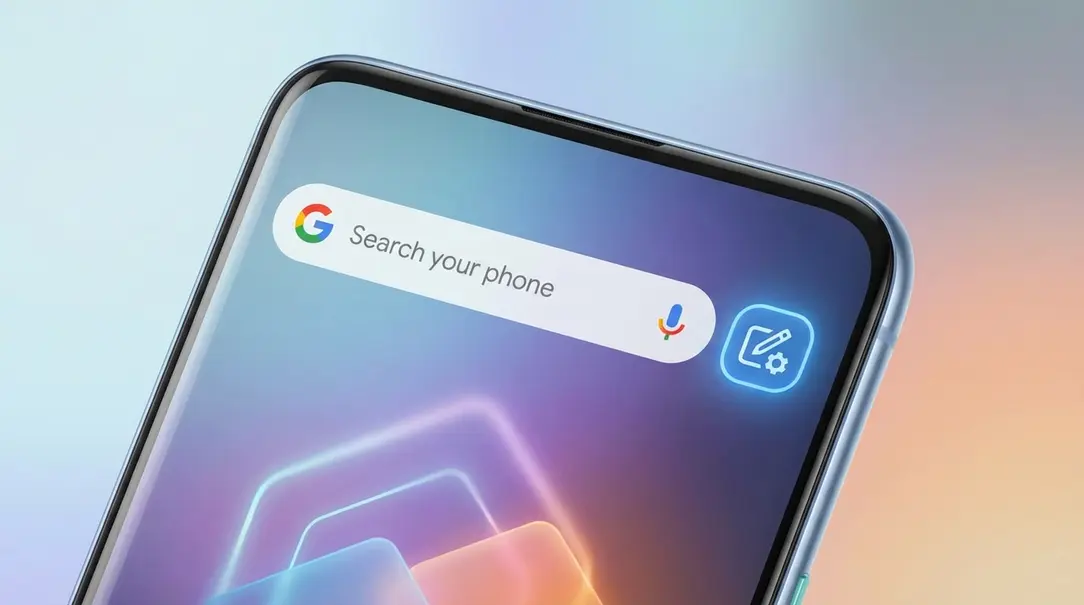
Android 17 Beta 1 reveals a convenient new way for users to personalize shortcuts directly within the Pixel Launcher. For those unfamiliar, the Pixel Launcher is the default home screen experience on Google Pixel smartphones, known for its clean interface and tight integration with Google services.
The key enhancement here is accessible through a simple action:
- By **long-pressing the search bar** located on your home screen, you will gain access to the new Widget Settings.
- Within these settings, users can easily **change the shortcut** positioned next to the voice search icon.
Currently, the available shortcuts offer quick access to a range of useful functions, including:
- Weather updates
- News feeds
- A dictionary lookup
- AI-powered search capabilities
This flexibility means users can tailor their home screen to their specific needs, boosting productivity and personalizing their device experience. Alternatively, if no shortcut is desired, the Pixel Launcher can be left in its original, minimalist state.
Beyond functional changes, the Pixel Launcher in Android 17 Beta 1 also introduces additional cosmetic options, such as the ability to set a translucent appearance for a fresh, modern look.
Key Changes Introduced in Android 17 Beta 1
Android 17 Beta 1 is currently available for download, but exclusively for Google Pixel smartphones. This includes devices from the Pixel 6 up to the Pixel 10 Pro, and the eagerly awaited upcoming Pixel 10a models. Accessing this early version requires enrollment in the official Android beta program. The next beta iteration is expected to be released around March 2026.
It’s important to remember that beta versions are early previews, and while they offer a sneak peek, the features are still under development and may contain bugs or undergo further changes. As such, these initial changes compared to Android 16 are currently quite refined and include:
- An updated icon for the volume settings, affecting all audio playback elements.
- The introduction of a fixed video recording quality selection, offering more consistent results.
- Improved processor efficiency through the offloading of unnecessary tasks, potentially leading to better performance and battery life.
- Enhanced readability within the settings menu, making navigation and adjustments more user-friendly.
Frequently Asked Questions (FAQ)
What is Android 17?
Android 17 is the upcoming major update to Google’s Android operating system, bringing new features, design elements, and performance improvements to smartphones and other Android devices.

How can I get Android 17 Beta 1?
Android 17 Beta 1 is currently available for select Google Pixel devices (Pixel 6 through Pixel 10 Pro, and upcoming Pixel 10a). You need to enroll your compatible device in the official Android beta program to receive the update.
What are the main features of Android 17 Beta 1?
The primary highlight of Android 17 Beta 1 is the enhanced ability to customize shortcuts directly from the Pixel Launcher’s search bar. Other notable changes include an updated volume settings icon, fixed video recording quality options, improved CPU efficiency, and a more readable settings menu.
Is Android 17 Beta 1 stable for daily use?
As a beta release, Android 17 Beta 1 is an early preview intended for developers and enthusiasts. It may contain bugs, performance issues, and features that are not yet finalized. It is generally not recommended for primary devices that require high stability for daily use.
About Post Author
