

Contents
Google Messages Introduces Real-Time Location Sharing for Enhanced Coordination and Safety
Google Messages is finally catching up with other leading messaging applications, rolling out a highly anticipated real-time location sharing feature. This new capability is seamlessly integrated with Google’s broader Location Sharing Hub, offering users a more dynamic and secure way to connect and coordinate.
Real-Time Location Sharing Arrives in Google Messages
The tech giant, Google, continues to introduce significant updates to its messaging platform. Following recent enhancements like advanced protection against SMS spam, the focus has now shifted to a practical everyday feature: real-time location sharing.
After initial announcements, Google has begun implementing the ability for users to share their live location dynamically. This new function is progressively rolling out, with early adopters already experiencing its benefits. The solution leverages Google’s Location Sharing Hub, which serves as Google’s comprehensive answer to similar services like Apple’s Find My.
How the Feature Works
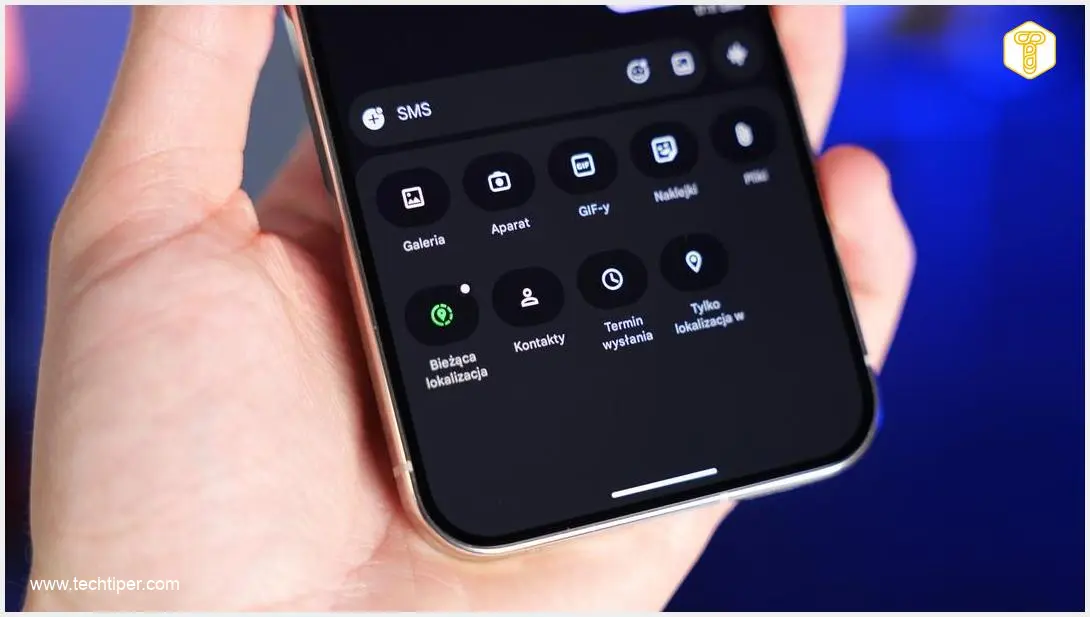
This innovative tool allows users to broadcast their current position directly within a chat thread. What makes it particularly useful is the dynamic map update, meaning recipients can observe the sender’s movement in real-time without needing to switch to Google Maps. This functionality is supported in both individual and group chats, with location data presented as an interactive card embedded within the conversation itself.
- Dynamic Updates: See your contact’s movement live on a map.
- Integrated View: Location appears directly within your chat, no app switching needed.
- Versatile: Works for both one-on-one and group conversations.
- Interactive Card: Location information is displayed in an easy-to-understand format.
Step-by-Step Guide: Sharing Your Live Location
For those eager to utilize this new feature, the process is straightforward:
- Open a Chat: Navigate to any conversation window within Google Messages.
- Access Sharing Menu: Tap the plus icon located to the left of the text input field. This action will expand the sharing menu.
- Select “Live Location”: Within the expanded menu, you will now see a new option labeled “Live Location.”
- Choose Duration: The application will prompt you to select a specific time frame for how long your location will be shared.
- Send: After setting the duration, tap “Send.” Your conversation partner will then receive an interactive window to track your live position.
Availability and Rollout
The feature is currently rolling out, with many beta users and those on newer devices like the Google Pixel 10 Pro XL (running Google Messages beta version 20260313_00_RC00) already having access. Google is expected to make this valuable tool available to all users in the near future.
Frequently Asked Questions (FAQ)
What is Google’s Location Sharing Hub?
Google’s Location Sharing Hub is a centralized service that allows users to share their real-time location with specific contacts for a set duration. It’s designed to enhance coordination and safety, offering a comprehensive platform similar to Apple’s Find My, where users can manage who sees their location across various Google services.

How does real-time location sharing improve safety?
Real-time location sharing enhances safety by allowing users to let trusted contacts know their current whereabouts and movements, especially when traveling alone, meeting new people, or in unfamiliar areas. In emergencies, it provides crucial information for quick assistance. Users maintain full control over who they share their location with and for how long.
Can I control who sees my live location and for how long?
Yes, absolutely. Google has built this feature with user privacy and control in mind. When you initiate live location sharing, you can explicitly select which contacts or groups receive your location. You also specify the duration for which your location will be shared, from a short period to “until you turn it off.” You can stop sharing at any time.
Is this feature available on all Android devices?
The real-time location sharing feature is rolling out progressively to Google Messages users on Android devices. While it is initially available to beta testers and users on certain newer Android phones, Google plans to make it widely accessible to all Google Messages users in due course. Ensure your Google Messages app is updated to the latest version to get access as soon as it’s available for your device.
Source: 9to5google, internal research.
Opening photo: Krzysztof Wilamowski
About Post Author
