

Contents
Choosing the Right Weather App for Android Auto: A Driver’s Guide
For many drivers, reliable weather information isn’t just a convenience—it’s a necessity. Whether you’re planning a long road trip, commuting to work, or simply wondering if it’s safe to wash your car, accurate forecasts for storms and precipitation are crucial. Surprisingly, the selection of dedicated weather applications for Android Auto is quite limited. To help you navigate this sparse market, I’ve put several leading options to the test to identify which one provides the best protection against unexpected weather conditions on the road.
MyRadar: Unrivaled Features for Real-Time Tracking
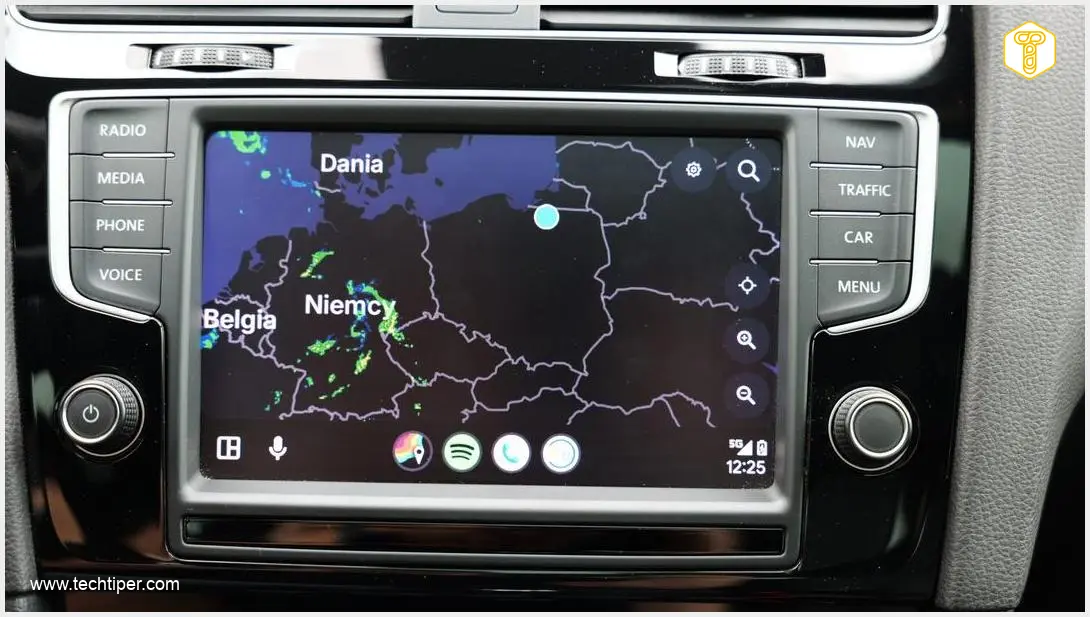
The MyRadar application quickly emerged as the standout performer in my testing. Its comprehensive features and intuitive interface made it my go-to tool for checking weather conditions while driving. Here’s what makes MyRadar shine:
- Real-time Precipitation Tracking: The interface allows for convenient, real-time tracking of rain and storms directly on your car’s display. This visual feedback is invaluable for understanding immediate weather patterns.
- Flexible Display Options: MyRadar offers significant flexibility, allowing you to customize the map view and the elements displayed, ensuring you see the information most relevant to your journey.
- RouteCast Feature: A particularly practical feature for travelers is RouteCast. This predicts weather conditions along your entire planned route, taking into account your projected time and location. This foresight is incredibly helpful for long-distance driving.
- Multi-platform Availability: Beyond Android Auto, MyRadar is also available on smartphones and Wear OS smartwatches, offering a consistent experience across your devices.
While MyRadar offers impressive functionality, it’s not without its quirks. My initial attempt to launch the app on Android Auto resulted in a black screen. Although stability improved after restarting the overlay, it’s clear that the software could benefit from further optimization to ensure a smoother user experience right from the start.
Weather&Radar: Simplicity Meets Stability
A strong contender to MyRadar, the aptly named Weather&Radar app focuses on providing clear, user-friendly weather information with excellent stability. This application excels in several areas:
- Readability and Ease of Use: Weather&Radar prioritizes a clean interface, making it easy to digest weather information at a glance—a critical factor for drivers.
- Seamless Split-Screen Operation: It performs exceptionally well in split-screen mode, running smoothly alongside other essential apps like Google Maps without any performance hiccups. Consider how integrating Android Auto EV route planning with Google Maps could further enhance your journey.
- Comprehensive Forecasts: Users gain access to hourly forecasts and crucial warnings about severe weather events, keeping them informed of potential hazards.
- Key Data at Your Fingertips: The interface allows for quick checks of current precipitation, temperature, and lightning strike data, providing a holistic view of the immediate weather.
The primary drawback for Weather&Radar is the absence of more detailed features, such as integrated route planning. While it provides excellent current data, those looking for advanced navigational weather integration might find it slightly limited. This software is available for Android Auto and smartphones.
Google Weather: Android Auto’s Default but Limited Solution
The official weather widget from Google is a built-in feature of Android Auto, but its functionality can be quite underwhelming for users expecting detailed weather graphics and radar. Here’s what you need to know about the default Google Weather experience:
- Basic Information Only: Clicking the weather icon doesn’t launch a dedicated app with visual radars or detailed graphics. Instead, it activates the Gemini assistant (see how Gemini integration with Android Auto works), which verbally provides basic daily parameters.
- Voice-Activated Forecasts: Drivers will hear information such as maximum and minimum temperatures or the chance of rain, all delivered audibly, keeping their eyes on the road.
- No On-Screen Graphics: A graphical weather view is only accessible on your smartphone or via a desktop browser, not directly on the Android Auto display.
Despite these limitations, Google Weather’s simplicity has its advantages. A single tap initiates an audio forecast for your current location, preventing any visual distractions while driving. If you need weather details for your route, simply ask Gemini, making it a truly hands-free experience.
Frequently Asked Questions (FAQ)
Why are there so few dedicated weather apps for Android Auto?
The development environment for Android Auto applications is more restrictive than for standard smartphone apps, requiring specific optimizations for in-car use and driver safety. This often leads to a smaller selection of highly specialized applications, including weather apps, as developers focus on core functionalities and user experience within strict guidelines.

What are the most crucial features for an Android Auto weather app?
The most crucial features for a weather app in Android Auto include real-time precipitation tracking (radar), route-specific forecasts (like MyRadar’s RouteCast), clear and concise visual information that doesn’t distract the driver, and stable performance in a car environment. Voice integration is also a significant plus for hands-free operation.
Is the built-in Google Weather widget sufficient for most drivers?
For drivers who only need basic, auditory weather updates (current temperature, chance of rain) without visual radar or detailed forecasts, the built-in Google Weather widget, powered by Gemini, can be sufficient. However, those requiring advanced features like real-time storm tracking or route-specific weather planning will likely need a dedicated third-party app like MyRadar or Weather&Radar.
Source: ZDNet, Original Research
Opening photo: Krzysztof Wilamowski
About Post Author
