

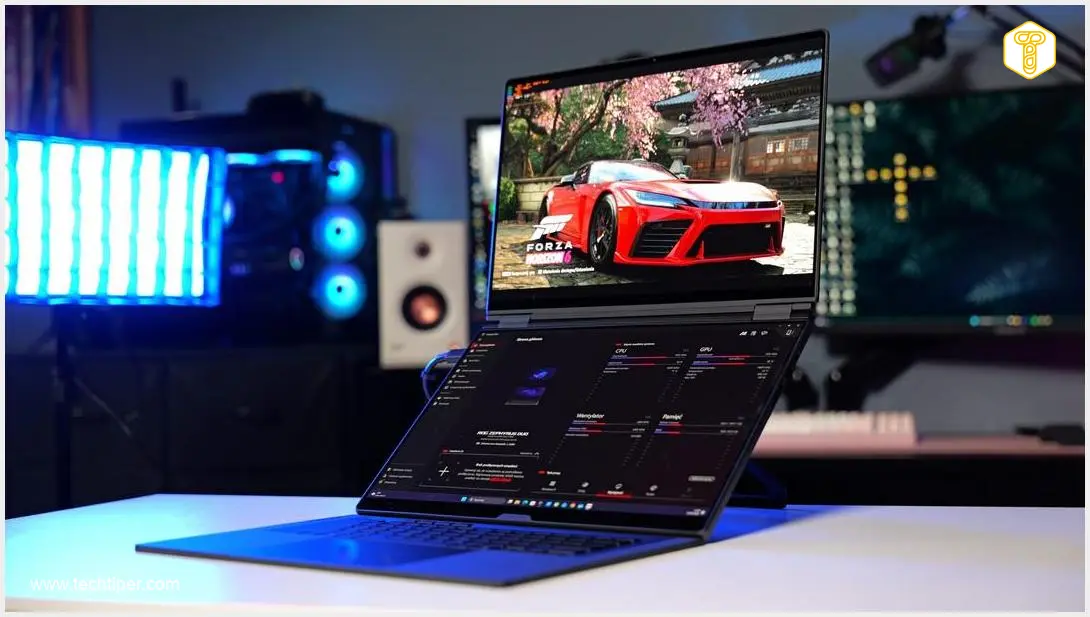
ASUS ROG Zephyrus Duo 2026 Review
-
Design and Build Quality
-
Dual OLED Displays
-
Performance (CPU/GPU)
-
Battery Life
-
Keyboard and Touchpad
-
Value for Money
A Groundbreaking Dual-Screen Powerhouse with a Premium Price
The ASUS ROG Zephyrus Duo 2026 sets a new standard for portable workstations, combining phenomenal performance, outstanding build quality, and two brilliantly implemented OLED screens that genuinely enhance productivity. While its innovative design and top-tier components come with an exceptionally high price tag and a few minor compromises like the absence of an Ethernet port, it offers an unparalleled experience for professionals and gamers seeking the ultimate in mobile computing.
Advantages
- Brilliantly implemented dual OLED screens significantly enhance productivity and multitasking.
- Exceptional performance from Intel Core Ultra 9 386H and NVIDIA RTX 5090 with 24 GB VRAM.
- Outstanding build quality with almost entirely metal and glass construction.
- Advanced and effective cooling system, maintaining comfortable surface temperatures.
- Respectable battery life for its class in single-screen, standard use.
- Comfortable, quiet, and detachable backlit keyboard with good key travel.
- Fast, full-sized SD card reader (UHS-II).
- Storage upgradeability via an empty M.2 slot.
- Sophisticated, understated design without aggressive gaming aesthetics.
- High-quality six-speaker audio system.
- Comprehensive software optimization for dual-screen usage and performance control.
Disadvantages
- Extremely high price tag, representing a substantial financial investment.
- Heavy and large for a 16-inch laptop (6.22 lbs / 2.82 kg).
- Absence of a dedicated Ethernet (RJ45) port.
- Fan noise can be disruptive in “Turbo” performance mode.
- Limited RGB lighting might disappoint some gaming enthusiasts.
- Minor inconveniences: no numeric keypad and small arrow keys.
- Could benefit from more USB ports.
- 2 TB base storage might seem modest for a premium device (though expandable).
Contents
ASUS ROG Zephyrus Duo 2026 Review: Dual OLED Screens and RTX 5090 Power
Dual-screen laptops have been steadily captivating consumers in recent years, and the ASUS ROG Zephyrus Duo 2026 aims to set a new standard. This review will delve into whether the latest generation of ASUS’s flagship model offers a suite of features and functionalities that truly make a difference beyond its innovative second screen. Can its exceptional capabilities compensate for what can only be described as a remarkably high price tag? Let’s find out.
What’s in the Box?
The ASUS ROG Zephyrus Duo 2026 arrives in a substantial package, revealing an impressive array of accessories. Naturally, the laptop itself is the centerpiece. Beyond that, ASUS includes a precise ASUS Pen, compatible with both the primary and secondary displays. What’s more, you’ll find not one, but two chargers:
- A compact, mobile 100-watt USB-C power adapter, ideal for travel.
- A more traditional, robust 300-watt power brick, which unlocks the full potential of the laptop’s processors and can deliver up to 150 watts to the graphics card alone.
Design and Build Quality
The ASUS ROG Zephyrus Duo 2026 features two identical 16-inch OLED screens. For a 16-inch design, this laptop is notably large and relatively heavy, measuring between 0.78 to 0.98 inches (1.99 to 2.49 cm) thick and weighing 6.22 pounds (2.82 kg). This is primarily due to its unique dual-screen architecture.
Fortunately, ASUS has made no compromises on build quality. The laptop is constructed almost entirely from metal and glass, resulting in exceptional fit and finish. Despite its gaming pedigree, the device’s design is surprisingly understated, devoid of aggressive cutouts, garish accents, or overly flashy RGB lighting. Its sophisticated aesthetic allows it to seamlessly blend into most computer setups.
The top lid, made from an aluminum alloy, offers impressive rigidity. A striking feature here is the “Slash Lighting” strip, offering 35 illumination zones and 15 pre-programmed animations. The etched ROG logo further enhances its premium look. Remarkably, the lid effectively resists fingerprints, making it easy to keep clean.
On the underside of the ASUS ROG Zephyrus Duo 2026, you’ll find a sturdy metal base that elevates the laptop, along with numerous anti-slip pads (including on the base itself). This area also houses cooling vents, speaker grilles, and a small service window. By removing just two Torx screws, users can access, among other things, two M.2 slots for storage, one of which is conveniently empty. This allows for easy and cost-effective expansion of storage space.
The laptop boasts a total of six speakers, including two woofers, delivering loud and surprisingly high-quality audio. While much of the sound emanates from the bottom cover, the overall sound profile is commendable, though it can vary slightly depending on the laptop’s physical configuration.

Versatile Usage Modes
The ASUS ROG Zephyrus Duo offers remarkable flexibility, thanks to its dual screens, robust hinges, and metal base. Beyond the traditional laptop mode, it supports various configurations:
- Laptop Mode: Standard clamshell operation.
- Vertical Dual-Screen Mode: Extends your display vertically, ideal for documents and content creation.
- Horizontal Dual-Screen Mode (Book Mode): Offers a wider workspace.
- Sharing Mode: Lays flat for collaborative viewing.
- Tent Mode: Perfect for media consumption without the keyboard.
While I primarily used it in conventional laptop mode, the vertical dual-screen configuration quickly became a close second. This setup transforms the device into a true powerhouse for productivity. Working with documents, creating content, and even video editing reach a level unattainable by typical laptops, even those with larger single screens. All of this is delivered in a form factor that still fits comfortably into standard backpacks and laptop bags. The functionality of this solution can be invaluable, though it’s important to note that the dual screens don’t offer a significant advantage for most gaming scenarios.
Connectivity: Ports
The selection of ports, while adequate, isn’t exceptionally extensive. On the right side, you’ll find a USB-C port (Thunderbolt 4 with DisplayPort support), a USB 3.2 Gen 1 Type-A port, and a fast, full-sized SD card slot (UHS-II, 312MB/s) – a welcome addition for content creators.
The opposite side features one USB 3.2 Gen 2 Type-A port and another USB-C port. Additionally, ASUS includes a dedicated power input, a combo audio jack, and an HDMI 2.1 output. While a few more USB ports would be appreciated, the current array is serviceable. Gamers might particularly miss the RJ45 (Ethernet) port for wired internet, but the laptop compensates with modern wireless connectivity standards like Wi-Fi 7 and Bluetooth 6.0.
Keyboard and Touchpad
In contrast to some high-end gaming laptops like the MSI Titan 18 HX with its mechanical Cherry switches, the ASUS ROG Zephyrus Duo, designed for mobility, features a membrane keyboard. The keyboard module itself is impressive, measuring a mere 0.2 inches (5.1 mm) thick when detached from the laptop. While the laptop can technically close without the keyboard, a noticeable gap appears between the screens.
Despite its slender profile, ASUS engineers have managed to incorporate a mechanism that provides a comfortable 1.7mm key travel. The typing experience on the included keyboard is quite pleasant and quiet. The four additional programmable M-keys (M1, M2, M3, M4) are a thoughtful touch, allowing for custom shortcuts. However, the absence of a numeric keypad and the small arrow keys might be minor inconveniences for some users.
The touchpad, on the other hand, is generously sized for a gaming device. Finger movements are smooth, and the touchpad flawlessly registers every interaction and gesture.
The entire keyboard assembly is evenly backlit and operates wirelessly. With the backlight enabled, you can expect approximately 5 hours of use, while disabling it can nearly double the battery life. A red LED on the left side flashes when the battery level drops to around 20%. Charging occurs via USB-C (e.g., connected to the laptop) or through the pogo pins that connect the keyboard module to the computer.
It’s clear that ASUS engineers dedicated considerable attention to this component, ensuring that users don’t feel they are compromising despite the laptop’s innovative and atypical design.
Stunning Dual OLED Displays
Undoubtedly, the most compelling feature of this laptop is its pair of exquisite OLED displays. ASUS has equipped the Zephyrus Duo with two 16-inch panels, boasting exceptional image parameters. Both screens offer a crisp 3K (2880 × 1800 pixels) resolution, a smooth 120 Hz refresh rate, and an ultra-fast 0.2 ms response time. Furthermore, these displays are factory-calibrated, offer an impressive 1100 nits of peak brightness, and carry certifications from TÜV Rheinland, Pantone, and Vesa.
The on-paper specifications are highly impressive, but the real-world experience is even better. Vibrant colors, profound blacks, and superb responsiveness make the ASUS ROG Zephyrus Duo 2026 a joy for gaming and content consumption. The high maximum brightness ensures the laptop remains perfectly usable even in brightly lit rooms or outdoors. Gamers will also appreciate the inclusion of NVIDIA G-Sync technology for tear-free visuals.
Both screens are, of course, touch-sensitive and protected by hardened Corning Gorilla Glass, ensuring smooth interaction with fingers or the ASUS Pen, and easy cleaning with a dry microfiber cloth. Above the primary display, there’s a good quality Full HD camera that supports Windows Hello for secure facial recognition login.
Battery Life and Charging
ASUS has integrated a 90 Wh battery into the chassis, which is just shy of the maximum capacity allowed on airplanes (typically 100 Wh). This capacity ensures a respectable battery life in classic laptop mode with a single active screen.
With the keyboard backlight off and brightness set to approximately 50%, I achieved around 5 hours of work in Google Workspace. Lowering the brightness further would extend the runtime. Naturally, the laptop can be discharged in under two hours if running demanding applications or with both bright screens active.
When connected to the larger 300W power supply, the laptop recharges at around 95 watts. This means it can charge from 20% to 100% in approximately 50-60 minutes. The compact 100-watt charger offers slightly slower but still satisfactory charging speeds.
Software Experience
The laptop runs on Windows 11 Pro, and ASUS has optimized the software to maximize the dual-screen design. A particularly useful feature is an overlay that appears when dragging windows, allowing users to effortlessly snap applications to both screens, a single screen, or even a specific section of a screen.
While the large on-screen keyboard is perhaps less essential, it can display practical shortcuts and sliders customizable via the ASUS Dial & Control Panel, which can be tailored for various applications.
Other proprietary ASUS applications include myASUS, providing access to general settings, diagnostics, and customer support, and ASUS GlideX, designed to enhance productivity and enable smartphone connectivity.
Additionally, ASUS ROG Zephyrus Duo 2026 users have access to Armoury Crate, a comprehensive utility focused on gaming and performance customization. The main screen provides an overview of key components, and the app allows users to change performance profiles, configure lighting, set macros, and manage scenario profiles.
RGB Lighting
Unlike some competitors, such as the Predator Helios 18 AI, which boast extensive RGB lighting, the Zephyrus Duo 2026 takes a more restrained approach. The primary source of illumination is the full RGB backlit keyboard. The only other element emitting light is the “Slash Lighting” strip on the rear lid. Control over all lighting elements is managed through the Aura Sync section within the Armoury Crate application. Enthusiasts seeking an abundance of flashy RGB effects might find this setup a bit modest.
Performance: Unleashing Raw Power
The ASUS ROG Zephyrus Duo 2026 is equipped with top-tier components to deliver uncompromising performance. Its computational power comes from the 16-core Intel Core Ultra 9 386H processor, which also features a Neural Processing Unit (NPU) capable of up to 50 TOPS. For graphics, the tested configuration includes the most powerful available GPU: an NVIDIA GeForce RTX 5090 with 24 GB of VRAM. System memory is a generous 64 GB of LPDDR5X, and storage is provided by a 2 TB PCIe Gen 5 SSD.
For creative professionals, the combination of the powerful CPU, RTX 5090 GPU, and dedicated NPU makes this an excellent choice for demanding creative workflows leveraging GPU acceleration and AI tasks.
Processor Benchmarks
The Intel Core Ultra 9 386H is one of the most potent processors on the market, though in some specific scenarios, it showed slightly lower scores compared to the formidable AMD Ryzen AI Max+ 395 found in compact devices like the ASUS ProArt PX13. Intel has recently moved away from Hyper-Threading, so the Core Ultra 9 386H offers 16 cores and 16 threads. Its base frequency is 2.1 GHz, boosting up to 4.9 GHz. The chip can draw up to 80 watts in turbo mode (25 watts in base mode) and is equipped with 18 MB of Intel Smart Cache.
Performance in Cinebench 2026 across different power modes:
- Silent Mode: 4875 nT, 511 1T. Average CPU power draw: 59W. Average core temperature: 90°C.
- Performance Mode: 4988 nT, 514 1T. Average CPU power draw: 59W. Average core temperature: 82°C.
- Turbo Mode: 5001 nT, 513 1T. Average CPU power draw: 64W. Average core temperature: 85°C.
In Silent mode, the laptop lives up to its name. Fan noise is audible but subdued, with the processor drawing an average of 59 watts under full load. Surprisingly, Silent mode is not significantly less powerful than the Performance profile, although components operate at noticeably higher temperatures. This makes it a great option for those who prioritize quiet operation without sacrificing too much performance. Turbo mode delivers the highest performance but comes with a considerable increase in noise. It’s worth noting that the physical orientation of the laptop (e.g., laptop mode, dual-screen modes, tent mode) had a negligible impact on processor performance, with less than a 2% difference between the best and worst results in Cinebench nT, falling within the margin of error.
Graphics Card Benchmarks
The NVIDIA GeForce RTX 5090 graphics card is equipped with 24 GB of dedicated memory, provides 1824 AI TOPS, features a TGP (Total Graphics Power) of up to 150 watts, and supports Deep Learning Super Sampling (DLSS) 4 scaling technologies. Benchmarks in 3DMark and Cinebench for the two highest performance profiles yielded impressive results:
- Performance Mode: 3DMark Steel Nomad: 4804; 3DMark Time Spy: 18018; 3DMark Fire Strike: 33537; Cinebench 2026: 87061.
- Turbo Mode: 3DMark Steel Nomad: 5349; 3DMark Time Spy: 19686; 3DMark Fire Strike: 35059; Cinebench 2026: 95120.
While these results are not drastically higher than an RTX 5080 in an Acer Predator Helios 18 AI, they do lag behind an RTX 5090 in a larger system like the MSI Titan 18 HX. However, it’s crucial to remember that the ASUS ROG Zephyrus Duo 2026 is a considerably slimmer and smaller device. The ample 24 GB of VRAM will prove invaluable for tasks such as 3D modeling and complex rendering.
AI Computation Benchmarks
The ASUS ROG Zephyrus Duo features a dedicated NPU, but AI computations can also be offloaded to the powerful RTX 5090. This makes it an ideal machine for local artificial intelligence workloads, similar to the advanced capabilities seen in next-generation AI laptops like the ASUS Zenbook A14/A16.
Geekbench AI results (Performance mode):
- Single Precision: CPU (ONNX): 4896; GPU Intel Graphics (DirectML): 667192; GPU RTX 5090 (DirectML): 39724487; NPU (OpenVINO): 2028.
- Half Precision: CPU (ONNX): 1370; GPU Intel Graphics (DirectML): 640113; GPU RTX 5090 (DirectML): 32584; NPU (OpenVINO): 8169.
- Quantized Score: CPU (ONNX): 4438; GPU Intel Graphics (DirectML): 18634500; GPU RTX 5090 (DirectML): 64; NPU (OpenVINO): 944.
Storage Performance
The ASUS ROG Zephyrus Duo 2026 in its tested configuration comes with a 2 TB M.2 PCIe Gen 5 SSD. While a 2 TB capacity might seem modest for a premium-priced device, users benefit from a free M.2 slot for expansion. The installed drive delivers excellent transfer speeds, closely approaching the maximum theoretical values for PCIe 5.0 SSDs.
CrystalDiskMark results (8 GB file):
- Sequential Read: 13185.1 MB/s
- Sequential Write: 11987.35 MB/s
- Random Read: 484.93 MB/s
- Random Write: 546.27 MB/s
Gaming Performance
For many, gaming performance is paramount. I tested the ASUS ROG Zephyrus Duo 2026 in a selection of popular, ranging from less to more demanding, titles.
Cyberpunk 2077
First up was the visually demanding Cyberpunk 2077. While not the most current title, this 2020 game can still push even the most powerful hardware. Our initial test used the default Ultra preset with DLSS and ray tracing disabled. As expected, the performance was excellent.
- Performance Mode: Average FPS: 55.3; Max FPS: 69.5; Min FPS: 46.5.
- Turbo Mode: Average FPS: 62.3; Max FPS: 78.6; Min FPS: 51.9.
Turbo mode significantly boosts performance, with the RTX 5090 drawing approximately 110 watts instead of 80 watts, but the fan noise can be disruptive. Therefore, subsequent tests were primarily conducted in Performance mode, which I found to be a better balance. Next, we tested with the ray tracing ultra preset. In a second attempt, DLSS was added in “Quality” mode for ray tracing.
- Ray Tracing (Rasterization): Average FPS: 24.7; Max FPS: 31.3; Min FPS: 21.1.
- Ray Tracing + DLSS Quality: Average FPS: 38.4; Max FPS: 48.6; Min FPS: 33.5.
NVIDIA RTX 50 series graphics cards offer DLSS 4 with frame generation. We tested frame generation at 2x and 4x settings. While MFG 4x resulted in over 120 frames per second, I found MFG 2x to offer a better overall gameplay experience due to fewer artifacts.
- Ray Tracing + DLSS Quality + Frame Generation 2x: Average FPS: 75.7; Max FPS: 86.0; Min FPS: 67.0.
- Ray Tracing + DLSS Quality + Frame Generation 4x: Average FPS: 125.6; Max FPS: 145.0; Min FPS: 112.4.
Forza Horizon 6
Next up was the much newer racing title, Forza Horizon 6. While its basic settings aren’t overly demanding, enjoying the best graphics requires powerful hardware. DLSS in “Quality” mode was sufficient to achieve over 60 frames per second.
Results in Performance mode:
- Extreme: Average FPS: 85; 1% Low: 69.2; 0.1% Low: 56.2.
- Extreme + Ray Tracing: Average FPS: 47; 1% Low: 42.4; 0.1% Low: 41.0.
- Extreme + Ray Tracing (DLSS Quality): Average FPS: 63; 1% Low: 55.5; 0.1% Low: 51.1.
- Extreme + Ray Tracing (DLSS Quality, MFG 2x): Average FPS: 109; 1% Low: 74.2; 0.1% Low: 53.6.
Marvel’s Spider-Man Remastered
The final AAA title tested was Marvel’s Spider-Man Remastered. This console port looks decent but doesn’t demand the absolute strongest components. Even without active DLSS, the performance was excellent. For gameplay, I would likely opt for maximum settings with ray tracing enabled.
Results in Performance mode:
- Rasterization: Average FPS: 110.2; Max FPS: 120.5; 1% Low: 71.8; 0.1% Low: 55.8.
- Ray Tracing (Rasterization): Average FPS: 79.1; Max FPS: 92.7; 1% Low: 57.9; 0.1% Low: 46.5.
Fortnite
Finally, I tested one of the world’s most popular games. I measured gameplay fluidity during a standard solo game in “zero build” mode. Settings were mostly high, with only rendering distance set to maximum. The ASUS ROG Zephyrus Duo 2026 effortlessly exceeded 200 frames per second.
Results in Performance mode:
- Average FPS: 254.8
- Max FPS: 329.1
- 1% Low: 139.8
- 0.1% Low: 65.4
Thermals and Noise Levels
ASUS has implemented an advanced cooling system, comprising two fans, a vapor chamber, and liquid metal (instead of thermal paste) on the processor. Additionally, a graphite insulating layer protects the screen from overheating. This sophisticated setup effectively dissipates heat, as evidenced by the consistent benchmark results across different performance modes. Even in Silent mode, performance doesn’t significantly drop compared to the performance-focused profiles.
However, core temperatures do vary; in Silent mode, the CPU and GPU can operate at over 90 degrees Celsius under load. From a user’s perspective, these internal temperatures are less impactful due to the unique design, which remarkably isolates the hot chassis. The only scenario where the keyboard becomes noticeably warm is in classic laptop mode, but even then, surface temperatures remain comfortable. After 30 minutes of gaming, the hottest spot measured 39 degrees Celsius (102.2°F), while the WASD key area was around 35 degrees Celsius (95°F). A well-designed feature is that hot air is expelled exclusively from the rear of the chassis.
The ASUS ROG Zephyrus Duo 2026 can be surprisingly quiet, even under load, thanks to its excellent Silent mode. Performance mode, my daily driver, introduces noticeable fan noise under load but remains unobtrusive. Activating Turbo mode, however, necessitates wearing headphones, as the noise becomes quite disruptive after a few minutes.
Technical Specifications and Pricing
The ASUS ROG Zephyrus Duo 2026 demands a significant investment. The base variant (32 GB RAM / 1 TB SSD) with an RTX 3070 Ti is priced starting around 23,399 PLN (approximately $5,800 USD / €5,300 EUR). A version with an RTX 5080, 64 GB RAM, and a 2 TB SSD starts at 27,999 PLN (approximately $7,000 USD / €6,400 EUR).
The most impressive configuration, featuring the flagship RTX 5090, comes in two main options: 32 GB RAM for 28,999 PLN (approximately $7,200 USD / €6,600 EUR), and the tested variant with double the operating memory (64 GB RAM) for 31,599 PLN (approximately $7,900 USD / €7,200 EUR). Regardless of the chosen specification, the ASUS dual-screen laptop represents a substantial financial commitment.
Key Specifications:
- Displays: Two 16-inch OLED panels, 2880 x 1800 pixels (3K, 16:10), 120 Hz refresh rate, 100% DCI-P3 coverage, MUX Switch.
- Processor: Intel Core Ultra 9 386H (up to 4.9 GHz), 16 cores, 16 threads, 18 MB Intel Smart Cache, NPU up to 50 TOPS.
- Graphics Cards:
- Dedicated: NVIDIA GeForce RTX 5090, 24 GB GDDR7 VRAM, TGP up to 150 W.
- Integrated: Intel Graphics Xe.
- RAM: 64 GB LPDDR5X 8533.
- Storage: 2 TB M.2 PCIe 5.0 NVMe.
- Ports:
- 1 x SD Card Reader (UHS-II, 312MB/s)
- 1 x Power Input
- 1 x HDMI 2.1
- 2 x USB 3.2 Gen 2 Type-A
- 1 x Headphone/Microphone Combo Jack
- 2 x Thunderbolt 4 (with DisplayPort and Power Delivery)
- Battery: 90 Wh, 300 W power adapter included.
- Connectivity: Bluetooth 6.0, Wi-Fi 7.
- Other Features: Full HD webcam, Windows Hello facial recognition, touch-enabled screens, detachable backlit keyboard.
- Operating System: Windows 11 Pro.
- Dimensions: 13.98 x 9.72 x 0.98 inches (35.5 x 24.7 x 2.49 cm).
- Weight: 6.22 lbs (2.82 kg).
Conclusion and Our Verdict
The ASUS ROG Zephyrus Duo 2026 is an exceptionally expensive, yet surprisingly brilliant laptop. It’s rare for a portable device to leave such a profound impression. This machine delivers phenomenal performance, outstanding build quality, and a respectable battery life for its class.
However, its most significant assets are the brilliantly implemented dual screens. Far from being a mere gimmick, the secondary display genuinely enhances comfort and and productivity, and setting up the multi-screen workspace is remarkably quick. The only notable drawback is the absence of a dedicated Ethernet (RJ45) port.
Undoubtedly, the most substantial barrier for many potential buyers will be the price. Innovation and top-tier components always command a premium, but the additional cost for an extra 32 GB of RAM, for instance, echoes the sometimes exaggerated pricing structures of other premium brands. If you are seeking an unparalleled portable workstation that offers exceptional productivity and innovative design, the ASUS ROG Zephyrus Duo 2026 comes highly recommended.
Frequently Asked Questions (FAQ)
The dual-screen setup on the ASUS ROG Zephyrus Duo 2026 is highly beneficial for productivity. Its swift deployment and flexible configurations (like vertical dual-screen mode) significantly enhance multitasking, content creation, and document management, making it a powerful tool for professionals and creators.
While offering exceptional features, the main compromises include its very high price, the absence of a built-in Ethernet (RJ45) port, and potentially loud fan noise in “Turbo” performance mode. Its weight and size might also be a factor for those prioritizing extreme portability.
The ASUS ROG Zephyrus Duo 2026 features an advanced cooling system, including a vapor chamber, liquid metal on the CPU, and two fans. This system is highly effective at heat dissipation, allowing for consistent performance even under heavy loads. Surface temperatures remain comfortable during use, and hot air is efficiently expelled from the rear.
Source: Krzysztof Wilamowski & Opening photo: Krzysztof Wilamowski
About Post Author
