

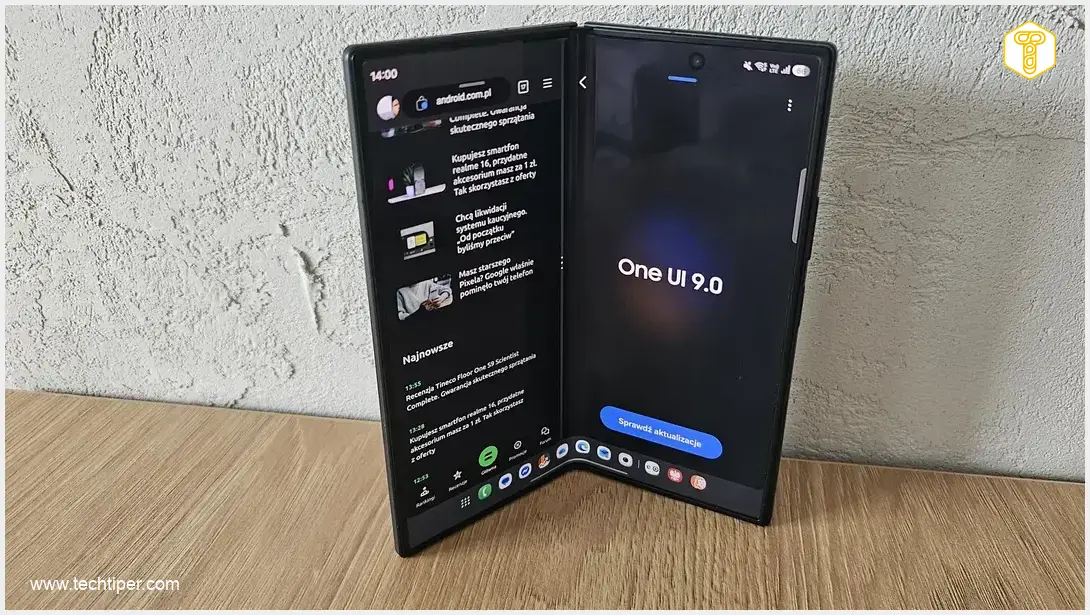
One UI 9 on Foldable Devices Review
-
Multitasking & Productivity
-
Intuitive & Responsive Interface
-
Enhanced Taskbar
-
Unified Home Screen Customization
-
Flex Mode Effectiveness
One UI 9: Unleashing the True Potential of Foldables
One UI 9 transcends its incremental feel on traditional smartphones, truly shining on foldable devices. It offers a deeply intuitive and productive experience, leveraging the expansive screen for seamless multitasking, an enhanced taskbar, and highly customizable home screens. The refined and contextually aware Flex Mode finally becomes a powerful, real-world tool, making foldables feel more like compact workstations than oversized phones.
Advantages
- Optimized for foldable form factors, making full use of large screens.
- Transforms multitasking into a core, highly efficient feature with intuitive window management.
- Interface feels intuitive and responsive, akin to a compact tablet experience.
- Enhanced, functional taskbar (reminiscent of macOS) streamlines app access and switching.
- Offers a vast, highly customizable home screen for consolidated widgets and apps.
- Contextually aware Flex Mode provides practical tools for productivity and media consumption.
- Delivers a genuine “PC-like” productivity experience on a mobile device.
Disadvantages
- Feels less innovative and more incremental on traditional, non-foldable smartphones.
- Highly customizable home screen, while powerful, could be perceived as cluttered by some users.
- Tent Mode functionality, while useful, might be overlooked by many users.
Contents
One UI 9 on Foldable Devices: Where the Interface Truly Shines
One UI 9, Samsung’s custom Android overlay, often feels merely incremental on traditional smartphones. It’s as if the company was simply checking off a list of “minor improvements” rather than truly innovating the interface. However, the true potential of One UI 9 becomes evident when experienced on a foldable device. It quickly becomes clear that this update was specifically designed with these revolutionary form factors in mind, rather than conventional handsets.
A System That Finally Has Room to Breathe
On conventional smartphones, One UI 9 feels like a talented actor confined to a tiny stage. It’s only when a device like the Galaxy Z Fold8 Ultra is unfolded that the system’s true design intent shines through. This iteration of One UI was clearly engineered for a fundamentally different workflow. Multitasking, often an afterthought on standard phones, becomes a core principle and an indispensable feature here. For example, users can effortlessly manage multiple applications simultaneously, a capability that truly transforms productivity on a foldable device.
This approach allows users to seamlessly run several apps side-by-side or in pop-up windows, turning the device into a powerful portable workstation. Whether you’re comparing documents, joining a video call while referencing notes, or drafting an email with a spreadsheet open, the expansive screen of a foldable makes such complex tasks not just possible, but intuitive. Explore the latest advancements in multi-window and cross-device functionality in One UI 9.
Samsung has finally embraced the vast screen real estate offered by foldables, implementing solutions that are far more sophisticated than in previous generations. The ability to manage multiple applications concurrently is a game-changer. For instance, you can effortlessly engage in mobile gaming while simultaneously responding to messages. Furthermore, complex tasks such as analyzing large spreadsheets in a financial application and drafting an important email can be performed without constantly switching between apps, drastically improving efficiency.
An Intuitive and Responsive Interface
On foldable smartphones, One UI 9 transcends the notion of being merely a ‘larger version’ of its traditional phone counterpart. Interactions on devices like the Galaxy Z Fold series adopt a new rhythm, more akin to working on a compact tablet than an oversized smartphone. Samsung has evidently recognized that users seek an intuitive experience that anticipates their needs, rather than a system they have to contend with. Consequently, key interface elements—including icons, window management, and the dock—have been meticulously refined to provide a seamless and highly functional user experience.
“Switching between applications on the large display genuinely feels like working on a full-fledged computer, not just a phone attempting to mimic one. The multitasking I’ve always craved is finally intuitive—windows can be moved, merged, and split, and the entire system responds with such fluidity that it feels as if the interface anticipates every user gesture.” — Adam Lulek, August 5, 2026.
This is a prime example of software meticulously designed for foldable devices, rather than merely being adapted with a ‘let’s see if it works’ approach. Users can effortlessly launch applications side-by-side by simply dragging them from the taskbar. Opening an app in a small floating window and managing it—for instance, minimizing it to a discreet bubble—is also remarkably intuitive. While many of these functionalities existed in previous generations, it’s only now, particularly with window management, that they feel truly intuitive and polished. These advancements, coupled with leaked specifications for upcoming foldable models, highlight Samsung’s continued commitment to optimizing the foldable experience.
The Enhanced Taskbar
The thoughtful design extends to the taskbar, which evokes a sense of macOS rather than conventional Android implementations. It is stable, predictable, and, most importantly, highly functional—it truly serves as a command center rather than just a decorative shortcut bar. Users can configure it to remain visible on top of any active application (though it’s hidden by default, appearing with a simple swipe). This feature significantly streamlines the process of launching a second or even a third application on the display. While custom app layouts have been savable for a long time (via a star icon in the interface), One UI 9 has made recalling these layouts incredibly fluid and seamless, further enhancing productivity.

A Unified, Expansive Home Screen
One UI 9 also transforms the home screen into a vast, customizable canvas—a significant advantage often overlooked but crucial for daily device usage. The combination of One UI 9 with Samsung’s Good Lock application and its Home Up module unlocks remarkable customization capabilities. For users who prefer a single, consolidated home screen over multiple pages, this setup is invaluable. It allows for the arrangement of all essential widgets and applications within one accessible area.
This synergy enables users to consolidate everything they need on the foldable’s inner display. You can access weather forecasts, cryptocurrency rates, and real-time stock quotes for companies and indices from various global markets. You can also integrate shortcuts to notes from applications like OneNote, widgets displaying indoor and outdoor temperatures, and organize key applications into folders. While some might perceive this as cluttered, for many, it’s an incredibly organized and supremely useful setup, placing everything needed literally at their fingertips.
Flex Mode That Makes Sense
For years, Flex Mode was often perceived as a marketing showcase rather than a genuinely practical feature. With One UI 9, however, it’s evident that Samsung has finally grasped the true potential of a foldable screen: it’s not just an impressive mechanical marvel, but a profound opportunity to forge new interaction paradigms. In applications such as YouTube, Microsoft Word, Teams, and other video-related (and non-video) apps, Flex Mode now operates with enhanced contextual awareness. When the device is bent, the interface dynamically adjusts upon tapping a small icon, adapting intelligently to the user’s actual activity, rather than presenting a seemingly arbitrary add-on panel.
For example, when using YouTube, video controls conveniently appear on the lower portion of the screen. In Microsoft Word, the interface can display a touchpad with a text cursor or a full keyboard. Practically, this means that the bent-screen mode has evolved beyond a mere ‘cool extra’ to become a powerful, real-world tool—ideal for video conferencing, note-taking, and various productivity tasks.
Furthermore, the less-often discussed Tent Mode, where the phone is propped up in an inverted ‘V’ shape, offers another practical dimension. While primarily a hardware-driven configuration, it enhances usability, particularly for media consumption. Many users might overlook this capability, yet it’s an excellent feature for hands-free activities like watching movies or video calls, transforming the device into a personal display stand.
Frequently Asked Questions (FAQ)
One UI 9 is Samsung’s custom Android operating system overlay. It is particularly significant for foldable phones because it has been specifically optimized to leverage their unique form factor and expansive screen real estate, offering a far more intuitive and productive user experience compared to its implementation on traditional smartphones.
One UI 9 transforms multitasking on foldables from a mere add-on to a fundamental feature. It allows users to effortlessly run multiple applications side-by-side, in pop-up windows, and manage them intuitively with features like the enhanced taskbar and seamless window manipulation. This makes complex workflows, such as simultaneously analyzing data and drafting emails, highly efficient.
In One UI 9, Flex Mode has evolved to be more contextually aware and practical. Instead of generic panels, apps like YouTube, Word, and Teams now dynamically adjust their interfaces when the device is bent, displaying relevant controls (e.g., video controls in YouTube, a touchpad or keyboard in Word) on the lower screen. This turns Flex Mode into a valuable tool for video conferencing, note-taking, and various productivity tasks.
Based on user experience, One UI 9 on foldable devices genuinely delivers a level of productivity and interaction that closely mimics a full-fledged computer, particularly for managing multiple windows and applications. The sophisticated software design, combined with the large screen, moves beyond mere marketing, providing a tangible and intuitive “desktop-like” workflow that significantly enhances user capability.
Source: Original work. Opening photo: Adam Lulek
About Post Author
