

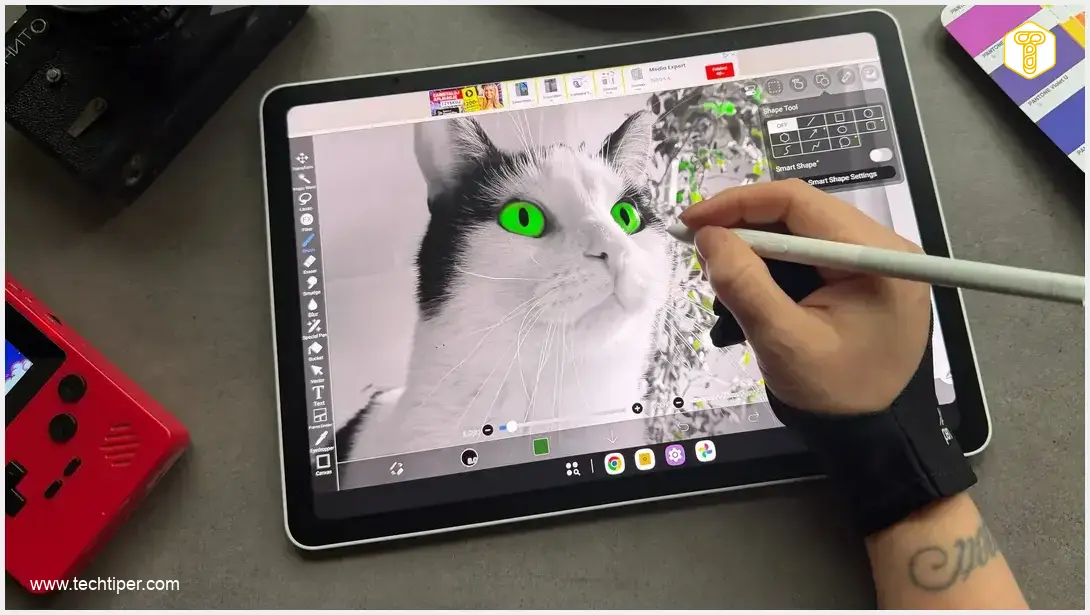
XPPen Magic Pro 13 Review
-
Hybrid Functionality
-
Design & Ergonomics
-
Display Quality
-
Stylus Precision
-
Performance & Android Features
-
Battery Life
Unleash Your Creativity with the Versatile XPPen Magic Pro 13
The XPPen Magic Pro 13 is a groundbreaking hybrid tablet that excels as both a standalone Android device and a professional graphic monitor. Its stunning display, precise X4 stylus, robust performance, and thoughtful design make it an exceptional choice for artists and designers seeking unparalleled flexibility and precision in their creative workflows.
Advantages
- Seamless dual functionality as a standalone Android tablet and a professional graphic display.
- Incredibly lightweight (655g) and slim (6.65mm) design with IP54 dust and splash protection.
- Stunning 12.95-inch 3K LCD display with a creative-friendly 3:2 aspect ratio, 120Hz refresh rate, and exceptional color accuracy (100% sRGB, 96% DCI-P3).
- Anti-glare and anti-fingerprint matte coating provides a paper-like drawing sensation and reduces eye strain.
- Highly precise, battery-free X4 Smart Chip Stylus with 16,384 pressure levels and 60° tilt support.
- Robust performance powered by an octa-core MediaTek Dimensity 8300 processor and 8GB LPDDR5X RAM.
- Excellent battery life, exceeding 14 hours at 120Hz refresh rate.
- Expandable internal storage up to 2TB via microSD card.
- Comprehensive modern connectivity, including dual USB-C (with PD), Wi-Fi 6E, and Bluetooth 5.4.
Disadvantages
- Premium price point may be a barrier for some users.
Contents
Unleash Your Creativity: The Dual Nature of the XPPen Magic Pro 13
The XPPen Magic Pro 13 is a groundbreaking device crafted for illustrators, graphic designers, animators, and creators who refuse to compromise between the convenience of mobile work and the precision of a professional desktop setup. This innovative tablet seamlessly merges two worlds: a powerful Android-based graphic tablet on one side, and a professional-grade graphic monitor that connects effortlessly to your computer on the other. This review explores how this versatile device empowers artists to draw, design, animate, and work without being confined by location or time.
A Hybrid Powerhouse: Two Devices in One
For years, the digital art community has been divided between mobile tablet enthusiasts (Android or iPadOS) and traditionalists who prefer the unparalleled precision of a professional display hooked up to a desktop computer. The XPPen Magic Pro 13 skillfully bridges this divide. It’s not just another tablet attempting to mimic professional-grade hardware; it was meticulously engineered from the ground up to excel in two distinct yet equally important roles. This hybrid approach offers unparalleled flexibility, allowing you to transition between a fully independent Android tablet and a dedicated graphic display for your computer.
Thoughtful Design and Ergonomics That Impress
The Magic Pro 13 boasts an incredibly lightweight and slim profile, making it a true marvel of engineering. With a thickness of just 6.65 millimeters (approximately 0.26 inches) and weighing only 655 grams (about 1.44 pounds), it feels comfortable in hand and barely adds any bulk to your backpack. It’s astonishing how much technology is packed into such a sleek chassis: a robust 10,200 mAh battery, four powerful speakers, two cameras, and a comprehensive suite of modern connectivity options.
Its two USB-C ports significantly enhance flexibility. Both support 45W Power Delivery (PD) fast charging. This intelligent design means you can use the device in Drawing Display Mode, connected to your computer via one USB-C port, while simultaneously charging it through the other. Connectivity is further bolstered by Wi-Fi 6E, Bluetooth 5.4, four speakers, and an array of microphones for clear audio input.
Moreover, the chassis is IP54-certified, providing protection against dust ingress and incidental splashes. While this doesn’t transform it into a rugged outdoor device, it offers peace of mind against everyday spills and environmental elements.
A Display Engineered for Creativity
At the core of the XPPen Magic Pro 13 is a stunning 12.95-inch LCD panel, featuring a sharp 3096 × 2064 pixel resolution and an ideal 3:2 aspect ratio. This aspect ratio is a game-changer for graphic artists, offering significantly more vertical workspace compared to standard 16:9 screens. This extra vertical real estate is invaluable for creating comics, portraits, posters, and any print-oriented materials, allowing for a more natural and efficient workflow.
The screen delivers a peak brightness of 650 nits, ensuring vibrant visuals even in well-lit environments. Color accuracy is exceptional, with 100% sRGB coverage and 96% DCI-P3, alongside the ability to systemically switch between sRGB, Adobe RGB, and DCI-P3 color spaces. This precise color management allows artists to perfectly match their output to specific tasks, whether preparing graphics for the web or working on projects destined for print.

A truly pleasant surprise is the support for refresh rates of 60, 90, or 120 Hz. Switching to 120 Hz, especially for animation or rapid brushwork, results in strokes appearing almost instantaneously, offering an incredibly fluid and responsive drawing experience. The display also includes a “hover” function, which shows the cursor’s position before the stylus even touches the screen, enhancing precision.
Furthermore, the display features an anti-glare (AG) and anti-fingerprint (AF) matte coating. This coating dramatically reduces reflections and smudges while providing a subtle tactile resistance that remarkably mimics the feel of drawing on physical paper. With TÜV SÜD certification for low blue light emission, artists can enjoy extended creative sessions without significant eye strain.
The Precise X4 Smart Chip Stylus
Included with the Magic Pro 13 is the X4 Smart Chip Stylus, powered by advanced Electro-Magnetic Resonance (EMR) technology. This cutting-edge stylus offers an astonishing 16,384 levels of pressure sensitivity, tilt detection up to 60°, and an incredibly low initial activation force of just 2 grams.
In practice, this translates to an extraordinarily natural and intuitive drawing experience. The stylus responds to the lightest touch, providing granular control over line thickness and opacity. Seamless transitions from delicate, detailed sketches to broad brush strokes feel effortless and intuitive. Best of all, the X4 Smart Chip Stylus is completely battery-free, eliminating the need for charging and ensuring your creative flow is never interrupted by a dead battery.
XPPen thoughtfully includes four standard replacement nibs and four felt nibs. These felt nibs provide a superb writing and drawing sensation, genuinely emulating the feeling of a pen gliding across paper, rather than a stylus on a glass screen.
Enhancing Your Workflow: Dedicated Drawing Modes
One of the standout features is the hardware-driven Drawing Display Mode. Simply connect the tablet to your PC or Mac using a full-featured USB-C cable, and the device instantly and natively switches into graphic tablet mode. There’s no need for complex configurations, external intermediate applications, or any lag associated with wireless image transmission.
In this mode, the XPPen Magic Pro 13 functions as an active secondary monitor with full pen input support. You’ll see your computer’s desktop directly on the tablet screen, allowing you to utilize professional graphic software such as Adobe Photoshop, Clip Studio Paint, or Blender with familiar ease. This mode enables the tablet to either mirror your main computer display or act as an extended workspace, significantly boosting productivity for tasks that require a second screen. For those seeking other high-performance digital art displays, you might find our review of the XPPen Artist Pro 27 Gen 2 display insightful.
But the versatility doesn’t stop there. A quick manipulation of the physical buttons allows you to switch to the Drawing Tablet Mode. By double-pressing the volume (“+” or “-“) buttons, the device enters a mode where its screen turns off, and it functions purely as a traditional, black graphic pad. Your work is then observed on your computer’s main monitor, with the XPPen Magic Pro 13 serving as a highly responsive input surface – much like a classic pen tablet.
Performance and the Advantages of Android
Under the hood, the XPPen Magic Pro 13 is powered by an octa-core MediaTek Dimensity 8300 processor (built on a 4nm process), complemented by 8GB of high-speed LPDDR5X RAM and 256GB of internal storage. This robust configuration ensures that demanding tasks, such as loading large video projects or multi-layered graphic files, are handled with remarkable speed. For even more storage, a microSD card slot supports expansion up to a massive 2TB, guaranteeing ample space for extensive creative assets and project archives.
The tablet runs on an Android OS, which XPPen has enhanced with its own suite of customized tools tailored for creative professionals. The “Shelf” application, for instance, allows for convenient image cataloging, tagging, quick annotations, and efficient project archiving. Meanwhile, the lightweight “Canvas” app is perfect for rapid sketching and capturing spontaneous ideas before transitioning them to more advanced graphic programs.
To help you get started right out of the box, the XPPen Magic Pro 13 comes pre-installed with recognized creative applications like ibisPaint, Clip Studio Paint, MediBang Paint, and WPS Office, complete with free trial periods for their premium versions. For those interested in other innovative Android tablets, our Lenovo IdeaTab Plus Matte Edition review offers a look at another device pushing boundaries.
Regarding battery life, the XPPen Magic Pro 13 truly excels. In PC Mark battery tests, it achieved over 14 hours of operation with the screen refresh rate set at a demanding 120 Hz. This impressive result inspires confidence for prolonged creative sessions away from a power outlet.
XPPen Magic Pro 13: Key Specifications
To summarize the impressive capabilities of XPPen’s new tablet, here are its core specifications:
- Operating System: Android OS with XPPen’s customized creative features
- Display:
- 12.95-inch LCD
- 3K resolution (3096 x 2064 pixels, 287 ppi)
- 3:2 aspect ratio
- 100% sRGB, 96% DCI-P3 color gamut coverage
- Color Temperature: 5000 K (minimum); 7200 K (typical); 8000 K (maximum)
- Refresh Rates: 60/90/120Hz
- Anti-glare and anti-fingerprint coating
- TÜV SÜD Low Blue Light Certification
- Brightness: Up to 650 nits
- Processor: MediaTek Dimensity 8300 (4 nm)
- RAM: 8 GB LPDDR5X
- Internal Storage: 256 GB
- Cameras: 8 MP front, 13 MP rear
- Connectivity:
- 1 × USB-C 3.2 Gen 1
- 1 × USB-C 3.2 Gen 2
- Wi-Fi 6E
- Bluetooth 5.4
- Sensors: Gravitational sensor, ambient light sensor, Hall sensor, SAR sensor
- Stylus:
- X4 Smart Chip Stylus with X4 chip and EMR technology
- 16,384 pressure levels
- 60° tilt support
- 2-gram initial activation force
- Accuracy (center of screen): ±0.2 mm
- Reading height (center of screen): 10 mm
- Stylus reading resolution: 5080 LPI
- Other Features:
- microSD card support (up to 2 TB)
- 2 microphones
- 4 full-range speakers
- IP54 rating (dust and splash protection)
- Battery: 10,200 mAh, 45W PD fast charging
- Dimensions: 6.65 mm (0.26 inches) thickness
- Weight: 655 grams (1.44 pounds)
Pricing and Availability
The XPPen Magic Pro 13 typically retails at a premium price point, reflecting its advanced features and dual functionality. For context, its launch price in the Polish market was around 4399 PLN, which converts to approximately $1099 USD at the time of writing. XPPen frequently offers promotional discounts and bundles, such as special pricing during holiday seasons or specific sales events. Prospective buyers should check official channels for current offers, which can sometimes include significant savings.
The XPPen Magic Pro 13 debuted to significant acclaim at a recent major tech exhibition, earning prestigious accolades such as “Best of IFA” from Yanko Design, a testament to its innovative design and capabilities.
Conclusion
The XPPen Magic Pro 13 is a testament to innovation in the creative technology space. It’s a professional, highly versatile drawing tablet that fluidly transitions between a powerful standalone Android tablet and a full-fledged graphic display when connected to a computer. This dual functionality empowers creators to pursue their passion whether they’re on the move or settled at their desk. For any artist or designer seeking a truly universal tool that offers both freedom and precision, the Magic Pro 13 is an exceptional choice, hitting all the right notes for modern creative workflows.
Frequently Asked Questions (FAQ)
The XPPen Magic Pro 13 uniquely integrates two core functionalities. As a standalone device, it runs on Android OS with custom creative apps, allowing for drawing, designing, and general tablet use on the go. When connected to a PC or Mac via a USB-C cable, it seamlessly transforms into a high-precision graphic monitor (Drawing Display Mode) or even a traditional drawing pad with its screen off (Drawing Tablet Mode), extending your desktop workspace or mirroring it for professional software use.
Its 12.95-inch LCD display boasts a 3K resolution (3096 x 2064 pixels) and a artist-friendly 3:2 aspect ratio, providing ample vertical workspace. It offers excellent color accuracy with 100% sRGB and 96% DCI-P3 coverage, along with selectable color spaces for print or web. The 120 Hz refresh rate ensures fluid, responsive drawing, while the anti-glare, anti-fingerprint matte coating provides a paper-like texture and reduces eye strain with TÜV SÜD low blue light certification.
The included X4 Smart Chip Stylus utilizes EMR technology, providing an exceptional 16,384 levels of pressure sensitivity, 60° tilt detection, and an incredibly low 2-gram initial activation force. These features combine to deliver a natural, intuitive drawing experience with precise control over line thickness and opacity. Critically, it’s battery-free, ensuring uninterrupted creative sessions.
Source: Internal research.
Opening photo: Jolanta Szczepaniak
About Post Author
