
Contents
Xbox Refreshes PC App: Available Now for Testing
In November 2026, Xbox rolled out a significant refresh to its PC application, promising not just a visual overhaul but also substantial performance improvements. According to Microsoft, this update aims to deliver a faster, more responsive, and aesthetically pleasing experience for PC gamers. Let’s dive into the details of this eagerly anticipated update, which incorporates several modern design trends.
Blazing Fast Performance and Modern Design
The most compelling promise of the new Xbox app for PC is its enhanced speed. Microsoft states that the updated application will load windows up to 65% faster compared to its predecessor. This dramatic increase in responsiveness is a direct response to user feedback and a cornerstone of the new experience.
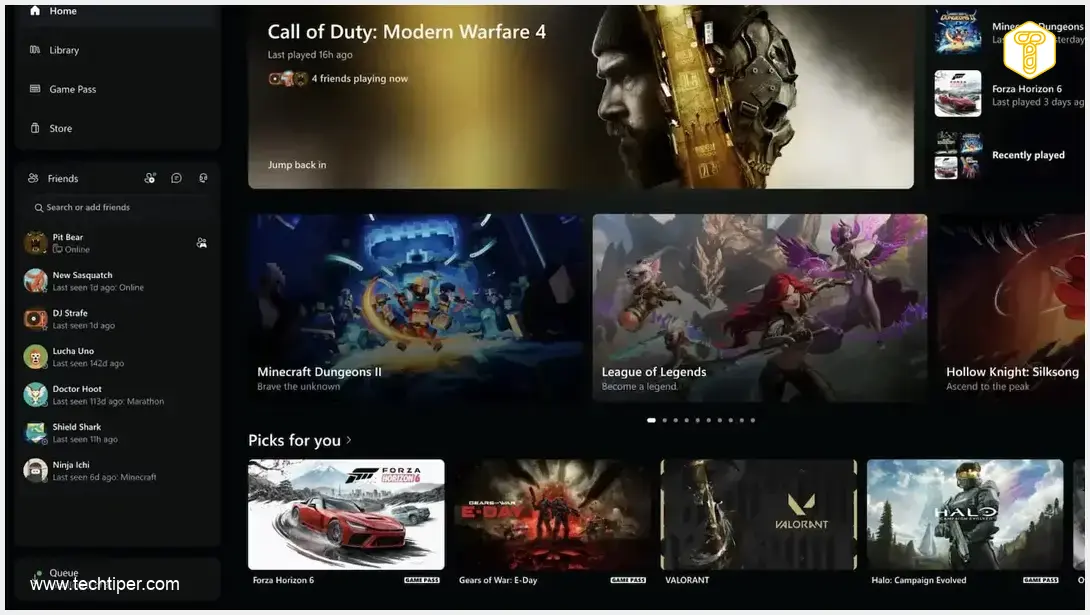
Alongside performance, the app’s visual design has received a complete makeover. Xbox is embracing contemporary aesthetics with a focus on gradients and elliptical elements. Users will notice more elliptical buttons and bars throughout the interface, elegantly combined with black-and-green gradients. This cohesive design language provides a much cleaner and more streamlined look than the previous iteration.
A notable functional change is the prominent display of your friends list on the main screen, positioned conveniently on the left side of the application. This makes connecting with your gaming community more immediate and accessible.
PC Game Pass: Your Gateway to an Expansive Library
The Xbox app continues to be the primary gateway to the expansive PC Game Pass subscription. For a monthly fee, subscribers gain access to a continuously updated library of games, including day-one releases from Microsoft’s own studios. Recent additions, such as Gears of War: E-Day, which launched on October 6, 2026, exemplify the value proposition. It’s important to note that while PC Game Pass offers a vast array of titles, the Call of Duty series is typically not included in this subscription.
The ongoing commitment to expanding the Game Pass library further enhances the PC gaming experience, especially when paired with advancements in gaming technology. Efforts like Project Helix aim to unify the gaming experience across PC and console, suggesting deeper integration and performance optimizations. Such developments are crucial for an evolving ecosystem, much like how Windows 11 introduced major changes to native apps and search functionalities, continuously improving the user experience.
How to Experience the New Xbox PC App Today
If you’re eager to try out the refreshed Xbox PC app, you can do so by joining the Xbox Insiders program. This allows you to get a sneak peek at upcoming features and provide valuable feedback directly to Microsoft. Here’s how to get started:
- Install Xbox Insider Hub: Download and install the Xbox Insider Hub application directly from the Microsoft Store.
- Launch the Hub: Open the Xbox Insider Hub app on your PC.
- Navigate to Previews: Within the app, select “Previews” from the menu.
- Join PC Gaming: Look for the “PC Gaming” preview and opt to join it.
- Confirm and Download: After confirming your participation, the program will download the new version of the Xbox app.
- Enjoy the Refresh: The next time you launch the Xbox app, you’ll be greeted with the updated interface and improved performance.
Frequently Asked Questions (FAQ)
Microsoft claims the updated Xbox PC app will load windows up to 65% faster than the previous version, providing a more responsive and fluid user experience.
The new design features a modern aesthetic with an emphasis on black-and-green gradients and elliptical buttons and bars. The friends list is also more prominently displayed on the main screen for easier access.

You can access the updated app by joining the Xbox Insiders program. Simply install the Xbox Insider Hub from the Microsoft Store, navigate to “Previews,” and select “PC Gaming” to enroll.
Source: XBOX Wire. Opening photo: XBOX / Press Materials
About Post Author
