
Contents
Enhance Your Local Forecasts: Google Pixel Weather App Gets User-Reported Conditions
Google has rolled out a fresh update for its Pixel Weather application, introducing a notable new capability: the option to report current weather conditions in your vicinity. This significant addition aims to refine local weather predictions, making them more accurate and real-time. Alongside this, Google has also implemented several user interface improvements to enhance the overall app experience.
Report Weather in Your Area: How It Works
A New Way to Improve Accuracy
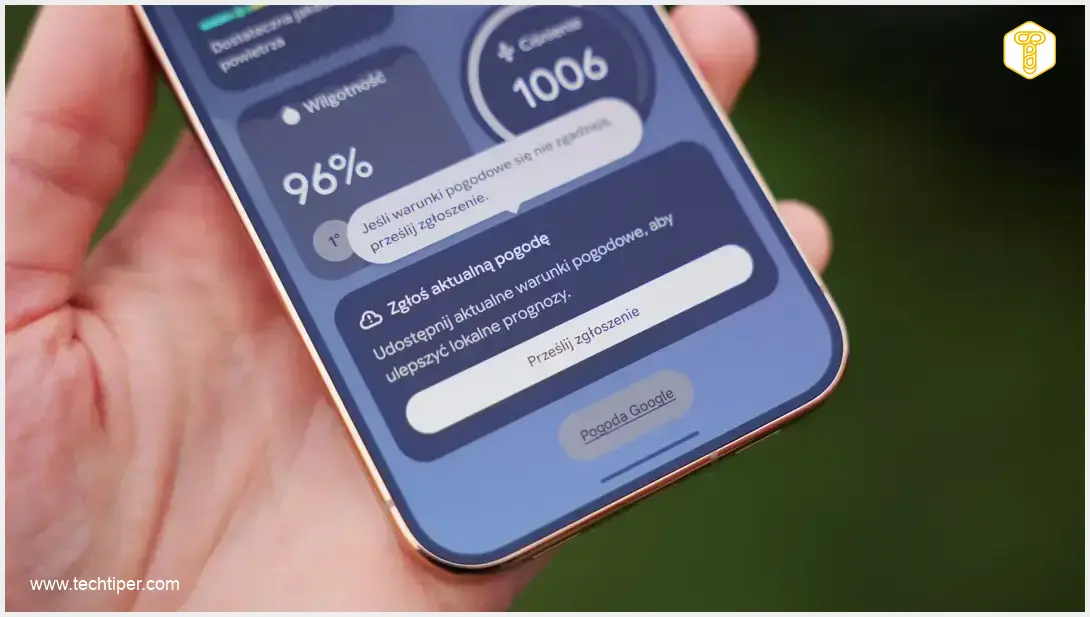
The core of this new Pixel Weather update is a tool that allows users to submit real-time weather observations for their exact location. The primary goal behind this innovative feature is to drastically improve the precision and localized accuracy of weather forecasts. By gathering on-the-ground data directly from users, Google can better understand microclimates and sudden weather changes.
You’ll find this new reporting tool conveniently located at the bottom of the location section within the app, making it easily accessible whenever you need to provide an update.
What You Can Report
When you decide to report the weather, the app allows you to provide crucial details:
- Current Temperature: You can indicate if the temperature feels lower or higher than what is currently being reported by the app.
- Current Conditions: You can select from various options describing the present weather, such as “clear skies,” “partly cloudy,” “light snowfall,” “heavy rain,” and more, providing a granular view of your immediate environment.
Your Privacy Matters
For users concerned about data privacy, Google has provided clear assurances. The company emphasizes that the information you submit is utilized solely for the purpose of enhancing weather forecasts. Crucially, these reports are not directly linked to your user account, ensuring your privacy while contributing to a better weather service for everyone.
Refined User Experience: Interface Improvements
Beyond the groundbreaking reporting feature, Google has also delivered a series of subtle yet impactful interface improvements for Pixel smartphone owners. These enhancements contribute to a more polished and intuitive user experience. For instance, users might notice refined layouts and clearer information on city-specific pages, particularly those displaying weather warnings or alerts, making critical information more digestible.
Availability and Version
This new functionality is part of the Pixel Weather application update, version 1.1.20261012.x. Google began rolling out this update more broadly over the past weekend, meaning it should now be available to a wider range of Pixel users.
Beyond Weather: Recent Pixel Feature Drops
This weather app update arrives on the heels of other significant enhancements for Google Pixel smartphones. Mid-November saw the release of the latest Pixel Feature Drop, which brought a suite of advanced, AI-powered options to Pixel devices.
AI-Powered Shopping and Assistance
Among these innovations is an advanced shopping automation feature, specifically for Pixel 10 series devices. Leveraging the power of Google Gemini, users can now automate tasks like grocery shopping or ordering food online, streamlining daily errands with intelligent assistance. For more ways Google is integrating AI into user convenience, explore features like Google Gemini Memory Import, which enhances your digital assistant’s understanding over time.

Personalized Widgets with Natural Language
Another exciting addition is a tool that empowers users to create highly customized widgets. This feature allows you to design unique on-screen elements based on simple, natural language prompts, bringing a new level of personalization to your device. This focus on personalized experiences also extends to communication, as seen with Google Pixel’s Personalized Voicemail Greetings, offering a tailored touch to every interaction.
Frequently Asked Questions (FAQ)
When you report current weather conditions, you provide hyper-local, real-time data that traditional weather stations might miss. This ground-level input helps Google’s algorithms create more accurate and immediate forecasts for your specific area, especially useful for microclimates or sudden weather shifts.
Yes, Google states that all user-reported weather data is used exclusively to improve forecast accuracy and is not directly linked to your personal Google account. This ensures your privacy while allowing you to contribute valuable information.
You can report both the perceived temperature (whether it feels warmer or cooler than what’s displayed) and current conditions such as clear skies, various levels of cloudiness, different types of precipitation (rain, snow, hail), and more, offering a comprehensive snapshot of the weather around you.
While the article specifically mentions Pixel smartphones in general, Google typically rolls out app updates like this to all supported Pixel devices. If you own a Pixel phone that receives regular software updates, you should receive this Pixel Weather app update (version 1.1.20261012.x) as it becomes available in your region.
Source: 9to5Google
Opening photo: Krzysztof Wilamowski
About Post Author
