
Contents
Google Chrome on Smartphones: A Fresh Look with Material You
Google Chrome, the widely popular web browser, has received a subtle yet significant visual overhaul on smartphones. This update enhances the user interface, making the browsing experience even more visually appealing and cohesive with modern Android aesthetics. The refreshed design is part of Google’s ongoing commitment to its Material You design language, specifically integrating principles from Material 3 Expressive. Discover how to check if this elegant new look has already arrived on your device.
Embracing Material 3 Expressive: What’s New?
The latest update for Google Chrome builds upon the Material You philosophy, which emphasizes personalization and dynamic theming. While Chrome previously allowed users to synchronize its color scheme with their Android system’s primary theme, Google has now taken this integration a step further. Material 3 Expressive focuses on bringing a more fluid, intuitive, and visually distinct experience across Google’s ecosystem.
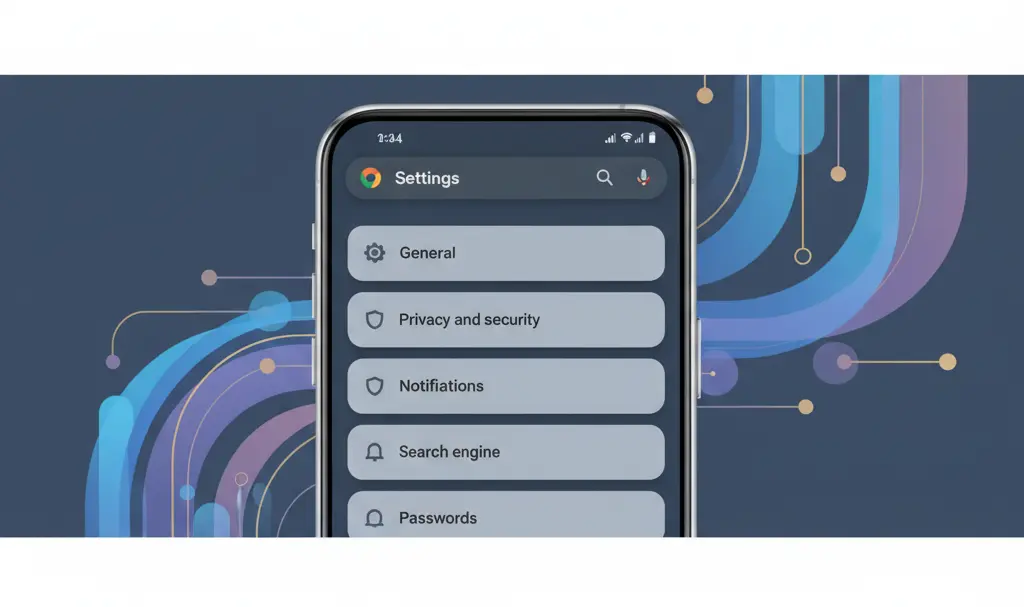
The most noticeable change introduces dedicated “tiles” for each item within the browser’s settings menu. These tiles appear in a lighter, complementary shade of your dominant system color, making the settings view significantly cleaner and more organized than before. This design choice not only improves aesthetics but also enhances usability by visually separating each option, making navigation more intuitive.
How to Check for the New Material You Design in Chrome
Curious if your Google Chrome app has already received this beautiful update? It’s a simple process to verify:
- Open the Chrome Browser: Launch the Google Chrome application on your smartphone.
- Access the Menu: Tap on the three vertical dots (more options icon) located in the upper right corner of your screen.
- Navigate to Settings: From the dropdown menu, select “Settings.”
- Look for the New Layout: Observe the layout of the settings menu. If the update has arrived, you will see each setting item distinctly separated by its own dedicated tile, presented in a lighter shade of your system’s accent color.
If you don’t immediately see this new design, there’s no need to worry. This is a server-side update, meaning it’s rolled out gradually by Google and cannot be manually downloaded from the Google Play Store. Patience is key; the updated interface will eventually reach your device automatically.
The Evolution of Google Chrome’s Design
Google’s continuous refinement of Chrome’s interface reflects its dedication to providing a seamless and enjoyable user experience. The Material You design language, first introduced with Android 12, allows apps to adapt their color palettes based on the user’s wallpaper, creating a highly personalized and harmonious look across the entire operating system. This latest Chrome update further solidifies this vision, making the browser feel more integrated with your Android device than ever before.
For users who value a consistent and aesthetically pleasing digital environment, these design enhancements are a welcome addition. It’s not just about looks; a well-designed interface can improve navigation and overall user satisfaction.
Speaking of staying updated with Android, you might be interested in learning about potential future enhancements with our article on Android 17: Features and Release Date Expectations.
While enjoying the new aesthetics, always prioritize your online safety. Malicious software can sometimes target browsers. Learn more about protecting yourself by reading about Using Google Chrome: Beware of Voidstealer Malware.
Frequently Asked Questions (FAQ)
What is Material 3 Expressive and how does it differ from previous Material You designs?
Material 3 Expressive is an evolution of Google’s Material You design language, focusing on creating more dynamic, distinct, and personalized interfaces. While Material You primarily introduced dynamic color theming based on wallpapers, Material 3 Expressive goes further by applying these principles to create clearer visual hierarchies, such as the new tiled menu items in Chrome. It aims for a more “expressive” and unique look that enhances usability through improved visual separation and intuitive layouts, making elements feel more tactile and interactive.
Why is the update rolling out as a server-side update, and what does that mean for users?
A server-side update means that the new features are activated directly from Google’s servers rather than requiring users to download a new app version from the Google Play Store. This allows Google to roll out changes gradually, monitor performance, and fix any potential issues before a wider release. For users, it means the update will appear automatically on their devices over time without any action required on their part. It’s a common practice for major software companies to ensure a smooth transition and minimize disruption.
Will this design update impact Chrome’s performance or battery life on my smartphone?
It is highly unlikely that a visual design update, such as the one to Material 3 Expressive in Google Chrome, would significantly impact your smartphone’s performance or battery life. These changes are primarily aesthetic and involve adjustments to the user interface’s visual rendering rather than core functionality or background processes. Google optimizes its apps to be efficient, and while any visual change involves some rendering, the impact on modern smartphones is generally negligible.
Are there any accessibility improvements included with this new design?
While the primary focus of this update is aesthetic, Material Design principles often inherently lead to improved accessibility. The use of distinct tiles and clearer visual separation in the settings menu can benefit users with visual impairments by making options easier to distinguish and select. Material You also tends to improve contrast and readability, contributing to a more accessible experience for a broader range of users. Google typically incorporates accessibility considerations into all its major design updates.
Source: 9 to 5 Google. Opening photo: Bendix M / Shutterstock
About Post Author
