
Contents
Google Gemini App Updates: Enhanced Chat Interface and Sharing Features
Google is rolling out significant updates to its Gemini artificial intelligence application, primarily focusing on a more intuitive chat interface and streamlined content sharing options. While Android users will experience the most substantial changes, bringing a fresh layout that might require a brief adjustment period, the overall improvements are expected to be highly positive for user experience.
A More Intuitive Chat Experience on Android
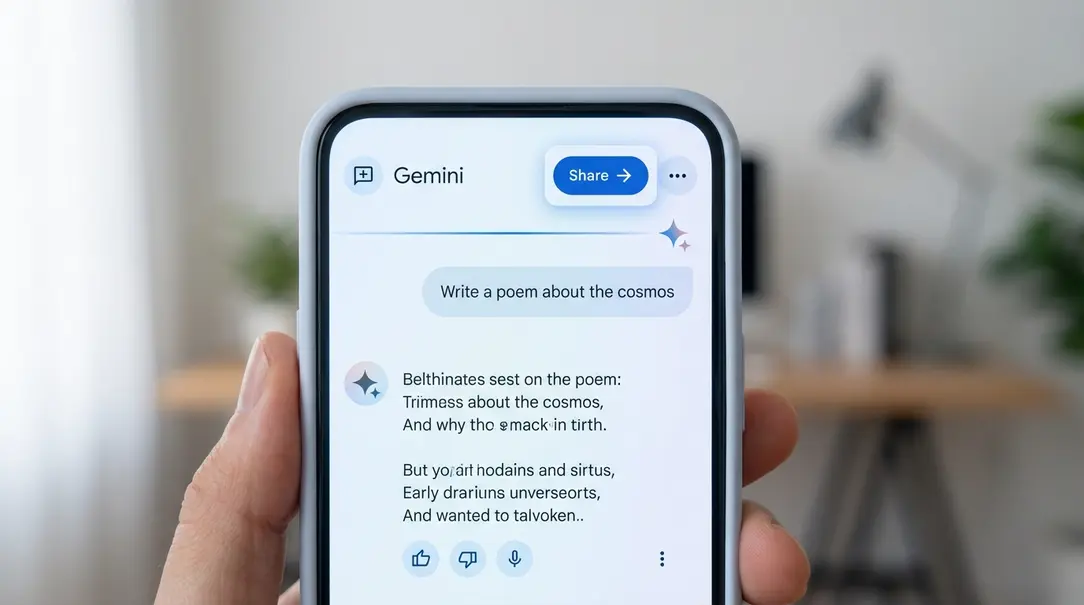
The Gemini app for Android has undergone a visual overhaul of its chat screen. The most noticeable change is the revised arrangement of elements within the top bar, which now prominently features actions related to sharing and conversation management.
Key Interface Changes for Android Users:
- Chat Title Alignment: The conversation title, previously centered, has been moved to the left side of the screen.
- New Chat Icon: Adjacent to the chat title, a dedicated icon for starting a new conversation has been introduced.
- Prominent Share Button: A highly visible share button now appears directly next to the new chat icon, making it easier to share Gemini’s responses or entire conversations.
- Streamlined Menu: A three-dot menu icon is now positioned further along the top bar. This menu provides access to essential conversation management options, including the ability to pin a conversation, rename it, delete it, or navigate to help and feedback resources.
This new design adopts a more classic layout, aligning Gemini’s interface with the user experience found in many other Google applications. This move enhances consistency and familiarity for users accustomed to Google’s ecosystem.
Minor Visual Adjustments for iOS Users
It’s worth noting that a similar set of sharing and menu icons has already been implemented in the web browser version of Gemini. While the new interface layout has not yet reached the Gemini app on iOS, iPhone and iPad users did receive a distinct, purely visual update this week.
The latest update to the iOS application features an enlarged and repositioned Gemini lightning bolt icon. The symbol is now larger and situated closer to the edge of its rounded square background. However, this is a comparatively minor and less impactful change than the functional interface enhancements introduced on Android.
Why These Updates Matter
These updates reflect Google’s ongoing commitment to refining the user experience for Gemini. By making sharing more accessible and organizing chat management options logically, Google aims to:
- Improve Usability: The repositioned elements make the app more intuitive and easier to navigate for everyday tasks.
- Enhance Sharing: A dedicated and visible share button encourages users to share useful information or creative content generated by Gemini.
- Boost Consistency: Aligning the Android app’s design with the web version and other Google applications creates a more cohesive user experience across platforms.
- Streamline Workflow: Quick access to actions like pinning and renaming conversations helps users manage their interactions with Gemini more efficiently.
Frequently Asked Questions (FAQ)
Q: What is Google Gemini?
A: Google Gemini is an advanced artificial intelligence chatbot developed by Google, designed to engage in natural language conversations, answer questions, generate creative content, and assist with various tasks.
Q: Which platforms are affected by these updates?
A: The primary interface changes for chat and sharing are rolling out to the Gemini app on Android. iOS users have received a minor visual update to the Gemini icon.
Q: What are the main benefits of the new interface on Android?
A: The new Android interface offers improved usability with easier access to sharing and conversation management features, better consistency with other Google apps, and a more streamlined user experience.
Q: When will iOS users receive the full interface update?
A: The article does not specify a timeline for when the full interface changes will arrive on iOS. Updates typically roll out in phases.
About Post Author
