
Contents
Google Messages Enhances Smart Replies with New “Tap to Draft” Feature
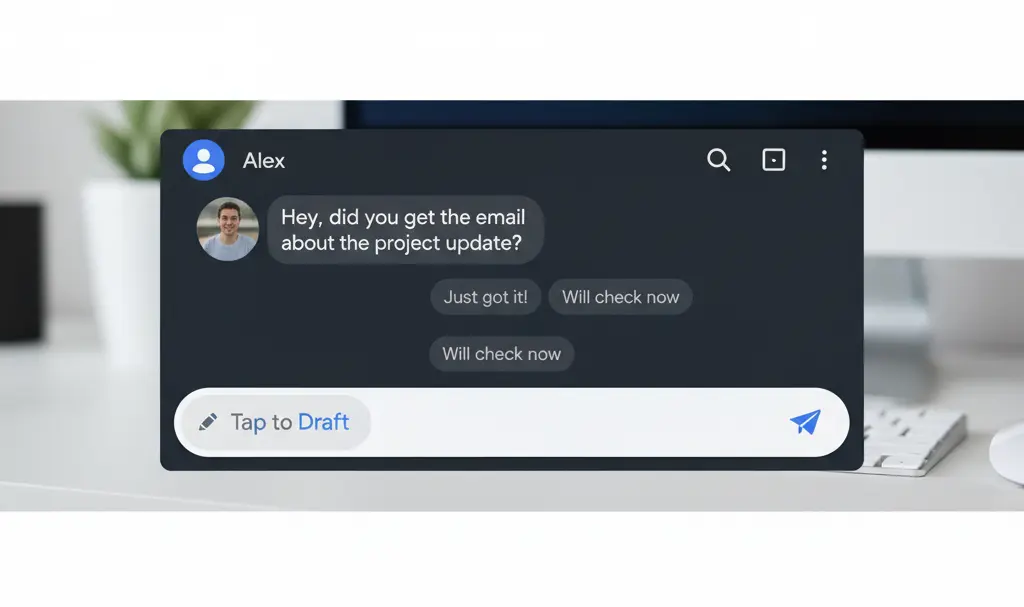
Google Messages is rolling out a highly anticipated update that significantly improves the popular Smart Reply feature. Previously, tapping a suggested quick response would immediately send it, often leading to unintended messages or the need for immediate follow-up corrections. The new “Tap to Draft” functionality addresses this by allowing users to edit or expand on a suggested reply before it’s sent, offering greater control and a more seamless messaging experience.
The Evolution of Smart Replies in Google Messages
Smart replies first debuted in Google Messages back in 2018. This innovative feature leverages on-device Artificial Intelligence (AI) to analyze incoming messages and propose concise, contextually relevant responses. For example, if a contact asks “How are you doing?”, the app might suggest replies like “I’m doing well!” or “Not great today.”
While convenient, the original implementation had a significant drawback: selecting any of these suggested responses would instantly send the message. This often resulted in users accidentally sending a reply that was too brief, informal, or required further details, frustrating many who preferred to review their messages before dispatch.
Introducing “Tap to Draft”: More Control for Users
With the latest update, Google introduces the “Tap to Draft” option. When enabled, tapping a suggested smart reply no longer triggers an automatic send. Instead, the suggested text is populated into the message input field, giving you a crucial opportunity to:
- Review the suggested response for accuracy and tone.
- Modify or rephrase the text to better suit your communication style.
- Add more details or context to the initial suggestion.
- Combine the suggestion with your own thoughts before sending.
This change empowers users with more control over their conversations, making smart replies a truly helpful aid rather than a potential source of messaging mishaps.
How to Activate “Tap to Draft”
Enabling this new feature is straightforward once it’s available on your device:
- Open the Google Messages application.
- Navigate to the app’s settings.
- Look for the “Suggestions” option.
- Within “Suggestions,” you should find and toggle on “Tap to Draft.”
If this option remains disabled, your Google Messages application will continue to behave as it did previously, sending smart replies automatically upon selection.
When Can You Expect This Update?
The “Tap to Draft” feature is currently in its beta phase, observed in Google Messages beta version 20260303_00_RC00. This indicates that it is undergoing testing with a limited group of users. Based on typical development cycles, it is expected to roll out to the stable version of the Google Messages application for all users in the coming weeks or months.
Frequently Asked Questions (FAQ)
What is the new “Tap to Draft” feature in Google Messages?
The “Tap to Draft” feature allows users to tap a suggested smart reply, which then populates the text field in Google Messages instead of automatically sending. This gives users the chance to edit, expand, or review the message before sending it.
How does “Tap to Draft” improve smart replies?
It improves smart replies by preventing accidental or premature message sends. Users gain more control, allowing them to refine the AI-generated suggestion to better fit their context and tone before hitting send.
When will the “Tap to Draft” feature be available to everyone?
The feature is currently in beta. While no exact date has been announced, it is expected to roll out to the stable version of Google Messages for all users in the coming weeks or months.
How can I enable “Tap to Draft” in Google Messages?
Once available, you can enable it by going to Google Messages settings, then selecting “Suggestions,” and finally toggling on the “Tap to Draft” option.
What are smart replies in Google Messages?
Smart replies are short, contextually relevant response suggestions generated by on-device AI in Google Messages. They are designed to help users quickly respond to incoming messages without typing a full response.
Source: Phone Arena. Opening photo: Gemini
About Post Author
