
Contents
Google Photos Unveils Major UI Redesign with Floating Navigation Bar
Google Photos, the ubiquitous photo and video management application, is rolling out a significant visual overhaul. Users will notice a prominent change in the app’s interface: a brand-new “floating” bottom navigation bar, designed to offer a more modern and intuitive user experience. This update aligns Google Photos with the design language seen across other Google applications, signaling a unified approach to user interface aesthetics.
A Fresh Look: The Floating Navigation Bar
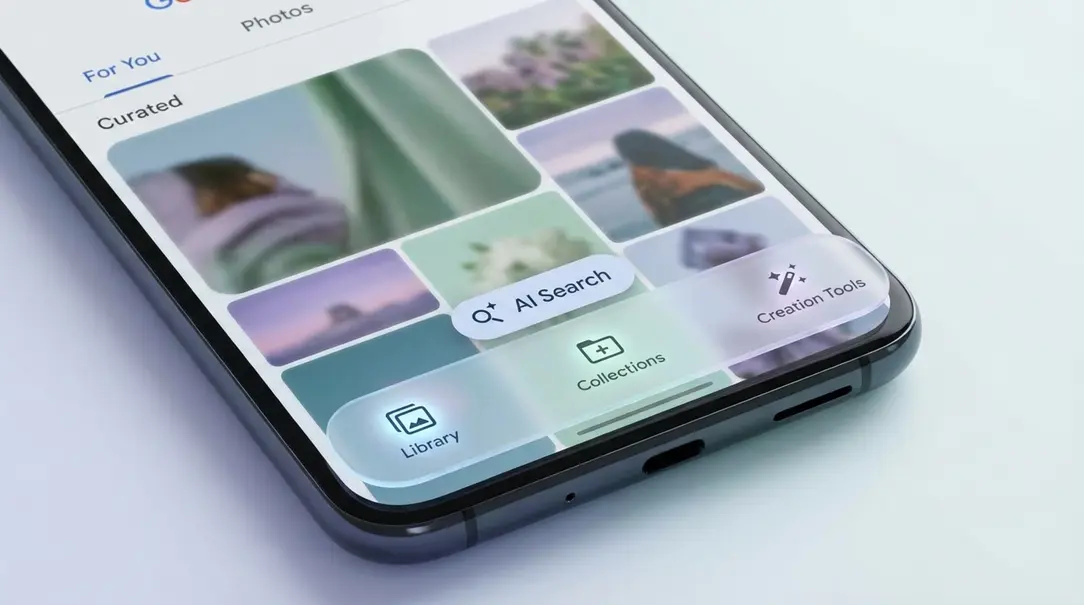
The core of this update is the redesigned bottom navigation bar. Moving away from the traditional full-width strip, the new bar presents itself as a more compact, “floating” panel that appears slightly detached from the bottom edge of your screen. This design choice contributes to a cleaner, more minimalist look, reducing visual clutter and emphasizing the content itself.
- Streamlined Access: The floating panel retains the most crucial shortcuts: your photo library, collections, and creation tools. This ensures that essential functionalities remain easily accessible without a disruptive change in navigation flow.
- Dedicated AI Search: One of the standout improvements is the dedicated, capsule-shaped button for AI-powered search. Previously integrated within the main navigation, separating it allows for quicker, more focused access to Google Photos’ powerful search capabilities, enabling users to find specific photos based on people, places, or objects with greater ease.
- Consistent Visibility: Despite its “floating” nature, the navigation bar remains visible as you scroll through your photos, ensuring a consistent user interface and preventing the need to re-engage controls.
It’s important to note that while the visual presentation has been significantly enhanced, the fundamental layout and functionality of these features remain largely consistent with what users are already familiar with. The change is primarily aesthetic, aiming to refine the app’s modern feel.
Rollout: iOS Users First, Android Coming Soon
The implementation of floating navigation bars isn’t new to Google. The tech giant has been gradually introducing this design element across its other Android and iOS applications, such as the Google Chat app, since late 2023. While tests for a similar solution within Google Photos date back several years, a full-scale rollout for the photo app only commenced last year.
Currently, the redesigned navigation bar is actively rolling out to users on iOS devices. Android users can anticipate this update in the coming weeks, as Google typically staggers its major feature rollouts across platforms.
Beyond the Navigation: Future Enhancements
The floating navigation bar is just one piece of Google’s ongoing effort to refine the Google Photos experience. The company is actively working on additional visual and functional improvements:
- Direct Image Copy to Clipboard: A highly anticipated feature in development will allow users to directly copy an image from Google Photos to their device’s clipboard. This will streamline workflows, making it easier to paste images into other applications without saving and re-uploading.
- Material 3 Expressive Styling: Google is also extending elements of its Material 3 Expressive design language into the app’s settings and various system views, including the critical backup section. Material 3 Expressive focuses on personalization, dynamic color, and enhanced accessibility, promising a more cohesive and visually rich experience across the app.
Frequently Asked Questions (FAQ)
What is the new Google Photos navigation bar?
It’s a “floating” bottom navigation bar that appears slightly detached from the bottom of the screen. It features a minimalist design with shortcuts to your photo library, collections, creation tools, and a dedicated, capsule-shaped button for AI search.
When will Android users receive the updated Google Photos interface?
The update is currently rolling out to iOS users. Android users can expect to receive the new interface in the coming weeks.
Are there any new functionalities with this update?
While the primary change is visual, the dedicated AI search button enhances accessibility. Google is also planning future functional updates, including the ability to copy images directly to the clipboard and further integration of Material 3 Expressive styling.
Why is Google implementing this “floating” design?
This design choice aims to provide a more modern, clean, and consistent user interface across Google’s suite of applications. It reduces visual clutter and enhances the overall aesthetic and user experience.
About Post Author
