

Contents
Garmin Brings Official WhatsApp to Smartwatches: A Game Changer for On-Wrist Communication
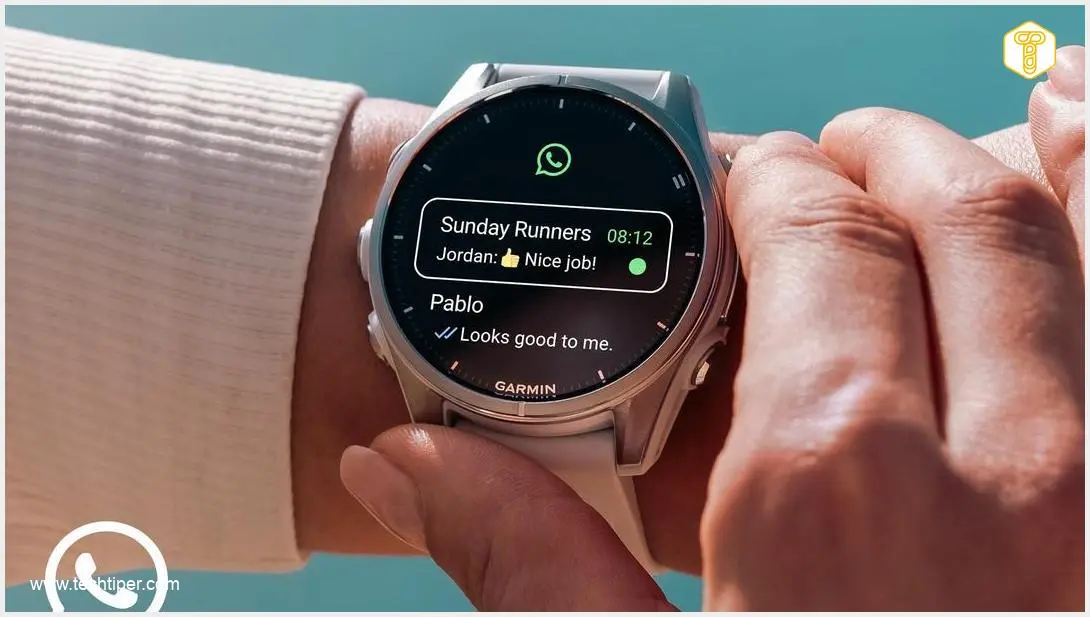
Garmin has officially rolled out a dedicated WhatsApp application for a selection of its Connect IQ smartwatches. This highly anticipated update allows users to manage their WhatsApp conversations directly from their wrist, marking a significant leap forward in functionality for Garmin devices. With the ability to view, reply, and react to messages without needing to reach for your phone, Garmin smartwatches are now functionally much closer to competitors like the Apple Watch and devices running Wear OS.
WhatsApp on Garmin Smartwatches: What You Can Do
Meta, the parent company of WhatsApp, has collaborated with Garmin to develop this official application, which is now freely available for download from the Connect IQ store. Users can experience a seamless communication flow directly from their smartwatch, including:
- View Recent Messages: Access up to 10 of your most recent conversations.
- Read Full Chats: Open and read entire message threads.
- Reply On-the-Go: Send quick replies directly from your wrist.
- Express Yourself: Utilize emojis and reactions to respond to messages.
This integration is designed to enhance convenience, especially during activities like workouts, runs, or travel, where pulling out a phone might be impractical. Garmin confirms that all messages and calls made through the app remain protected by end-to-end encryption, mirroring the security standards of the classic WhatsApp application on smartphones.
Notably, this is the first official third-party messenger application to be integrated into Connect IQ. This move signals Garmin’s intention to further open its platform to major services and providers, potentially paving the way for more comprehensive app support in the future.
Getting Started: How to Use WhatsApp on Your Garmin Watch
Installing and setting up WhatsApp on your compatible Garmin smartwatch is straightforward:
- Download the App: Head to the Connect IQ Store, available as a standalone app on Android and iOS, or through the Garmin Connect ecosystem. Search for and download the official WhatsApp application.
- Install on Your Watch: Follow the on-screen instructions to install the app on your Garmin smartwatch.
- Pair Your Account: Once installed, you’ll need to link the WhatsApp client on your watch to your WhatsApp account on your smartphone.
- Grant Permissions: Ensure you grant the necessary notification permissions for the app to function correctly.
The application operates as a client, leveraging data from your paired Android or iOS smartphone. This means an active Bluetooth connection between your smartwatch and phone is required for the WhatsApp features to work. While Garmin has not mentioned support for voice dictation, interactions primarily involve a keyboard for replies and the use of reactions.
Connect IQ’s Evolution: Why This Update is Significant
The debut of an official WhatsApp client is a strong indicator of Connect IQ’s maturity. It demonstrates that the platform is evolving beyond a simple collection of watch faces and basic widgets into a robust environment capable of hosting major service providers. When combined with existing integrations for music services, mapping, and extensive training metrics, the presence of WhatsApp could mean that many users no longer need a smartwatch with Wear OS or watchOS solely for convenient notification management and basic communication.
Compatible Garmin Smartwatches
While this is an exciting development, not all Garmin smartwatches will be able to utilize this new feature. The official WhatsApp application currently supports the following models:
- D2 Air X15
- Enduro 3
- Fenix E
- Fenix 8 Series (Fenix 8, Fenix 8 Solar, Fenix 8 Pro)
- Quatix 8 Series (Quatix 8, Quatix 8 Pro)
- Forerunner 570
- Forerunner 970
- Tactix 8
- Venu 4
- Venu X1
- Vivoactive 6
Models Not Yet Supported
Many still-popular Garmin models are notably absent from the compatibility list. These include:

- Enduro 2
- The entire Fenix 7 family
- Instinct 3
- Instinct E
- Instinct Crossover AMOLED
- Forerunner 165 (despite not yet having a direct successor)
This selective rollout suggests that the most comprehensive WhatsApp integration is primarily targeting users of Garmin’s newest and highest-tier models. This strategy is likely designed to encourage existing users to upgrade to fresher models to access the latest features.
Frequently Asked Questions (FAQ)
What can I do with WhatsApp on my Garmin smartwatch?
You can view up to 10 recent messages, read full conversations, send quick replies, and use emojis and reactions directly from your wrist, without needing to take out your phone.
How do I install WhatsApp on my Garmin smartwatch?
You can download the official WhatsApp application from the Connect IQ Store, available as an app on Android/iOS or via Garmin Connect. After installation, pair it with your phone’s WhatsApp account and grant notification permissions.
Does WhatsApp on Garmin smartwatches require my phone?
Yes, the app functions as a client for your smartphone. It requires an active Bluetooth connection to a paired Android or iOS device to send and receive messages.
Is WhatsApp on Garmin encrypted?
Yes, Garmin confirms that all messages and calls handled through the smartwatch app are protected with end-to-end encryption, just like the standard WhatsApp application on smartphones.
Which Garmin smartwatches are compatible with the official WhatsApp app?
Compatible models include D2 Air X15, Enduro 3, Fenix E, Fenix 8 Series, Quatix 8 Series, Forerunner 570, Forerunner 970, Tactix 8, Venu 4, Venu X1, and Vivoactive 6. Many older popular models are not currently supported.
Source: Garmin, PRNewswire, Notebookcheck. Opening photo: Gemini
About Post Author
