

Contents
XPPen Artist Pro 27 (Gen 2) Review: A Canvas for the Modern Digital Artist
Imagine a large screen, a pen in hand, and a digital canvas that responds to your every stroke. Is this the natural working environment for today’s illustrator? The XPPen Artist Pro 27 (Gen 2) confidently answers yes to this question. This review dives deep into what the XPPen Artist Pro 27 (Gen 2) offers, from its expansive creative space to its advanced technological features designed to empower digital creators.
XPPen: Empowering Digital Creativity from Student Sketches to Professional Illustrations
The market for digital creation tools has seen impressive growth in recent years. Among the brands that have long been a staple in the studios of illustrators, designers, and animators is XPPen. The company specializes in graphic tablets and drawing displays, offering a range from compact models for beginners to large, professional displays for those who work with graphics daily.
XPPen devices can be found on the desks of graphic design students, in professional design studios, and among freelancers specializing in illustration, concept art, and animation. A common thread across all their products is an emphasis on high image quality, pen precision, and comfortable use during long creative sessions.
Recently, the largest model in their line, the XPPen Artist Pro 27 (Gen 2), landed in my hands. For several weeks, I had the opportunity to use it in a home office setting, testing its performance in everyday tasks – from sketches and simple illustrations to working with advanced graphic applications. This experience provided significant insight into what it’s like to work with such a large, professional drawing display.
Unpacking Creative Power: The XPPen Artist Pro 27 (Gen 2) Hardware
Let’s start with the basics: the XPPen Artist Pro 27 (Gen 2) is a substantial professional graphic display designed for illustrators, designers, and digital creators who require a workspace reminiscent of a real canvas. The device features a 26.9-inch screen with a 4K resolution (3840 × 2160 pixels) and a 120 Hz refresh rate. This combination ensures an incredibly detailed image, making pen movements across the screen feel smooth and natural.
The unboxing experience itself is impressive. Alongside the display, you’ll find essential cables, two pens with spare nibs, a drawing glove, a cleaning cloth, a wireless shortcut remote, and a comprehensive instruction manual.
Stunning Color Accuracy and Intuitive Touch
A key highlight of this model is its color reproduction. XPPen states support for 1.07 billion colors and boasts a Calman Verified certification, confirming high color accuracy. In practice, this translates to very smooth tonal transitions and realistic colors – crucial for illustration, concept art, and visual design work.
The display also incorporates X-Touch, an advanced touch system that allows for finger-based control without needing to reach for a keyboard. Zooming in on the canvas, rotating projects, or quickly navigating application interfaces becomes highly intuitive. For many creators, this can lead to a more natural and fluid workflow.
Unparalleled Pen Precision
The included two X3 Pro styluses offer an astonishing 16,384 levels of pressure sensitivity. This number is remarkable even within the world of graphic tablets. Combined with the large screen, it allows for extremely subtle variations in line thickness and brushstroke intensity. The entire package is complemented by broad operating system compatibility and a suite of accessories designed to streamline the creative process.

Hands-On with a Digital Canvas: First Weeks with the XPPen Artist Pro 27 (Gen 2)
The sheer size of such a large screen is immediately striking. However, setting up the hardware proved surprisingly simple. After connecting it to a computer, the device was practically ready to use. Pen calibration took only a few moments, and configuring shortcuts or touch functions was straightforward within the clear control panel.
I began my journey with the display by making simple drawings and learning to use the pens in basic paint programs. Even for a hesitant beginner like myself, I quickly grasped the fundamentals and could move on to more advanced applications, such as Krita.
The Impact of an Expansive Workspace
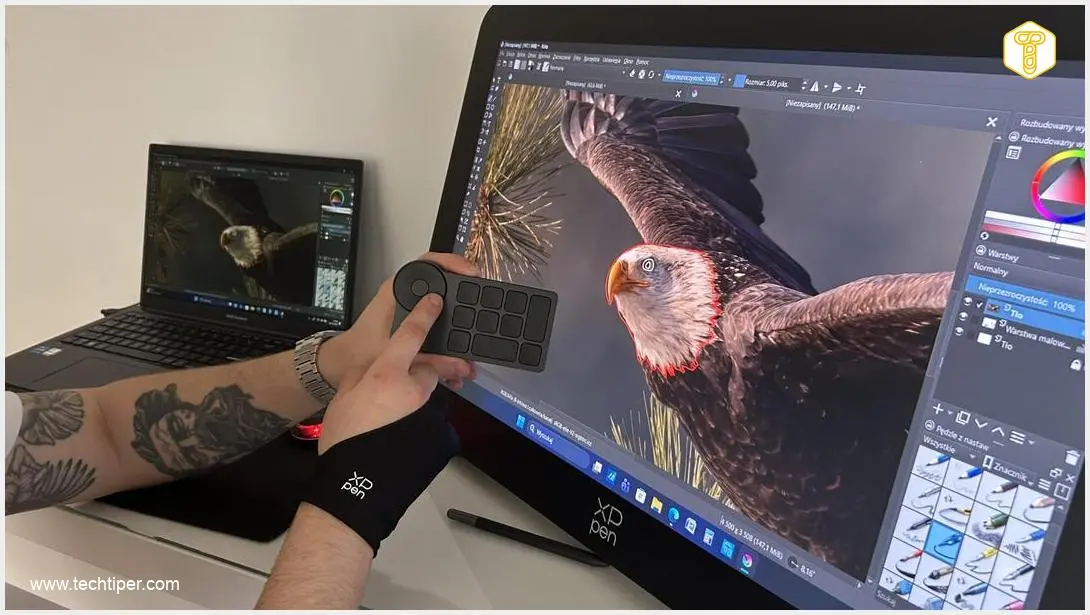
The biggest difference in daily work, of course, is the screen size. 26.9 inches provides a truly generous workspace – allowing you to view a large portion of an illustration and your tool panel simultaneously within graphic software. When working in applications like Krita, this means less constant zooming and panning. During work, you can also largely forget about interacting with your laptop or desktop computer, as this large screen provides easy access to all essential functions.
While I am far from a professional artist, even with my modest skills, it was clear that the pen responded very naturally. Gentle touches left thin lines, while firmer pressure created more prominent marks. At one point, I realized I was no longer just “testing the equipment” but simply drawing new sketches, and doing so quite effectively.
The touch support is also a significant advantage. Zooming in on a project with your fingers or rotating the canvas feels akin to using a large tablet. In practice, this means virtually no need to reach for the keyboard and a more direct connection to your project.
Technology Designed to Foster Creativity
XPPen highlights several features that distinguish this model in its professional device line. One such feature is the aforementioned 1.07 billion color reproduction. This wide color gamut is particularly beneficial when working with gradients and multi-layered illustrations where subtle tonal differences are critical.
I thoroughly enjoyed using the wireless shortcut remote, on which I quickly mastered basic commands. This allowed me to zoom in or out of the image with a single finger movement. The “undo” button is incredibly helpful, functioning like a classic Ctrl+Z but without needing to reach for the keyboard and search for key combinations. Simply click one button, and a mistake in your project instantly disappears.
The X-Touch system is another innovative solution that streamlines the entire creative process. Touch gestures allow you to quickly zoom, rotate, or pan the canvas, meaning your pen-holding hand spends more time on the screen. In practice, it mimics working on a large, digital sketchbook.
XPPen also emphasizes that this model is the culmination of the entire Artist Pro series, which includes devices from 14 to 27 inches. This allows users to start with smaller models and gradually transition to larger displays without changing their creative ecosystem.
The comprehensive accessory kit and compatibility with various operating systems are also important. The device can integrate with popular creative software environments, making it a versatile addition to any graphic workstation.
It’s worth noting that the XPPen Artist Pro 27 (Gen 2) can also double as a small monitor for other purposes.
The XPPen Artist Pro 27 (Gen 2): For Those Who Draw Seriously
After several weeks of working with the XPPen Artist Pro 27 (Gen 2), one thing is clear – this device is built for creators who demand a large workspace and highly precise pen control. Its 26.9-inch 4K screen, high refresh rate, and support for over a billion colors position it firmly in the professional segment of the market.
Despite its advanced capabilities, the device remains surprisingly accessible. Installation is hassle-free, and the intuitive touch system combined with precise styluses allows users to quickly feel comfortable with the digital canvas. For illustrators, designers, and concept artists, this could be a crucial piece of equipment that naturally integrates into their daily creative workflow, especially if they prioritize a large, detailed screen and fluid pen performance.
For a limited time, from March 20th to March 30th, the XPPen Artist Pro 27 (Gen 2) will be available at a promotional price of approximately $1950 USD (standard price: approximately $2175 USD). Additionally, customers can save an extra $50 USD by placing their order within the first three days before the product’s official launch. Please check local retailers for exact pricing and availability in your region.
Frequently Asked Questions (FAQ)
What makes the XPPen Artist Pro 27 (Gen 2) suitable for professional use?
The XPPen Artist Pro 27 (Gen 2) is designed for professionals with its 26.9-inch 4K display, 120Hz refresh rate, and support for 1.07 billion colors, ensuring exceptional detail, smooth performance, and accurate color reproduction critical for professional illustration, design, and animation work. Its high pen pressure sensitivity (16,384 levels) also allows for unparalleled control and nuance.
How does the X-Touch system enhance the creative workflow?
The X-Touch system enables intuitive finger-based gestures for navigating the canvas, such as zooming, rotating, and panning, directly on the screen. This reduces the need to constantly reach for a keyboard, creating a more fluid and natural interaction with your digital artwork, much like working on a traditional sketchbook.
Can I use the XPPen Artist Pro 27 (Gen 2) with existing creative software?
Yes, the XPPen Artist Pro 27 (Gen 2) is designed for broad compatibility with various operating systems and popular creative software environments, including applications like Krita and other industry-standard graphic programs. This ensures it can be easily integrated into any existing digital art workflow or graphic workstation setup.
What are the benefits of the wireless shortcut remote?
The wireless shortcut remote significantly streamlines the creative process by placing frequently used commands, like undo or zoom, at your fingertips. This allows for quick adjustments without interrupting your creative flow by reaching for the keyboard, enhancing efficiency and comfort during long drawing sessions.
Source: Own work. Opening photo: Borys Francuz
About Post Author
