

Contents
The 3-2-1 Rule: Safeguarding Your Data from Loss
Imagine losing all your photos, videos, documents, and projects in an instant. World Backup Day is the perfect opportunity to assess whether your backup system—if you have one—is keeping pace with technology. It’s crucial to understand the 3-2-1 system, the golden rule of backup, considered the absolute “minimum” for anyone who wants to avoid total data loss, whether in their personal life or a business environment.
Understanding the 3-2-1 Backup Rule
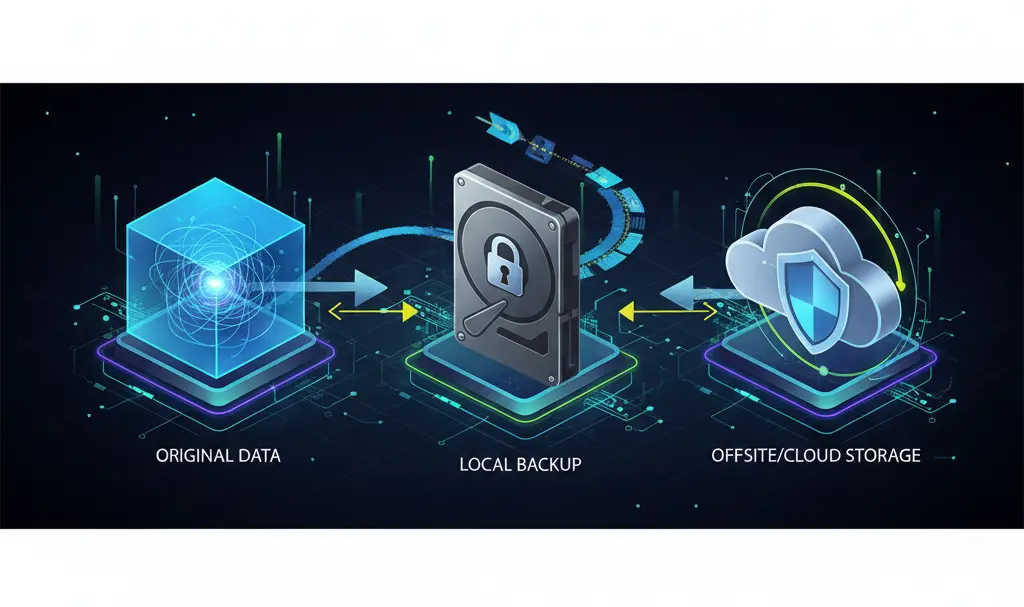
The 3-2-1 rule is a cornerstone of a clear and secure backup strategy. It dictates maintaining three copies of your data, on two different types of media, with one copy stored offsite:
- 3 – Three Copies of Your Data: This includes your original data plus at least two backup copies.
- 2 – Two Different Types of Media: Store your data on at least two distinct storage mediums. Examples include a hard drive and cloud storage, or a local disk and a Network Attached Storage (NAS) device.
- 1 – One Offsite Copy: At least one copy of your data should be stored geographically separate from your primary location (home or office). This is often achieved through cloud storage or a remote server.
This principle forms the basis of any sensible data protection strategy. Without it, the risk of losing your most important files—be it business data, critical documents, or cherished photos—increases exponentially. This rule isn’t just for businesses; it’s equally vital for individual users.
Why the 3-2-1 Strategy is Effective
Numerous scenarios can lead to data loss. Consider a single copy of files stored only on a laptop. It’s vulnerable to hardware failure, accidental damage, theft, malicious software, and human error (such as accidental deletion or formatting). The 3-2-1 rule provides:
- Redundancy: If one copy is corrupted or destroyed, other copies remain accessible, ensuring continuity.
- Media Diversity: Using different types of storage media minimizes the risk that a single type of failure (e.g., an SSD malfunction) will compromise all your backups.
- Offsite Protection: This safeguards against unexpected disasters like fire, flood, burglary, or ransomware attacks, preventing them from affecting all local storage devices or cloud backups simultaneously.
In each of these cases, adhering to the 3-2-1 rule provides at least one “clean” copy, allowing you to recover data and resume work, or retrieve years of family photos and other valuable archives.
Implementing the 3-2-1 Rule: A Practical Guide
The application of the 3-2-1 rule is straightforward and doesn’t require excessive effort or investment. You don’t need to be an IT professional to implement it; in practice, it can be set up in minutes.
- First Copy: Your original data resides on your computer’s or laptop’s primary drive.
- Second Copy: Store this on an external SSD or HDD. A NAS device located within the same premises can also serve this purpose.
- Third Copy: Keep this copy in the cloud (e.g., Google Drive, OneDrive, iCloud, Dropbox, etc.) or on a physical storage device stored away from your home or office.
It’s highly recommended to configure your system for automatic backups. You can enable features like Windows File History, Apple’s Time Machine, or utilize cloud-based backup services for this purpose. Remember to regularly save data to your external drive as well.
Crucially, you should periodically test your backups to ensure they are functional. The simplest test is to attempt restoring a few files from a backup. Remember, a backup that cannot be read is essentially useless. For cloud backups or those on external servers, always enable two-factor authentication (2FA) for added security. For sensitive documents like scanned deeds, financial records, or contracts, store them on a medium that is not constantly connected to power and the network.
Common Backup Mistakes to Avoid
Firstly, remember that cloud synchronization services are not the same as a true backup. If you use services like Google Drive, iCloud, or OneDrive and delete a file from your computer, it will typically disappear from the cloud as well. A genuine backup solution offers versioning, allowing you to restore a file from a week ago, even if it was accidentally overwritten or encrypted by malware today. This is especially important in today’s threat landscape, where advanced malware and ransomware can compromise your data.

Also, it’s time to retire older storage media. While floppy disks are long obsolete, optical media like CDs and DVDs now hold a similar status. They were once considered the “second” medium in the 3-2-1 rule, but today, faster NVMe/SSD drives are preferred for “hot” copies (quick access, data constantly in use). For “cold” copies (data that is “frozen” and often disconnected from the network), traditional HDDs or NAS servers are more suitable.
For completeness, consider “warm” copies, which represent an intermediate state. This could be a backup on a NAS server that saves data at a specific frequency, such as once a day. It’s not “hot” because it doesn’t reflect second-by-second changes, but it’s not “cold” either, as the device remains connected to the home network.
Furthermore, avoid relying solely on popular USB flash drives. Not only are they easily lost or damaged, but their NAND memory also has limited durability. They should certainly not be your only backup solution.
Conclusion
The 3-2-1 rule may evolve, but its fundamental principle remains unchanged: diversification. Data loss can be devastating, so it’s vital to do everything possible to prevent it. World Backup Day shouldn’t be the only day you think about data security.
Frequently Asked Questions (FAQ)
What are the key differences between cloud synchronization and a true backup?
Cloud synchronization services (like Google Drive or OneDrive) typically mirror your local files; if you delete or modify a file locally, the change is replicated in the cloud. True backup solutions, however, create independent copies of your data, often with versioning, allowing you to restore older versions of files even if the current one is lost, corrupted, or infected. This provides a safety net against accidental deletions, overwrites, or ransomware.
How often should I test my backups?
It is highly recommended to test your backups regularly, ideally at least once a quarter, or whenever there are significant changes to your data or backup strategy. A simple test involves attempting to restore a few non-critical files from your backup to ensure the data is intact and accessible. This verifies the integrity of your backup process and confirms that you can indeed recover your data when needed.
Is it safe to store highly sensitive documents (like legal contracts or financial records) in cloud storage?
While many cloud services offer strong encryption and security, for extremely sensitive documents, it’s advisable to add an extra layer of protection. This could involve encrypting the files yourself before uploading them to the cloud, or storing them on an encrypted external drive that is kept disconnected from the network when not in use. Always enable two-factor authentication (2FA) for your cloud accounts and choose providers with a strong reputation for security and privacy.
Source: Backblaze, Dropbox, MAIN Data Center, Reddit, Facebook.
Opening photo: Gemini
About Post Author
