

Contents
Google’s ‘Notification Rules’ Set to Revolutionize Android Alerts
Google is reportedly developing a significant new feature for its Android operating system, tentatively named “Notification Rules.” First spotted in the code of the Android 17 Beta 3 testing version, this innovation aims to give users unprecedented control over how they receive and manage alerts. While its inclusion in the final release of Android 17 is yet to be confirmed, the potential impact on daily smartphone use is considerable.
For more details on the upcoming Android 17, check out our comprehensive guide: Android 17 Features and Release Date Guide.
What Are Notification Rules?
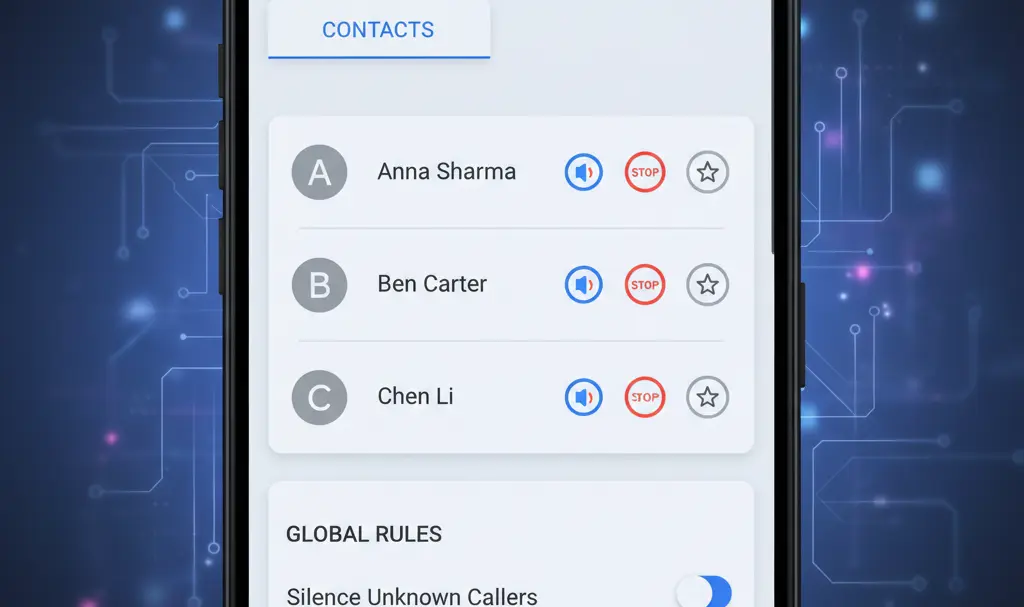
The “Notification Rules” feature is designed to allow users to create automated rules for notifications originating from specific applications and even individual contacts. Instead of manually adjusting settings for every single alert, users will be able to define how the system should handle incoming notifications from these sources based on predefined criteria. This moves beyond the current, often cumbersome, method of managing notifications app-by-app.
Customizable Reactions for Incoming Alerts
Analysis of the beta code suggests that users will have at least five distinct types of reactions they can set for their notification rules:
- Mute: Silences notifications from the specified source.
- Completely Block: Prevents any notifications from appearing from the source.
- Mute with Grouping: Silences notifications but groups them together for later review.
- Highlight: Visually emphasizes notifications, possibly displaying them in a priority format or with a distinct visual cue on the notification list.
- Highlight with Additional Alert:s Notifies the user with a special alert (e.g., a unique sound or vibration) in addition to highlighting the notification.
While some of these options, such as muting and blocking, are already available in Android for applications, the key innovation here is the expansion of these granular controls to specific individuals, such as selected contacts saved in the phone. This personalizes notification management in a way not previously possible.
Solving a Frustrating Problem: Personalized Notification Control
If Google successfully implements “Notification Rules,” it could effectively resolve a long-standing and often frustrating problem for Android users: managing unwanted or overwhelming alerts from specific people. Historically, users seeking to limit notifications from an individual contact often had to resort to drastic measures, like silencing their entire phone or completely blocking calls and messages from that person.
“Notification Rules” would provide a nuanced alternative. For instance, users could choose to entirely hide notifications from a particular contact during certain hours or days, or conversely, ensure that notifications from essential contacts and applications always remain visible and prioritized. This level of personalized control means less disruption and more focus on what truly matters.
The “Highlight” option, in particular, piques interest. It is speculated that this could mean displaying notifications in a prominent, priority form or visually distinguishing them on the notification shade, making sure important alerts stand out without being overly intrusive.
Beyond Google Pixel: A Broader Android Impact
Although “Notification Rules” first surfaced in a test version of stock Android, there are strong indications that this feature may not be exclusive to Google’s Pixel devices. Similar code fragments have reportedly appeared in leaks related to Samsung’s One UI 9, the custom Android overlay used on Galaxy smartphones. This suggests that the feature could become a widespread enhancement across the Android ecosystem, benefiting a much larger user base.

Read more about potential One UI 9 features here: Samsung One UI 9: What to Expect from the Next Iteration.
Android already offers sophisticated notification management tools, including automatic message categorization. However, “Notification Rules” takes this a significant step further by introducing automation at the level of specific individuals and applications, offering a truly customizable and intelligent notification experience.
Outlook and Availability
As of now, Google has not officially confirmed the “Notification Rules” feature, meaning its eventual inclusion in the final version of Android 17 is not guaranteed. It is also possible that the feature, if implemented, might debut in subsequent Android updates rather than the initial stable release of Android 17. Users should stay tuned for official announcements from Google regarding the future of notification management on Android.
Frequently Asked Questions (FAQ)
What are “Notification Rules” in Android 17?
“Notification Rules” is a new, unconfirmed feature for Android 17 that allows users to create automated rules for how notifications are handled from specific apps and individual contacts. This offers granular control, enabling actions like muting, blocking, or highlighting alerts based on user-defined preferences without manual intervention for each notification.
Will “Notification Rules” be exclusive to Google Pixel phones?
While the feature appeared in a test version of stock Android, there are indications that it may not be exclusive to Google Pixel devices. Similar code has been found in leaks related to Samsung’s One UI 9, suggesting it could be adopted by other Android manufacturers, including Samsung Galaxy smartphones.
How will “Notification Rules” improve user experience compared to current Android features?
Current Android versions offer app-level notification management. “Notification Rules” significantly enhances this by extending control to individual contacts and offering more automated, intelligent handling. This means users can set specific rules for people they know, reducing unwanted interruptions and ensuring important alerts are always visible, without needing to silence the entire device or manually adjust settings constantly.
When can users expect to see “Notification Rules” in the stable Android version?
As the feature is currently unconfirmed and only present in a beta build of Android 17, there is no official timeline. It may be included in the final release of Android 17, or it could potentially appear in later Android updates. Users should monitor official announcements from Google for availability details.
Source: SamMobile
Opening photo: Mobile Wala Bhai / YouTube, screenshot
About Post Author
