

Contents
Unveiling Your Smartphone’s Hidden Scanner: Why Your Phone Constantly Searches for Nearby Devices
Many smartphone users might be unaware that their device is continuously scanning its surroundings, even when Bluetooth is seemingly turned off. This “nearby device scanning” feature, commonly found on modern smartphones, serves a clear purpose: to simplify your user experience, despite its minimal impact on battery life.
Why Does Your Phone Scan Its Environment?
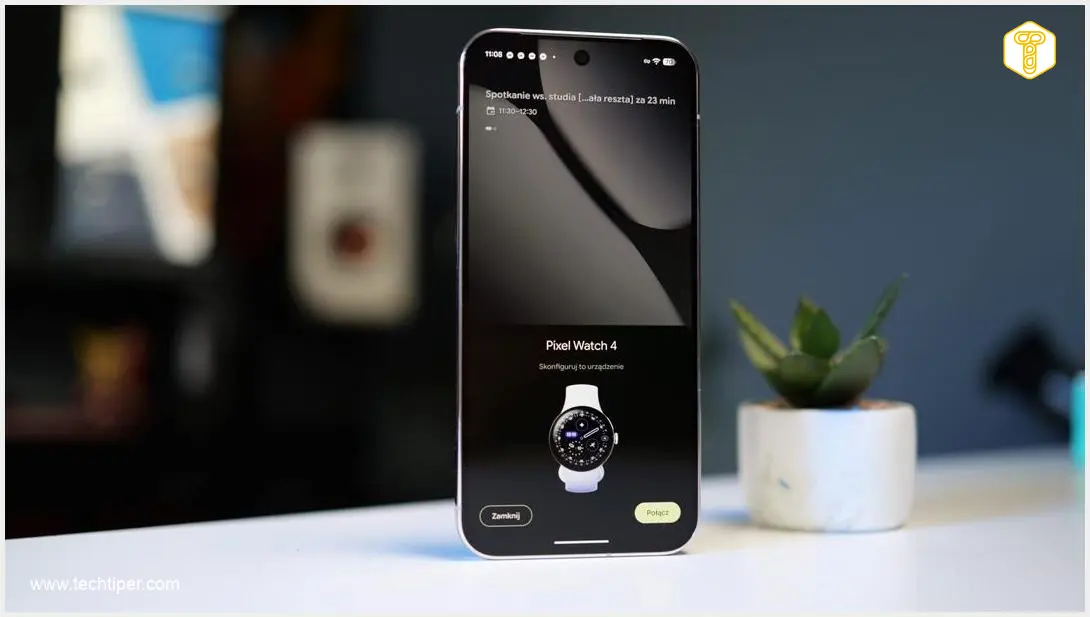
Most smartphone users have likely attempted to pair their phone with another device, such as a Bluetooth speaker, smartwatch, or wireless headphones. The pairing process is usually straightforward: enable Bluetooth or Wi-Fi on your phone and follow the accessory’s instructions. However, what many don’t realize is that their phone is constantly searching for compatible devices to connect with.
On most smartphones, this option is enabled by default. This ensures users can always discover and pair with new accessories effortlessly. The convenience factor is significant, allowing for quick connections to new gadgets without deep-diving into settings each time.
The downside is that your phone detects all nearby devices, not just your own. This means you might see your neighbors’ devices, though you typically cannot connect to them without their permission or a specific pairing process. It’s important to note that this mechanism is different from location trackers or similar technologies that pinpoint your exact whereabouts.
Crucially, this scanning operates in the background even if Bluetooth is manually disabled in your phone’s quick settings. Does this drain your battery significantly? Not usually. This scanning often utilizes the Bluetooth Low Energy (BLE) protocol, which is specifically designed to consume minimal power, ensuring that convenience doesn’t come at a high energy cost. For more tips on optimizing your phone’s power, you might find these battery life improvement settings helpful.
Security and Potential Drawbacks of Disabling Scanning
In terms of security, this continuous scanning mechanism is generally safe. Your phone primarily acts as a receiver, actively searching for compatible devices to establish connections. It’s not broadcasting sensitive personal data that would expose you to immediate threats. However, understanding how to manage Bluetooth home security and change device names can still be a good practice for overall digital hygiene.
While the security risks are low, disabling this scanning feature might cause unexpected issues. For example, it could affect previously paired devices that rely on this background discovery to maintain a stable connection. Additionally, certain applications that utilize proximity features or connect to specific accessories might stop functioning correctly if the scanning option is turned off. It’s a balance between perceived privacy and the seamless functionality of your device ecosystem.
How to Disable Nearby Device Scanning
If you wish to prevent your phone from continuously searching for nearby devices, you can usually disable this feature through your device’s settings. The exact steps and naming of the option can vary slightly depending on your phone’s manufacturer and operating system version.
Here’s a general guide:

- Navigate to your device’s Settings.
- Use the search bar within Settings and type “Nearby device scanning,” “Scanning for nearby devices,” “Bluetooth scanning,” or a similar phrase. This should lead you to the relevant option.
- Once found, you will typically see a toggle switch to enable or disable the feature.
For instance, on many Samsung phones, you might find this option by going to Settings > Connections > More connection settings. Within this menu, you should locate the toggle to disable nearby device scanning.
Frequently Asked Questions (FAQ)
While disabling nearby device scanning might offer a marginal improvement, the impact on battery life is generally minimal. This feature primarily uses Bluetooth Low Energy (BLE), which is designed for very low power consumption, meaning it’s unlikely to be a major battery drainer.
Yes, typically you will still be able to connect to new Bluetooth devices manually. Disabling background scanning often only prevents your phone from passively searching. You would usually need to go into your Bluetooth settings and initiate a manual scan or pairing process for new devices.
Generally, the privacy risks are low. Your phone acts as a receiver, looking for devices to connect to, rather than broadcasting sensitive personal data. However, frequent scanning could theoretically reveal your presence in certain locations if specific network monitoring tools were being used. For most users, the primary “privacy concern” is simply seeing a list of other people’s devices, not data exposure.
Source: Own elaboration
Opening photo: Krzysztof Wilamowski
About Post Author
