

Contents
Samsung Limits Samsung Find App Support for Older Galaxy Devices
Samsung is gradually phasing out full support for its Samsung Find application on older Galaxy smartphones and tablets, specifically those running Android 10 or earlier. This decision aligns with a common industry practice where manufacturers eventually cease extensive support for services on aging devices, choosing instead to focus resources on newer hardware and software advancements.
Samsung Find’s Limited Future for Older Galaxy Devices
Starting now, Samsung Find will no longer receive comprehensive support on devices operating with One UI 2.0 (which is based on Android 10) or older Android versions. While the fundamental location tracking functionalities will remain accessible for these older models, users should anticipate significant limitations:
- Restricted Connectivity: Connectivity and compatibility with newer Galaxy devices will be limited.
- No New Features: Older devices will not receive further feature updates, meaning they will miss out on enhancements and new functionalities introduced in the Samsung Find app. For instance, discussions around upcoming One UI 9 features often highlight innovations that require newer software.
- Lack of Security Patches: Crucial security updates specifically for the Samsung Find application will no longer be provided for these older devices. This is a significant consideration, especially when considering the importance of software security, as seen with ongoing efforts like the security update for the Galaxy A36.
Samsung justifies this strategic shift by emphasizing the need to “ensure the best service performance.” In essence, this means prioritizing development efforts and valuable resources towards newer generations of Galaxy devices. This approach enables the company to innovate more effectively and deliver cutting-edge features optimally on its latest hardware, ensuring a premium user experience for current-generation devices.
What is Samsung Find?
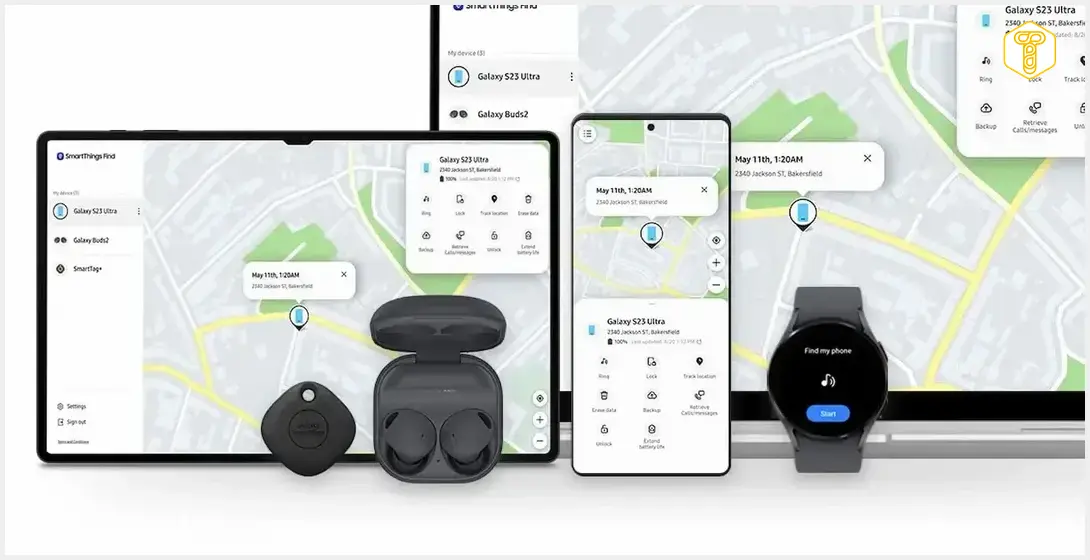
Samsung Find is a comprehensive, integrated service designed to help Galaxy users locate and manage their various devices. Previously incorporated within the SmartThings Find tab, it supports a wide array of Samsung products including:
- Smartphones
- Tablets
- Smartwatches
- Headphones
- Galaxy SmartTags
The service offers a suite of essential features for device management and recovery:
- Displaying the precise location of a device on a map.
- Playing a sound on a misplaced device to help locate it nearby.
- Remotely locking a lost device to protect personal data.
- Sharing device location with trusted family members or contacts for added peace of mind.
A pivotal component of the Samsung Find ecosystem is its offline finding mode. This innovative feature, officially supported on Galaxy smartphones and tablets running Android 8 and newer, allows devices to be located even when they are not connected to the internet. For select Galaxy smartwatches, headphones, and SmartTags, this capability creates a dispersed, anonymous network of Galaxy devices that can help pinpoint the location of lost items. Samsung’s ongoing development in newer app versions heavily focuses on enhancing these functionalities, introducing advanced features such as sophisticated location widgets and more detailed map views. Such advancements often leverage the capabilities of newer software, which older Android versions may not fully support.
Samsung Find vs. Google’s Find My Device Network
In contrast to Samsung’s updated policy, Google’s Find My Device network generally provides broader compatibility across a wider spectrum of Android versions. According to official Google documentation, its network-based offline device locating capabilities are available from Android 9 onwards. Furthermore, basic online device finding features extend support to even older Android releases, encompassing a significantly wider range of legacy smartphones. This broader compatibility often ensures that users with older Android devices can still utilize Google’s core device tracking services, even if they might miss out on the very latest features available on newer platforms.
Frequently Asked Questions (FAQ)
No, basic location functionalities will still be available. However, you will miss out on new features, security updates specific to the app, and experience limited connectivity with newer devices.
Samsung states this is to “ensure the best service performance.” This means they are redirecting development resources to newer Galaxy generations to focus on innovation and optimal functionality for their latest hardware, which often requires more modern software capabilities.

Source: Phone Arena, SammyGuru, Samsung, Google
Opening photo: Samsung / press materials
About Post Author
