

Contents
Enhance Your Remote Workspace: A Look at Mobile Pixels Portable Monitors
While many companies are gradually calling employees back to the office, remote work and ‘workations’ are here to stay. Not everyone has the space or need for a full, permanent workstation, yet still desires improved working conditions, especially a larger display area. This is where Mobile Pixels’ innovative portable monitors come in, offering practical solutions for enhancing productivity on the go.
Unboxing, Technical Specifications, and Pricing
Mobile Pixels Trio 3 Pro: Dual Screen Powerhouse
First, let’s explore the more extensive offering, the Mobile Pixels Trio 3 Pro, which includes two additional screens. The package typically contains the main monitor unit, two USB-C to USB-C cables (with a USB-A adapter), a set of four magnets, and a user manual. Interestingly, part of the packaging itself cleverly doubles as a mounting system. The Mobile Pixels Trio 3 Pro is generally available at a competitive price point, though deals might bring it down slightly. The manufacturer also offers options for extended and enhanced warranties, providing up to three years of coverage for various damages, often including free replacements.
Mobile Pixels Duex Float 2 Pro: Single, Larger Display
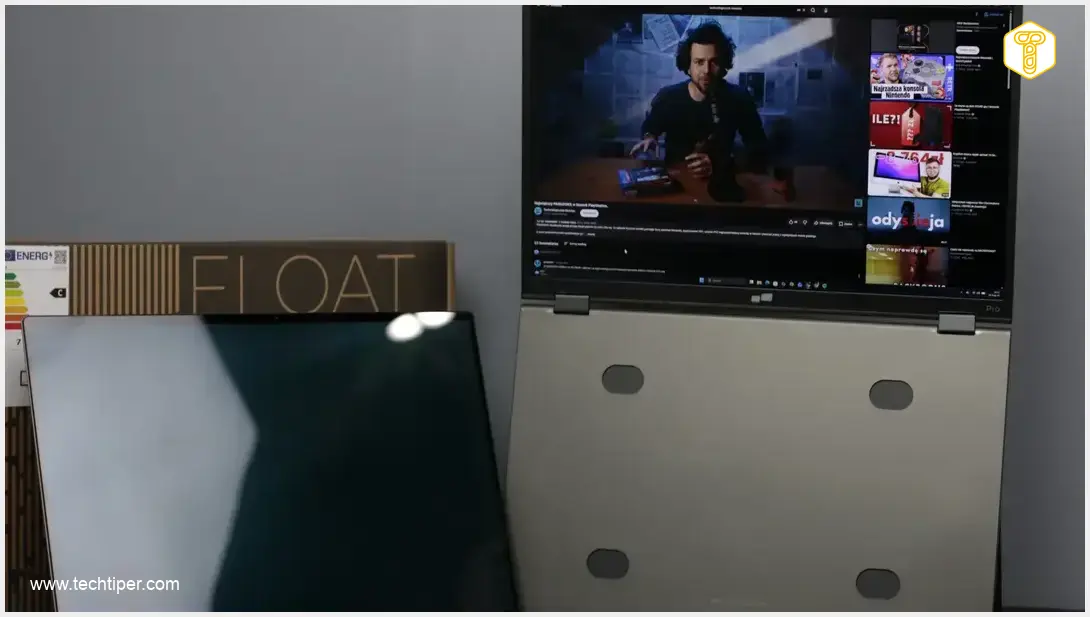
The Mobile Pixels Duex Float 2 Pro comes with a nearly identical kit. The only distinction is the inclusion of an HDMI to mini-HDMI cable instead of one of the USB-C cables. It also features magnets and a mounting system integrated into the packaging. As this model offers a single, larger additional monitor, its price point is typically more accessible than the Trio 3 Pro. Similar promotional offers and extended warranty options are available. The technical specifications for both Mobile Pixels devices are detailed below:
Technical Specifications
Duex Float 2 Pro
- Screen: 16-inch IPS LCD
- Resolution: 2560×1600 pixels (16:10 aspect ratio)
- Brightness: Up to 350 nits
- Color Gamut: 100% sRGB
- Contrast Ratio: 1200:1
- Refresh Rate: 120 Hz
- Ports: 2x USB-C (with Power Delivery and Pass-through), miniHDMI
- Other: Built-in stereo speakers
- Dimensions (Unfolded): 35.89×24×1.75 cm (approx. 14.13×9.45×0.69 inches)
- Weight: 1.31 kg (approx. 2.89 lbs)
Trio 3 Pro
- Screen: 2x 14.1-inch IPS LCD
- Resolution: 2240×1400 pixels (16:10 aspect ratio)
- Brightness: Up to 300 nits
- Color Gamut: 100% sRGB
- Contrast Ratio: 1000:1
- Refresh Rate: 60 Hz
- Ports: 2x USB-C (with Power Delivery and Pass-through)
- Other: No built-in speakers
- Dimensions (Folded): 34.14×22.43×2.29 cm (approx. 13.44×8.83×0.90 inches)
- Dimensions (Unfolded): 102.23×22.43×2.29 cm (approx. 40.25×8.83×0.90 inches)
- Weight: 1.81 kg (approx. 3.99 lbs)
Design and Build Quality of Mobile Pixels Trio 3 Pro/Float 2 Pro
Both monitors boast commendable build quality and fit-and-finish. While fingerprints can become noticeable with extended use, they are easily wiped away. Mobile Pixels has clearly prioritized portability; a fabric case not only protects the screen during transport but also cleverly transforms into a magnetic stand when in use, allowing for various viewing angles. These devices are not excessively heavy, ensuring high mobility when folded and packed.
Duex Float 2 Pro Design Highlights
The innovative kickstand design of the Mobile Pixels Duex Float 2 Pro enables diverse placement options. Users can position the monitor alongside their primary device or even above 15/16-inch laptops. The robust hinges securely hold the screen in place, complemented by strong magnets that prevent accidental dislodgement. For a more integrated setup, the included magnets can be affixed to your laptop, allowing the monitor to attach directly to the computer’s lid. The design itself is straightforward, featuring two USB-C ports and a mini-HDMI port on the edges. Additionally, you’ll find buttons for navigating the on-screen display (OSD) menu and speaker grilles. While the built-in speakers are suitable for video calls, don’t expect exceptional audio quality for immersive movie or TV show viewing.
Trio 3 Pro Design Considerations
The Mobile Pixels Trio 3 Pro largely shares the design principles of the Duex Float 2 Pro, though its increased weight can make positioning the dual screens at arbitrary angles a bit more challenging. For optimal stability, it is highly recommended to use the included magnets to securely attach the unit to your laptop. Notably, the Trio 3 Pro lacks built-in speakers, which isn’t a significant drawback given that this model is primarily designed for laptop users who typically rely on their laptop’s audio or external solutions.
User Experience with Mobile Pixels Trio 3 Pro/Duex Float 2 Pro
Setting up these portable monitors is remarkably straightforward and requires no specialized knowledge. Simply connect the device to your computer via USB-C (or HDMI for the Duex Float 2 Pro), and you’re ready to go. For optimal performance, especially maximum brightness, it’s advisable to connect an external power source to the Mobile Pixels monitor first. While not strictly mandatory, relying solely on bus power will limit the display’s brightness, which can then be adjusted via the built-in OSD menu. The OSD provides essential settings, including brightness and color temperature controls.
Trio 3 Pro: Dual Screen Productivity
For the Trio 3 Pro, the OSD menu offers the additional flexibility to disable one of the two screens if desired. The user experience is incredibly intuitive; once connected, you immediately benefit from an expanded workspace. The high resolution of these Mobile Pixels products is a significant draw, offering sharp and clear visuals. While the monitors allow for considerable angle adjustments, their viewing angles are somewhat limited, meaning direct viewing is best. This isn’t a major concern for typical laptop use but is worth noting. Similarly, the brightness, while adequate for indoor environments, may struggle in bright sunlight outdoors. Color reproduction is generally accurate and satisfactory for most applications.
Duex Float 2 Pro: Enhanced Visuals
In contrast, the Duex Float 2 Pro provides a single additional screen but offers slightly greater flexibility in positioning. Its larger 16-inch display, coupled with an even higher resolution, translates to a noticeably expanded workspace. A key advantage here is the elevated 120 Hz refresh rate, delivering a significantly smoother visual experience. Although its native brightness is marginally higher than the Trio 3 Pro, it still falls short of providing comfortable outdoor usability on a sunny patio. Color reproduction remains at a competent, sRGB-limited level, with minimal inaccuracies. Viewing angles are acceptable, though optimal clarity is achieved when viewing the screen head-on.

Conclusion and Our Opinion
This review provides a comprehensive look at the capabilities of Mobile Pixels’ portable monitors. Investing in one of these devices undoubtedly enhances the quality of your work, whether you’re at home or on a workation, all while offering excellent portability. They deliver a substantial, high-resolution secondary workspace that requires minimal setup time, making them ideal for most office tasks and beyond. It’s important to note that these monitors are not designed for professional photo editing, but they can significantly accelerate and simplify tasks like video editing when used as a complementary tool, with your primary screen serving as the main display. A minor drawback is the need for an external power source to unlock their full potential, such as maximum brightness on the Trio 3 Pro, despite the convenience of USB Pass-through charging. For alternative portable display solutions, consider exploring options like the ASUS ZenScreen OLED MQ16FC or the Lenovo ThinkVision P40wd for professional ultrawide needs.
Frequently Asked Questions (FAQ)
While these monitors offer high resolution and can certainly enhance productivity for creative tasks as secondary displays, their color reproduction (sRGB only) and brightness limitations mean they might not meet the stringent demands of professional-grade color-critical work. For dedicated professional use, especially photo editing, a primary, color-calibrated monitor is still recommended.
For full performance, particularly maximum brightness, connecting an external power source is recommended. While they can draw power from a laptop via USB-C, this might limit brightness and drain the laptop’s battery faster. The inclusion of USB Pass-through charging helps manage power for connected devices.
Source: Our editorial team. Opening photo: Our staff.
About Post Author
