

Contents
ASUS for the New School Year: The Laptop That Can Be Everything a Student Needs
Returning to school or university no longer means choosing between a lightweight laptop for studying and a powerful machine for gaming. Today’s notebooks are versatile tools, serving as a workstation, creative hub, AI assistant, and entertainment center after classes—and NVIDIA GeForce RTX technologies significantly expand their capabilities.
Forget the idea of a laptop designed only for studying. Modern demands require more, and a single device can now seamlessly handle it all. Choosing the right laptop for school today means finding a balance between performance, portability, and versatility.
What Today’s Students Expect from a Laptop
The role of a student’s laptop has evolved dramatically. It’s rarely used just for typing documents, browsing the internet, or creating presentations. Throughout a single day, it might be needed for note-taking during lectures, preparing a project, photo editing, video editing, working with AI tools, and then running a demanding game in the evening. Investing in separate hardware for each of these applications simply doesn’t make sense.
The challenge arises when you need to balance raw performance with crucial mobility. A laptop carried between home, school, university, and the library can’t be a huge, heavy machine that turns commuting into an arduous workout. On the other hand, a compact computer must have enough power reserves to handle not only documents but also creative projects, AI applications, and contemporary games.
The ASUS ROG Zephyrus G14: A Mobile Hub for Learning, AI, and Creativity
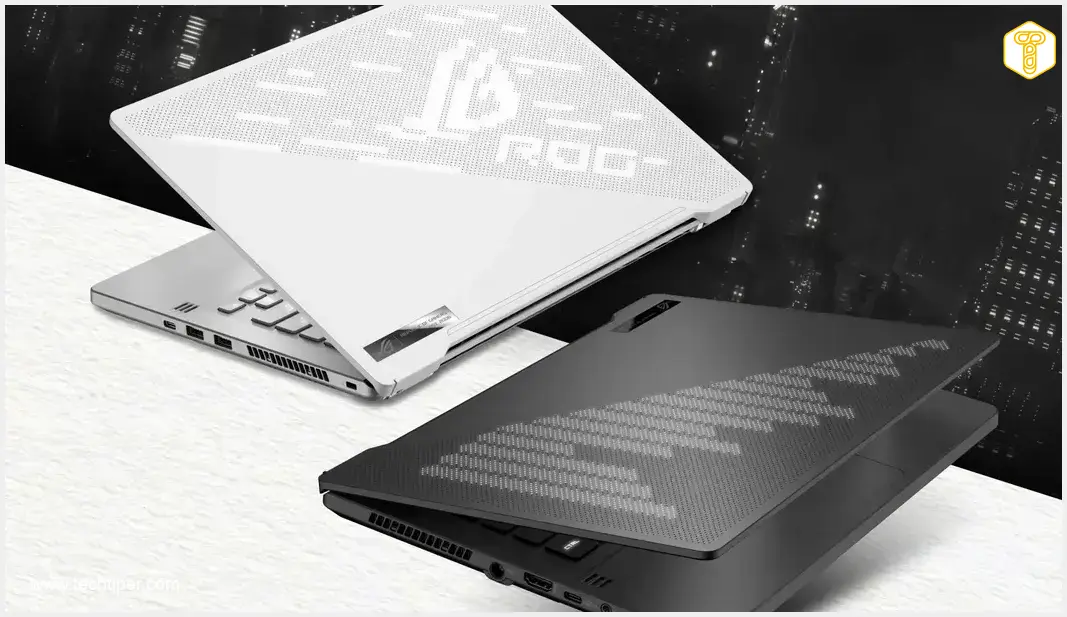
In scenarios demanding both power and portability, the ASUS ROG Zephyrus G14 stands out. While positioned in the premium segment, its greatest asset isn’t just its “gaming” label. Instead, it’s the combination of a compact form factor, easy transport, and performance that allows it to serve as a single device for virtually your entire day.
For a laptop taken to classes daily, size and weight are just as important as component power. The ROG Zephyrus G14 was developed with this blend in mind, weighing approximately 1.58 kg (about 3.5 lbs). This makes it easy to carry during classes, take to the library, and then leverage for far more demanding tasks once you’re home.
This is especially critical for creative projects. Editing video footage, working with graphics, or preparing 3D scenes can quickly test the limits of an ordinary laptop. With hardware equipped with an NVIDIA GeForce RTX 5070 Laptop GPU, the additional GPU power can be utilized not just by games, but also by professional programs and hardware-accelerated solutions.
This marks a significant shift in how we think about gaming laptops. The graphics card doesn’t have to sit idle for most of the day, waiting for a game to launch. It can actively work on video editing in Adobe Premiere Pro, rendering scenes in Blender, editing materials in the Adobe suite, or working in DaVinci Resolve. Furthermore, technologies associated with NVIDIA Studio enable the utilization of GeForce RTX capabilities across a wide range of creative applications.
ASUS ROG Zephyrus G14 (2026) GU405 Technical Specifications:
- Graphics Card: NVIDIA GeForce RTX 5070 Ti Laptop GPU, 12 GB GDDR7
- Processor: Intel Core Ultra 9 386H, 16 Cores, up to 4.9 GHz
- RAM: 32 GB LPDDR5X 8533 MHz
- Storage: 1 TB SSD PCIe 4.0 NVMe M.2
- Display: 14-inch, OLED, 3K (2880 × 1800), 120 Hz
- NPU: Intel NPU, up to 50 TOPS
- Connectivity: Wi-Fi 7, Bluetooth 6.0
- Battery: 73 Wh, 4 cells
- Weight: 1.58 kg (approx. 3.5 lbs)
- Dimensions: 31.1 × 22.0 × 1.59–1.83 cm (approx. 12.2 x 8.7 x 0.6-0.7 inches)
GeForce RTX: Beyond Just Gaming
For students, one of the most compelling aspects is that a powerful graphics card finds applications far beyond just gaming. Rendering a 3D project, exporting a video, or working with complex effects can utilize the GPU much more intensively than typical office tasks. In practice, this means the same laptop can be used for preparing a presentation in the morning, editing project materials in the afternoon, and then gaming in the evening.

NVIDIA’s AI-related solutions play a crucial role here. Modern applications increasingly leverage a device’s local capabilities for AI-driven functions. GeForce RTX is well-prepared for such tasks, thanks to specialized units designed to accelerate AI computations.
The situation is similar in creative software. NVIDIA GPUs can offload certain calculations from the main processor, and support for technologies within the NVIDIA Studio ecosystem allows for better utilization of the laptop’s capabilities when creating content. If an academic project starts as a simple video, graphic, or 3D visualization and evolves into something much more elaborate, a powerful GeForce RTX unit ceases to be a luxurious add-on and becomes a practical necessity.
After Classes: Gaming with DLSS and Ray Tracing
Alright, academics are important, but after several hours of classes, everyone deserves some less productive time. This is where the ROG Zephyrus G14 can reveal its other side. NVIDIA GeForce RTX technologies ensure that gaming isn’t just about how powerful the graphics card itself is.
One of the most significant solutions is DLSS (Deep Learning Super Sampling), a technology that uses artificial intelligence to boost both performance and image quality. Instead of treating rendering resolution as the only way to improve a game’s visuals, DLSS leverages AI algorithms for image reconstruction. The result? In supported titles, you can achieve higher frame rates while maintaining high graphical fidelity.
Things get even more exciting with Ray Tracing enabled. This technology allows for a more realistic simulation of light behavior, reflections, shadows, and scene illumination. While visually stunning, it comes with a computational cost. That’s why combining Ray Tracing with DLSS solutions is so practical. Gamers don’t have to choose between stunning graphics and smooth performance as often as they would with traditional rendering.
The capabilities don’t end there. Frame Generation uses AI to create additional frames, significantly increasing the perceived smoothness of gameplay. Ray Reconstruction, in turn, employs AI to enhance image quality in scenes that utilize Ray Tracing.
Added to this suite is NVIDIA Reflex, designed to reduce system latency. In dynamic online games, this can be particularly critical when every reaction and split second counts.
As a result, a laptop with GeForce RTX can fulfill two entirely different functions in a single day. First, it helps create a project, render a scene, or edit a film, and then a few hours later, it allows you to run a demanding game using technologies like DLSS, Frame Generation, and Ray Tracing. It is precisely this versatility that is far more compelling today than the mere label of “gaming laptop.”
Advanced Technologies Are Not Exclusive to the Most Expensive Laptops
The ROG Zephyrus G14 is an example of premium hardware, and it would be misleading to suggest its capabilities come at the lowest price point on the market. However, this doesn’t mean that users interested in AI, creativity, or GeForce RTX technologies must immediately opt for the highest-end segment.
Key NVIDIA solutions are also available in more affordable ASUS laptops. Examples include the ROG Strix G16, as well as models from the TUF Gaming family, such as the TUF A16 or TUF A14, which are equipped with NVIDIA GeForce RTX GPUs. This means the choice of a specific laptop can be tailored to individual budgets and needs, rather than viewing all these technologies as exclusive to a single, top-tier model.
This is particularly important information when purchasing equipment for a new school or academic year. Not everyone requires maximum performance and a premium-class design. For one person, the mobility of the ROG Zephyrus G14 might be paramount; for another, the larger screen and performance of the ROG Strix G16; and someone else might primarily seek a favorable balance of features to price within the TUF Gaming family. In each case, it’s worth looking beyond just the laptop’s name or its gaming aesthetic, and focusing instead on what you can achieve with it.
Additional Benefits to Consider
Purchasing an ASUS device can offer more than just a specific piece of hardware; it often comes with additional benefits. Depending on the product and current offers, users might take advantage of programs such as ASUS Google AI or ASUS Perfect Warranty. Owners of ROG devices may also be interested in the ROG Elite program, which provides extra perks for users of ASUS gaming hardware.
One Laptop, Many Uses
The back-to-school season in 2026 looks entirely different from how it did a few or even a dozen years ago. A laptop increasingly serves as a notebook, a creative studio, a tool for AI, and a gaming console—all at once. Therefore, when choosing one, what matters is not just performance in one specific application, but the ability to seamlessly transition between various tasks.
The ROG Zephyrus G14 perfectly exemplifies this direction: its compact design facilitates daily portability, while its high performance extends far beyond basic tasks. Crucially, NVIDIA GeForce RTX technologies are not confined solely to the gaming world. They can support learning, content creation, 3D projects, and work with AI applications, and then, after classes, allow you to use the same hardware for entertainment.
Frequently Asked Questions (FAQ)
Modern student laptops need to balance performance with portability. They should be capable of handling various tasks, from note-taking and browsing to creative projects, AI applications, and even demanding games. Look for a powerful CPU, a dedicated GPU (like NVIDIA GeForce RTX), sufficient RAM, fast storage, and a lightweight, durable design for easy transport.
NVIDIA GeForce RTX GPUs excel in accelerating creative applications such as video editing (Adobe Premiere Pro, DaVinci Resolve), 3D rendering (Blender), and graphic design (Adobe Suite). They also provide dedicated AI cores to boost performance in AI-powered tools and features, making complex tasks faster and more efficient for academic projects.
The ASUS ROG Zephyrus G14 is designed to be highly versatile. Weighing around 1.58 kg (approximately 3.5 lbs), it offers exceptional portability for daily commutes between home, campus, and the library. While it boasts gaming-grade performance, its powerful NVIDIA GeForce RTX GPU and robust CPU make it an excellent choice for demanding academic tasks, creative work, and AI development, in addition to entertainment.
While premium laptops like the ROG Zephyrus G14 showcase these technologies at their best, NVIDIA’s core features, including DLSS (Deep Learning Super Sampling) and Ray Tracing, are available across a wider range of NVIDIA GeForce RTX-powered laptops. More budget-friendly ASUS models like the ROG Strix G16 or laptops from the TUF Gaming series (e.g., TUF A16, TUF A14) also incorporate these advancements, making them accessible to a broader student audience.
ASUS often offers supplementary programs and benefits for its customers. These can include initiatives like ASUS Google AI programs or comprehensive warranties such as ASUS Perfect Warranty. For owners of Republic of Gamers (ROG) devices, the ROG Elite program provides exclusive perks and advantages, enhancing the overall ownership experience.
Source: Own elaboration. Opening photo: ASUS / press materials
About Post Author
