
Contents
ASUS ZenScreen OLED (MQ16FC) Review: Your Essential Dual-Screen Companion on the Go
For many professionals, a single screen simply isn’t enough to maintain peak productivity. If you’re accustomed to a multi-monitor setup in your workspace, the thought of being limited to a laptop’s display while traveling or working remotely can be daunting. This is where the ASUS ZenScreen OLED (MQ16FC) steps in – a portable monitor designed to seamlessly transform your laptop into a powerful, dual-screen workstation, making mobile work as efficient as your office setup.
Why a Portable Monitor? The Multitasking Advantage
I count myself among those who thrive on multitasking. The ability to view multiple tabs, windows, email inboxes, and chat applications simultaneously, without constantly switching between them, is crucial for my workflow. While a large desktop monitor can accommodate such an arrangement, a compact laptop display simply doesn’t offer the necessary screen real estate. This often leads to a noticeable dip in productivity when I’m away from my main setup.
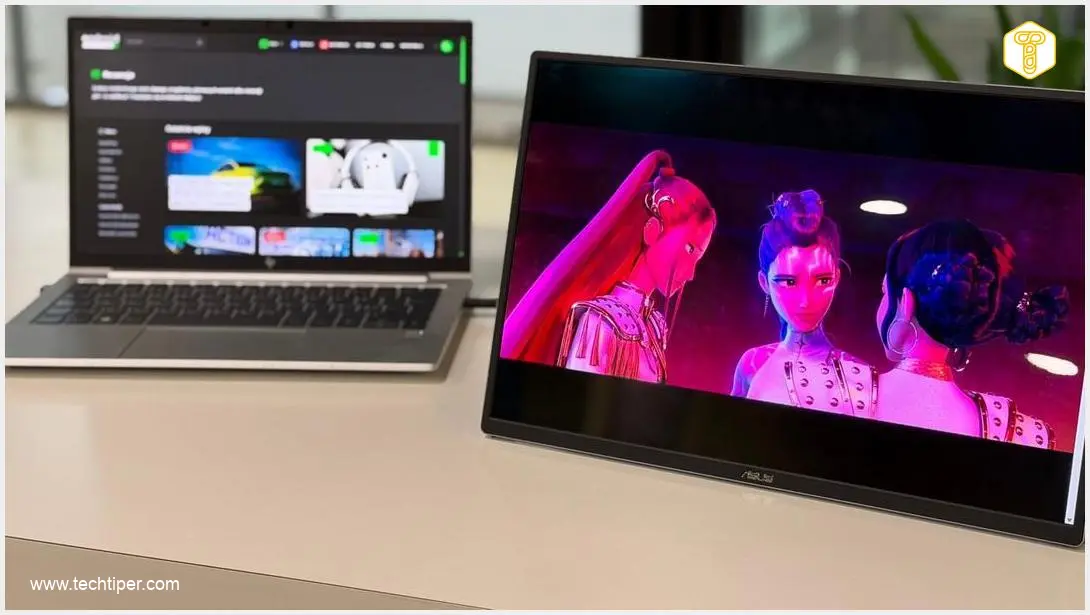
However, this doesn’t have to be the case. ASUS provides a straightforward and highly effective solution: a portable monitor that is far more than just an extra screen. The ZenScreen OLED (MQ16FC) is a robust OLED panel that easily fits into a laptop bag or backpack, promising to be one of the lightest 16:10 OLED displays on the market, according to the manufacturer.
Weighing only 650 grams (approximately 1.43 pounds) and incredibly thin at just 5 mm (though typically around 9 mm or 0.35 inches), this monitor delivers a substantial amount of additional workspace. This means you can work significantly more efficiently whether you’re in a coffee shop, a co-working space, or even on a train.
ASUS ZenScreen OLED (MQ16FC): A Closer Look
Unboxing and Accessories
The ASUS ZenScreen OLED (MQ16FC) arrives in minimalist packaging, consistent with the ZenScreen line’s elegant aesthetic. Inside the box, cardboard inserts meticulously protect the OLED screen from any mechanical damage during transit. Beyond the monitor itself, the package includes a compact power adapter with interchangeable plugs for various outlets and a selection of essential cables:
- USB-C to USB-C cable: This is the primary cable, handling both video transmission (DisplayPort Alt Mode) and power delivery through a single connection.
- Mini-HDMI to HDMI cable: Designed for connecting older devices or gaming consoles (which would then require additional power via USB-C).
The kit also features a tripod socket cover, which not only shields the threaded opening on the monitor’s rear but also aids in securely attaching the monitor to various tripod heads. Completing the ensemble is a textile sleeve, facilitating safe and convenient transport of the monitor.
Design and Build Quality
The ZenScreen OLED makes a strong impression in person, with reviewers consistently praising its slender profile, low weight, and premium material quality. Measuring approximately 8.95 mm (0.35 inches) thick and 358.7×226.15 mm (14.1×8.9 inches), and weighing around 0.65 kg (1.43 lbs), it can effortlessly be slipped into a backpack alongside a 14-inch or 15-inch ultrabook. The construction elegantly combines metal with high-quality plastic, resulting in a rigid frame that feels solid and silent during handling.
A notable design feature is the presence of two USB-C ports. This allows you to connect a charger to the monitor, which can then pass up to 65W of power to your laptop (Power Pass-through). This means you only need one wall outlet to power both devices, significantly reducing cable clutter.
Display Parameters: The OLED Advantage
The 16-inch OLED display boasts a 16:10 aspect ratio, which perfectly complements modern laptops that are increasingly moving away from the traditional 16:9 format. This taller aspect ratio allows for more content to be displayed vertically, making the monitor a genuine tool for productivity rather than just a secondary screen for media consumption. This aspect ratio and the quality of the OLED panel are particularly appealing to users of devices like MacBooks, offering an ideal complement to their Liquid Retina screens.
The screen resolution is 1920×1200 pixels, achieving an impressive screen-to-body ratio of 89%. It also delivers wide viewing angles and an exceptionally fast 1 ms response time. While a WUXGA resolution might seem modest compared to 2K or 4K panels, it appears to be a deliberate choice by the designers, likely balancing performance, power efficiency, and cost for a portable device.
The standout feature of the MQ16FC is undoubtedly its OLED matrix. It offers an astounding contrast ratio of 100,000:1, which translates to truly deep, absolute blacks rather than a dark gray. The 60 Hz refresh rate means this monitor isn’t geared towards competitive esports, but for all other applications, including office work and general content consumption, it provides perfectly smooth performance.
ASUS has also prioritized color accuracy, ensuring 100% DCI-P3 color gamut coverage. Furthermore, a Delta E value of less than 2 guarantees that the colors displayed on the screen are highly accurate and true to the creator’s intent, making it suitable for creative professionals.
The monitor also holds several certifications, including a TÜV Rheinland certification for low blue light emission, promoting eye comfort during extended use. In terms of brightness, I measured a maximum of 266 nits, slightly below the manufacturer’s declared value. However, this brightness level is more than sufficient for indoor environments. In very bright offices or outdoors, the glossy screen finish might be a more significant factor, as it is prone to reflections. While this finish enhances the perception of deep blacks, it also tends to show fingerprints and reflections. This is a characteristic of the technology, rather than a flaw.
Connectivity: Ports and Features
The ASUS ZenScreen OLED is exceptionally well-equipped with ports and connectors, surpassing many ultrabooks in its versatility. It features two USB-C ports with DisplayPort Alt Mode and Power Pass-through (up to 65 W).
These ports enable bi-directional charging, meaning the monitor can power the laptop, or vice versa, using just a single cable. Additionally, there’s a mini HDMI port (for older devices or gaming consoles) and a 3.5 mm mini-jack headphone port. This comprehensive selection collectively ensures impressive versatility for the device.
Device Casing and Stand
The device is incredibly slender, and its casing is crafted from a high-quality aluminum alloy, contributing to its robust structural rigidity. The integrated stand is a huge advantage, and the inclusion of a tripod socket further enhances its impressive flexibility.
Unlike its predecessors, the MQ16FC incorporates an ergonomic, integrated kickstand that allows for stable positioning of the screen at various angles without needing extra accessories. The screen can be set at any desired angle, and it also supports vertical (portrait) orientation for tasks like coding or document review.
ASUS ZenScreen OLED in Practice
If using a portable ASUS monitor involved a tangle of cables, power adapters, and extra dongles, I likely wouldn’t even consider such a solution. Mobile work emphasizes minimalism, not adding extra weight to your bag. Fortunately, this is entirely a non-issue with the OLED model under review. Thanks to USB-C technology (DisplayPort Alt Mode), literally one cable and an available port on your laptop are all it takes to bring the monitor to life, offering deep blacks and perfect colors. This embodies the essence of plug-and-play simplicity.
The MQ16FC is designed for users who demand maximum image quality in a portable format. Its OLED display delivers vibrant, saturated colors, and the blacks are stunningly deep. Coupled with its high resolution and the flexibility to be mounted on a tripod or used in portrait mode, it translates into a more enjoyable work or entertainment experience without eye strain, optimizing for whatever task is at hand.
Of course, the ASUS ZenScreen OLED isn’t solely for work. It’s equally adept at all kinds of entertainment, such as streaming or casual gaming. Here, users will undoubtedly appreciate the low response time, which contributes to smooth mobile gameplay.
Configuration and Control
Monitor configuration can be managed through the on-screen display (OSD) menu, system settings, or the DisplayWidget Center application. I personally find the OSD menu via physical buttons less intuitive, and system settings often lack sufficient customization. Therefore, I typically prefer using dedicated software to fine-tune the monitor to my specific needs.
The ZenScreen OLED features its own OSD menu, controllable via physical buttons on the right edge of the screen. This allows you to adjust brightness, contrast, change picture modes, color temperature, sharpness, and activate eye protection features like the blue light filter and flicker elimination.
However, for me, the most convenient option is the proprietary ASUS DisplayWidget application, which can be downloaded from the manufacturer’s website. This software enables you to control monitor settings using your mouse, eliminating the need to navigate through the OSD menu with physical buttons.
It’s also worth noting that when connected to a Windows computer, the ASUS DisplayWidget Center tool allows the MQ16FC to detect its orientation and automatically switch between landscape and portrait display modes.
Technical Specifications: ASUS ZenScreen OLED (MQ16FC)
According to the manufacturer’s website, the specifications for the ASUS ZenScreen OLED MQ16FC are as follows:
- Model: ZenScreen OLED MQ16FC
- Display: OLED, 16 inches, 16:10 aspect ratio, glossy panel, 16.7 million colors
- Resolution: 1920×1200 pixels (WUXGA)
- Response Time: 1 ms (GtG)
- Refresh Rate: 60 Hz
- Brightness: 300 cd/m2 (typical)
- Viewing Angle (CR≧10, Horizontal/Vertical): 178°/178°
- Contrast Ratio: 100,000:1 (typical), 100,000,000:1 (HDR, max)
- Connectivity: USB-C x 2 (DisplayPort Alt Mode), Mini HDMI, 3.5 mm Mini-jack
- Power Consumption (Operating): 4.7 W
- Power Consumption (Standby): 0.5 W
- Energy Class: C
- Additional Features: TÜV Rheinland flicker-free and low blue light certifications, glossy surface, Power Pass-through (max 65 W)
- Dimensions: 35.9 x 23.3 x 0.9 cm (approx. 14.1 x 9.2 x 0.35 inches)
- Weight: 680 g (approx. 1.5 lbs)
The ZenScreen OLED MQ16FC model stands out as a compelling premium offering, particularly aimed at MacBook users and creative professionals who demand uncompromising OLED image quality, excellent color coverage, and a refined design.
Conclusion: Our Opinion on the ASUS ZenScreen OLED (MQ16FC)
The ASUS ZenScreen OLED is not the first portable monitor from the Taiwanese manufacturer I’ve reviewed; I previously experienced a 15.6-inch IPS panel that genuinely impressed me. However, I would unhesitatingly upgrade to the OLED model. This monitor represents an excellent investment in comfort and image quality for anyone who desires, enjoys, or needs to work away from a traditional home or office setup.
ASUS delivers a portable monitor at its finest. It will appeal to both casual users and professionals who regularly work with graphics or video. The manufacturer has meticulously refined it in terms of contrast, deep blacks, superb DCI-P3 coverage, and high color precision.
Crucially, this device is specifically designed for frequent travelers. The monitor weighs less than 700 grams (1.54 lbs), and its thickness is under one centimeter (0.39 inches). This means it effortlessly slips into a bag alongside your laptop. We mustn’t overlook the rich array of ports and the incredibly useful Power Pass-Through function, which allows you to power your laptop through the monitor, thereby significantly reducing the number of cables required on your desk.
Frequently Asked Questions (FAQ)
What makes the ASUS ZenScreen OLED (MQ16FC) stand out from other portable monitors?
The ASUS ZenScreen OLED (MQ16FC) distinguishes itself with its high-quality OLED panel, offering superior contrast ratios (100,000:1), true blacks, and 100% DCI-P3 color gamut coverage with a low Delta E value, making it ideal for color-sensitive work. Its lightweight (650g) and ultra-slim design, combined with features like an integrated stand, tripod socket, and Power Pass-through via dual USB-C ports, provide unparalleled portability and versatility.
Is the 1920×1200 resolution sufficient for professional work or creative tasks?
While some professionals might prefer 2K or 4K resolutions, the 1920×1200 (WUXGA) resolution of the MQ16FC, combined with its 16:10 aspect ratio, is highly effective for productivity. The taller aspect ratio allows more vertical content, which is beneficial for document editing, coding, and web browsing. More importantly, the exceptional color accuracy (100% DCI-P3, Delta E < 2) and deep blacks of the OLED panel are crucial for creative tasks like photo and video editing, where color fidelity is paramount.
How does the Power Pass-through feature work, and what are its benefits?
The Power Pass-through feature on the ASUS ZenScreen OLED (MQ16FC) utilizes one of its USB-C ports to receive power from an external adapter and then deliver up to 65W of that power to your connected laptop. This means you can power both the monitor and your laptop using a single wall outlet and a single USB-C cable. The primary benefit is reduced cable clutter and the convenience of needing only one power source for your entire portable workstation.
Can this monitor be used with devices other than laptops, like smartphones or gaming consoles?
Yes, absolutely. The ASUS ZenScreen OLED (MQ16FC) is designed for broad compatibility. Its USB-C ports with DisplayPort Alt Mode can connect to compatible smartphones for a larger display experience, while the Mini HDMI port allows for easy connection to gaming consoles (like Nintendo Switch) or other devices that output video via HDMI. For such connections, the monitor would typically require external power via its other USB-C port.
What are the main considerations regarding the glossy screen finish?
The glossy finish of the OLED panel contributes to its stunning visual quality, enhancing the perception of deep blacks and vibrant colors. However, a key consideration is its reflectivity. In bright environments, such as near windows or under strong overhead lighting, the glossy screen can pick up reflections, which might impede visibility. It’s also more prone to showing fingerprints than a matte finish. Users should be mindful of their surroundings when using the monitor, especially in well-lit conditions.
Source: Internal, ASUS. Opening photo: Jolanta Szczepaniak
About Post Author
