

eufyMake E1: A Game-Changing Consumer UV Printer Review
-
Ease of Use & Setup
-
Print Quality & Durability
-
Design & Build Quality
-
Running Costs
-
User Experience (Odor)
-
Functionality & Versatility
Revolutionizing Consumer UV Printing with Accessible Quality
The eufyMake E1 successfully brings UV printing to the consumer market with its user-friendly interface, impressive print quality, and durable results on various hard surfaces. While offering excellent creative potential for customized products, users should be mindful of the significant ink odor during operation and the recurring running costs associated with ink consumption for maintenance and printing. Despite minor design and functionality quirks, it stands out as a unique and effective solution for personalizing objects.
Advantages
- Exceptional ease of use and simple setup via mobile app.
- Impressive print quality with high resolution (up to 1440 DPI).
- Highly durable prints on hard surfaces like glass, metal, and plastic.
- Effective algorithms for creating tangible textured/3D prints.
- Sleek, compact design for a UV printer, fits on countertops.
- Commendable build quality, stable with rubber feet.
- Quiet operation and low heat/light emission.
- Currently unmatched as a consumer-grade UV printer at its price point.
- Versatile for customizing a wide range of hard objects.
Disadvantages
- Strong, unpleasant ink odor during operation requiring significant ventilation.
- Casing prone to scratches, especially glossy plastic parts.
- High running costs due to expensive original ink cartridges.
- Significant ink consumption for automatic cleaning cycles, especially for infrequent users.
- Built-in camera can struggle with tall objects and cause print misalignments.
- Issues with printing accurately on beveled edges, leading to crooked results.
- Rotary printing attachment is less user-friendly and struggles with complex shapes.
- Requires substantial space, despite being smaller than industrial alternatives.
- Complex graphic editing is not ideal on small mobile screens.
Contents
The eufyMake E1: A Game-Changing Consumer UV Printer
A few years ago, 3D printers flooded the market, becoming accessible to almost everyone. Now, Eufy aims to revolutionize the UV printing market. This eufyMake E1 review will examine how the first truly consumer-grade printer performs in practice, capable of applying curable ink to various hard surfaces. How easy is it to use, and what are the running costs like?
Unboxing and Contents
The eufyMake E1 printer is available in several variants, differing in additional equipment that extends its functionality. The basic set includes the printer and two sizes of platforms. The manufacturer also provides a compact 66-watt power supply and UV protective glasses.
It is advisable to opt for at least the Basic Bundle, which adds a set of inks crucial for using the device. For this review, we received the top-tier Deluxe Bundle. This package includes a rotary printing attachment and a lamination device.
All components arrive in aesthetically pleasing cartons. The contents are also very well secured, ensuring no damage during transit when purchasing a new unit.
Design and Build Quality
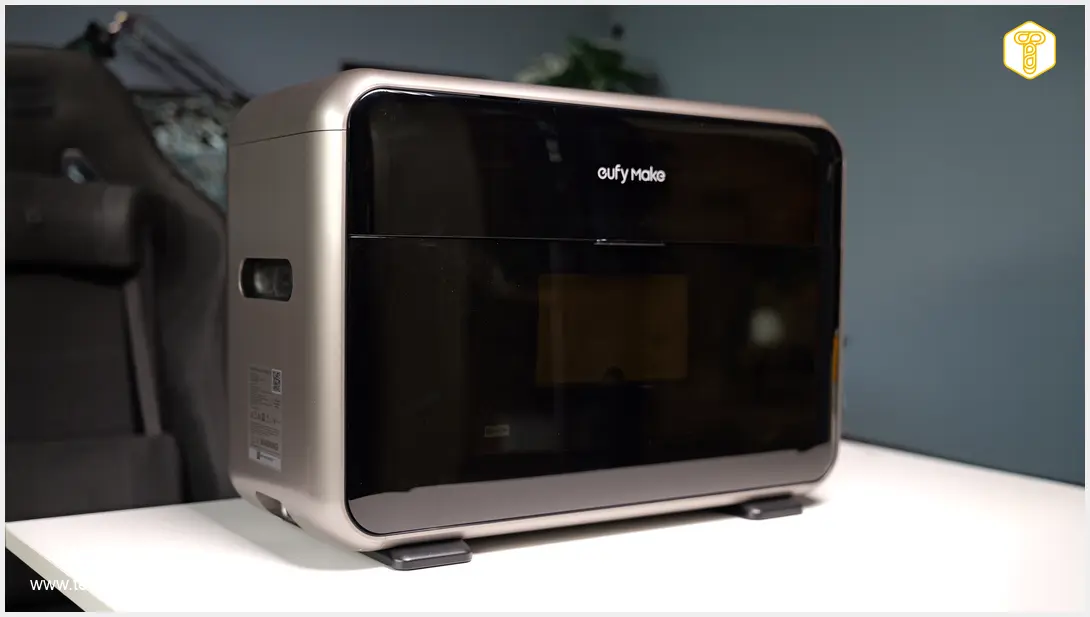
The manufacturer highlights the device’s small dimensions in its official materials. Indeed, the eufyMake E1 is a sleek machine for its category, fitting comfortably on any countertop.
Its build quality is commendable, though the casing is predominantly made of plastic. The printer weighs approximately 20 kilograms (about 44 lbs), and its rubber feet provide excellent stability.
The exterior features a gray, slightly glossy plastic that effectively conceals dust but is prone to scratches. The sides, finished in high gloss, are even more susceptible to scratching. Inside, a matte finish is prevalent.

A large Start/Stop button, used to confirm projects and initiate printing (operations can also be approved via the app), is prominently located on the top. It is surrounded by a green illuminated ring.
Also visible in this area are the ink cartridges. Next to them is a window through which you can view the camera module and print head. Printing is paused if this window is opened.
On one of the shorter sides, a flap covers the cleaning solution reservoir. On the opposite side, a sticker displays technical specifications. Below, you’ll find an RJ45 port, power input, and a status LED.
On both long sides, the manufacturer has placed detachable doors secured by latches. These provide access to the base where platforms or the rotary printing attachment are mounted. The change procedure is straightforward: simply release the lock, and the platform is disengaged.
eufyMake E1 in Practice
Setting up the eufyMake E1 is as simple as pairing a smartwatch or headphones. Users just need to download the manufacturer’s app, connect the device to power, and add the printer to their account. Then, it’s ready to operate. Installing inks or the cleaning solution tank is uncomplicated, and anyone should be able to manage this process.
The test unit arrived pre-used by other reviewers, evident from the numerous scratches. However, the most significant issue initially was a distinct odor.
Even before the first use, upon opening the doors, a pungent smell of ink was noticeable. There’s no need to be put off, as the device is equipped with a filter. We immediately proceeded to pair it with the application.
Cross-Platform Applications
Out of habit, we began with the mobile application. Initial steps with the manufacturer’s software can be overwhelming, as users are bombarded with ready-made projects from other users and a tab for generating graphics using ‘AI Credits.’
Users receive 200 AI credits to start, with this amount replenished monthly. A ‘Plus’ plan offering 600 credits costs $15 per month, while a ‘Pro’ subscription with 1800 credits is $30. Generating an A5-sized image from a photo costs 10 credits.
To begin printing, select ‘Print Photo’ or ‘New Design.’ You are then taken to a section for choosing the platform, material, print quality, and positioning of the object you wish to decorate. The printer then uses its built-in camera to scan the item and define the printable area.
The ultra-wide-angle camera can struggle with tall objects on the print bed (it cannot scan objects taller than 60 mm at all). Users have reported print misalignments of several millimeters. Finally, the print type is selected, including the order and layers of applied ink, or the addition of texture. It’s helpful that before starting a project, the user is informed of how many milliliters of each ink will be used, allowing for cost estimation prior to printing.
Editing complex graphics with multiple layers was not ideal on a small smartphone screen. Fortunately, the manufacturer also provides a desktop application. After logging in, the added printer was visible, and applying graphics with a mouse is significantly more precise.
Both applications offer simplified instructions and a live view of material consumption. Users don’t need to manually monitor cleaning solution and ink levels. The software also notifies users when specific tanks require replacement. For further exploration of advanced printing technologies, you might find interesting insights in our review of a similar niche product: Fichero Label Printer Action Review Organization.
Print Quality
The eufyMake E1 is more of a consumer device than a professional one. With that in mind, the quality of the resulting prints is highly impressive. The detail in images is phenomenal, boasting a high resolution of up to 1440 DPI, which is clearly visible in the finished prints.
Prints, especially on hard surfaces like glass, metal, and plastic, are very durable. There’s no chance of the ink being scratched off, for example, with a fingernail. More layers generally result in more durable prints.
The algorithms for applying texture also work exceptionally well. We decided to print an image of a car on a bamboo cutting board. The software and the printer itself did an excellent job of rendering depth, noticeable and tangible in areas like the air intakes.
It’s worth noting that the principle ‘the more, the better’ applies here. This means textured prints or those with a thick white undercoat look phenomenal. However, when printing without an undercoat on dark surfaces, the print itself can appear dark and less attractive.
We also encountered some issues with edges. When dealing with objects with slightly beveled edges, the printer struggled to accurately identify the object’s boundary. As a result, some prints came out crooked. To ensure the printer doesn’t go beyond the edge, it’s best to avoid using the maximum print size.
This became evident when printing a photo on a Stanley mug. The eufyMake E1 accurately recognized the mug’s dimensions, but we stretched the photo to the full available height. This resulted in ink bleeding onto the rubber base, causing the print’s edge to crumble.
The rotary printing attachment correctly elevates objects like bottles to ensure their surface is parallel to the print head’s movement. Unlike flat platforms, the software does not visualize the printing area and struggles to recognize narrowing sections around the neck.
Consequently, one of our test prints unpleasantly ‘ran off’ all the way to the bottle thread. Most such errors can be eliminated with experience, but the rotary attachment is not as user-friendly as the flat platforms.
The eufyMake E1 is ideal for users who want to add creativity to their surroundings. Almost anything sufficiently hard and able to fit into the printer can be decorated. However, the device will best serve individuals who sell their own products. The eufyMake E1 enables the rapid creation of limited edition mugs, magnets, or smartphone cases. This innovative approach to personalizing everyday objects reminds us of other unique gadgets that push boundaries, as explored in our article: Ranking of Technology Gadgets That Sound Like a Joke But Are Real.
User Experience (Operation)
As mentioned, the printer emits an unpleasant odor even when idle. This ink smell significantly intensifies when the device is operating. After about an hour of printing, we had to ventilate a room of approximately 25 square meters (about 270 sq ft) for the rest of the day.
While the eufyMake E1 might not be disruptive in a workshop setting, its odor could make printing at home bothersome.
However, the tested unit does not emit much light or heat. The power supply consumes a maximum of 66 watts. We also have no major complaints about the noise generated; the sound intensity is comparable to regular printers or quiet 3D printers. Apart from the smell, the overall operational experience is very good.
Print time primarily depends on the number of layers. A flat A5-sized image might take just under half an hour to print. However, for a 2-millimeter textured image, results could take up to two hours.
Running Costs
On the manufacturer’s website, it is stated that creating a 2D 5×5 cm (approximately 2×2 inches) magnet consumes 2 ml of ink. When switched to 3D printing, the eufyMake E1 will use 4.44 ml. Considering that 600 ml of ink costs approximately $325, the cost of printing a 2D and 3D magnet is roughly $1.08 and $2.38 respectively (assuming inks are consumed evenly). Thus, the printing costs appear quite favorable.
Printing images on canvas will be considerably more expensive. A 25×18 cm (approximately 10×7 inches) print at half the maximum height (1 mm) consumes about 15 ml. This process would cost roughly $8.13. The larger and more ‘textured’ the print, the higher the costs will be.
Automatic cleaning also adds to the cost. Maintenance activates automatically to clean the print head and nozzles. This process is relatively quick, lasting up to 10 minutes, and the printer remains quiet. Unfortunately, cleaning consumes ink—approximately 2 ml for daily cleaning after standard use.
Every few days, the eufyMake E1 performs a deep clean. The cost of this process is about 15 ml of ink. If you print infrequently—just a few magnets, mugs, or pictures a month—the ink wastage will be significant. It’s crucial to consider this before purchasing a UV printer.
Furthermore, at least initially, users are reliant on fairly expensive original cartridges. More affordably priced third-party alternatives are unlikely to appear on the market quickly, if at all.
Technical Specifications and Price
The eufyMake E1, bundled with inks, is priced at just under $2,750. While this is not a small sum, the tested device faces no direct competition as it is essentially the only consumer UV printer available.
Opting for the Deluxe Bundle with additional accessories brings the price to just under $3,750. Even at this price point, it remains more affordable than professional and more complex UV printers on the market.
Key Technical Specifications:
- Printer Type: Piezoelectric (Piezo InkJet)
- Print Resolution: Up to 1440 DPI
- Color Profile (Inks): CMYKWG (Cyan, Magenta, Yellow, Key/Black, White undercoat, Gloss/Varnish)
- Working Area (Flatbed Printing): 330 mm × 420 mm (approximately A3 size)
- Maximum 3D Texture Height: Up to 5 mm
- Maximum Table Load: 1.5 kg (approximately 3.3 lbs)
- Built-in Positioning Camera: 8 Mpx
- Supported Operation Modes: Flatbed, Rotary (with attachment), Roll-to-film (with attachment)
- Head Maintenance System: Automatic JetClean self-cleaning system
- Noise Level During Operation: Below 60 dB (average approx. 45–55 dB)
- Wireless Connectivity: Wi-Fi 802.11 b/g/n 2.4 GHz
- Maximum Power Consumption: 66 W
- Dimensions: 590 mm × 250 mm × 407 mm (approximately 23.2 in × 9.8 in × 16 in)
- Weight: 20 kg (approximately 44 lbs)
Conclusion
The eufyMake E1 is an impressive piece of equipment. The manufacturer aimed to simplify and miniaturize a UV printer, and the result exceeds expectations. Its ease of use, speed, and print quality speak for themselves. Despite minor drawbacks, the tested device is surprisingly refined.
This device will primarily appeal to creative individuals who wish to sell their own customized products (branded mugs, magnets, etc.) in limited quantities. It also offers an interesting synergy with 3D printers, allowing for ‘painting’ on 3D-printed objects.
However, it is not a device for everyone. The running costs are quite high. Although its size is reduced compared to commercial solutions, it still requires significant space. The odor during operation is also not pleasant. Nevertheless, we appreciate that this device is unique in its class. The eufyMake E1 UV printer fulfills its purpose effectively. If you need to leverage UV printing technology, there is currently no better choice at this price point.
Frequently Asked Questions (FAQ)
The eufyMake E1 is designed with ease of use and a more compact form factor than traditional industrial UV printers, making it accessible for home users and small businesses. Its simplified setup and intuitive app aim to democratize UV printing.
While the initial price of the eufyMake E1 is significant, the per-print costs for smaller items like magnets are relatively favorable. However, costs can escalate for larger, more textured prints and due to the automatic cleaning cycles which consume ink, making ongoing expenses a notable consideration for infrequent users.
The eufyMake E1 allows for high-quality, durable prints with vibrant colors and even textures on a wide variety of hard surfaces like glass, metal, and plastic. Its ability to quickly produce custom designs makes it ideal for creators looking to offer unique, branded items.
The printer uses UV-curable inks which can emit a strong odor during operation, requiring good ventilation in the workspace. While the printer has a filter, it’s recommended to operate it in a well-aired environment, especially for prolonged use. UV protective glasses are also included for safety.
Source: Own elaboration. Opening photo: Gemini
About Post Author
