

Contents
Experience the Enhanced Gemini: Google Rolls Out Visual Overhaul for Wear OS Smartwatches
Google is rolling out an exciting visual update for its Gemini AI assistant on Wear OS devices, bringing a fresh and modern look to users’ wrists. This aesthetic refresh is not limited to Pixel Watches; it’s also making its way to compatible Samsung Galaxy smartwatches, enhancing the user experience with a vibrant new interface.
A Fresh Look for Your Wrist: The “Glow Overlay”
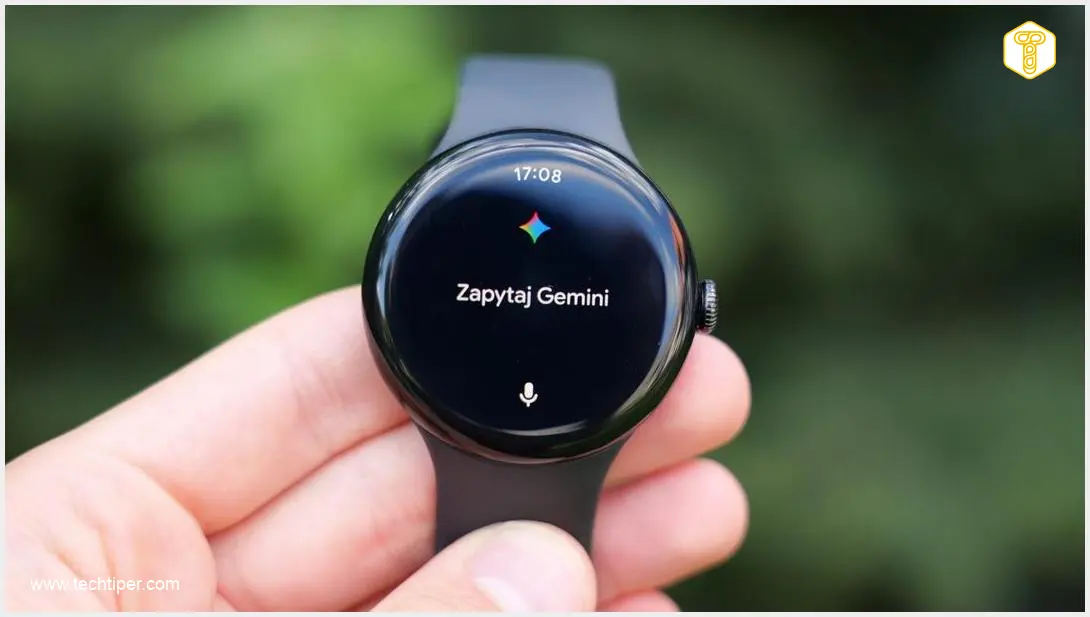
The most striking feature of this update is the introduction of a dynamic, colorful visual element that Google calls the “Glow Overlay.” When you activate the Gemini assistant on your smartwatch, a multi-colored animated overlay appears on the screen, accompanied by the iconic Gemini logo and a welcoming message.
This new interface adopts the principles of Material Design 3 Expressive, Google’s latest design language focusing on lively, personalized experiences. The “Glow Overlay” creates an engaging and interactive visual feedback mechanism, making interactions with Gemini more intuitive and aesthetically pleasing.
Enhanced Interaction and User Experience
Beyond the visual flair, the update also refines how users interact with Gemini:
- Command Transcription: In certain scenarios, your smartwatch may now display a transcription of your spoken commands, providing clear confirmation of what Gemini heard.
- Action Confirmation: The watch can also show confirmation of executed actions, ensuring you know when your request has been successfully processed.
- Repositioned Microphone Indicator: The system’s microphone usage indicator has been relocated from the bottom to the top of the screen, making it more visible and less obstructive during use.
These subtle yet impactful changes contribute to a more seamless and user-friendly experience when interacting with your AI assistant on Wear OS. For more on optimizing your smartwatch experience, you might find our insights on Wear OS 3 useful.
Broader Availability: From Pixel to Galaxy Watches
Initially rolled out to compatible Pixel Watches, this revamped Gemini interface is now extending its reach to a wider range of Wear OS devices. The updated look has already been observed on the 2024 Galaxy Watch Ultra and is anticipated to arrive on other Galaxy Watch models running One UI Watch 6.0 (or later).
It’s worth noting that Gemini began replacing Google Assistant on Samsung’s Wear OS watches some time ago. This latest update primarily focuses on bringing Google’s new visual design to these devices, ensuring a consistent and modern look across the Wear OS ecosystem. For those interested in the broader implications of AI integration, explore Google’s privacy tools for Gemini AI.
How to Get the Update
The updated version 1.36 of the Gemini application for Wear OS is being widely distributed through the Google Play Store. However, the activation of the new visual interface is partly controlled server-side. This means that even after installing the latest app version, some users may experience a gradual rollout and continue to see the older interface for a period. Patience is key as Google ensures a smooth transition for all users.
What This Update Means for Users
It’s important to understand that this rollout is primarily a visual refresh. Google has not introduced significant changes to Gemini’s core functionalities or the assistant’s response capabilities with this particular update. The focus remains on refining the aesthetic and user experience, making interactions with Gemini on your smartwatch more engaging and visually appealing.

Frequently Asked Questions (FAQ)
The “Glow Overlay” is a new, dynamic, multi-colored animated visual element that appears on your smartwatch screen when you activate the Gemini AI assistant. It’s designed to make interactions more engaging and visually appealing, aligning with Google’s Material Design 3 Expressive principles.
The update is rolling out to compatible Pixel Watches and is also extending to Samsung Galaxy Watch models, including the 2024 Galaxy Watch Ultra and potentially other Galaxy Watch devices running One UI Watch 6.0 (or later).
No, this update is primarily a visual refresh. While it enhances the user experience with improved aesthetics and minor UI adjustments like the repositioned microphone indicator, it does not introduce major changes to Gemini’s core functionalities or its response capabilities.
The updated version 1.36 of the Gemini app is rolling out via the Google Play Store, but the new visual interface is partly activated server-side. This means the rollout is gradual, and some users may still see the older interface even after updating the app. Please be patient as Google deploys it to all eligible devices.
Source: SamMobile. Opening photo: Krzysztof Wilamowski
About Post Author
