

Contents
Why the Google Pixel 10 is Worth Buying for Its Exclusive Google Maps Feature
Smartphones in the Google Pixel 10 series boast a variety of impressive strengths, but the Mountain View tech giant has introduced a unique, exclusive capability tailored specifically for navigation. Pixel users can now take advantage of a specialized Google Maps mode designed to save significant battery life during active routing.
The Battery Drain Dilemma in Navigation Apps
It is no secret that the Google Maps app can consume a massive amount of power. While an active cellular and GPS connection is strictly necessary for real-time navigation, the most energy-intensive component of your smartphone is undoubtedly the display. Constant rendering of colorful maps, points of interest, and traffic updates can quickly deplete a battery on a long road trip.
To combat this, Google has developed a dedicated power-saving mode. According to the manufacturer, users can expect up to 4 hours of additional battery life when this feature is active. This extension is absolutely invaluable during long journeys where a car charger might not be readily available.
If you have been looking for an upgrade, getting a great deal on a Google Pixel 10 might be the perfect opportunity to access these exclusive software enhancements.
How the Minimalist Rendering Profile Works
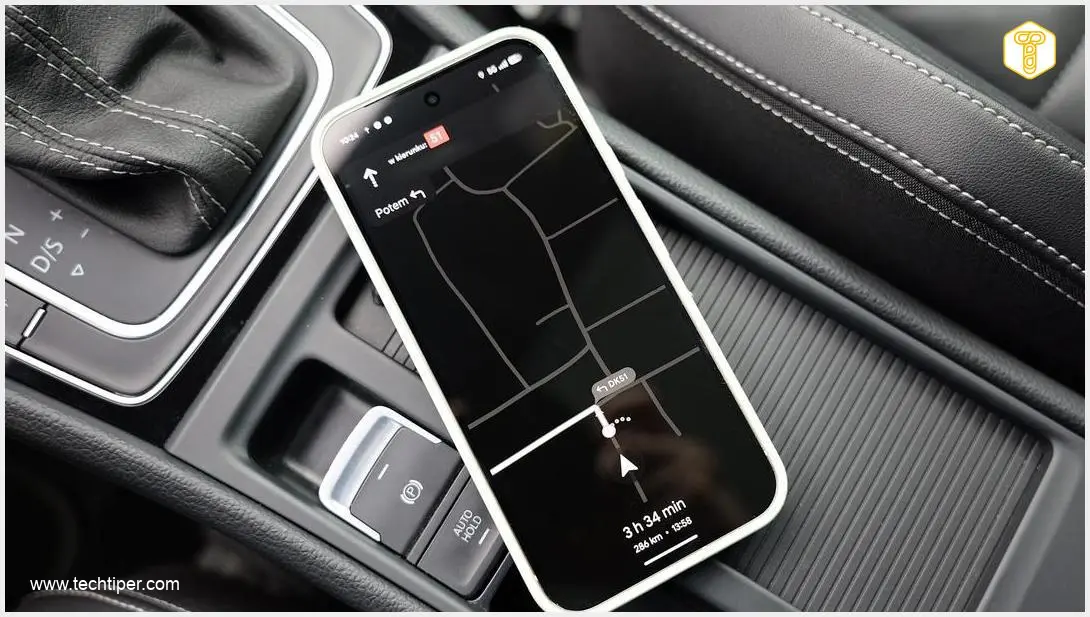
The new power-saving mode in Google Maps works by transitioning the application into a minimalist rendering profile. Once activated, the traditional navigation interface is drastically reduced to a simplified, monochromatic map.
Here is what happens under the hood when the battery saver is active:
- Always-On Display Integration: The map is displayed directly on the lock screen or via the Always-On Display (AOD).
- Reduced Rendering: The system strictly limits the number of graphical elements drawn on the screen, eliminating unnecessary visual layers.
- Lowered Refresh Rates: The display’s refresh rate and peak brightness are automatically lowered to conserve power.
- Focused Information: The app only displays critical driving data, such as the upcoming maneuver, distance to the turn, and the current road name.
It is important to note that navigation in this mode still fully utilizes the device’s GPS hardware. The substantial energy savings come directly from easing the workload on the device’s screen and graphics processor. This innovation pairs perfectly with the recent Google Maps faster location sharing update, offering a more efficient travel experience.
How to Enable Power-Saving Mode in Google Maps
Activating this feature is straightforward and can be done directly from the app’s settings. Follow these steps to maximize your battery life:
- Open the Google Maps application on your device.
- Navigate to your profile settings and tap on Navigation settings or Driving options.
- Locate and toggle on the Power saving mode option.
Once enabled, the magic happens automatically. When you turn off your smartphone’s screen while navigating, the device enters this specialized lock-screen mode. As soon as you unlock the display, Google Maps instantly reverts to its traditional, full-color view.

Availability: A Pixel 10 Exclusive
This innovative power-saving mode was specifically designed for the latest Google Pixel 10 series, which debuted in late 2025. Because it relies on specific hardware and software integrations within the newest generation of Pixels, it is highly unlikely to be released for smartphones from other manufacturers or even older Pixel models.
Frequently Asked Questions (FAQ)
Does the Google Maps power-saving mode turn off GPS?
No, the GPS remains fully active to ensure accurate and reliable navigation. The battery savings are achieved entirely by simplifying the display interface, lowering the screen brightness, and reducing the refresh rate on the Always-On Display.
Can I use this minimalist navigation mode on older Google Pixel devices?
Currently, this feature is an exclusive addition to the Google Pixel 10 series released in late 2025. There are no official announcements indicating that Google will roll out this specific mode to older Pixel generations.
How much extra battery life does the power-saving mode actually provide?
According to Google’s estimates, utilizing this minimalist rendering mode during continuous navigation can extend your smartphone’s battery life by up to 4 additional hours, making it highly beneficial for long road trips without access to a charger.
Source: Own elaboration. Opening photo: Krzysztof Wilamowski
About Post Author
