

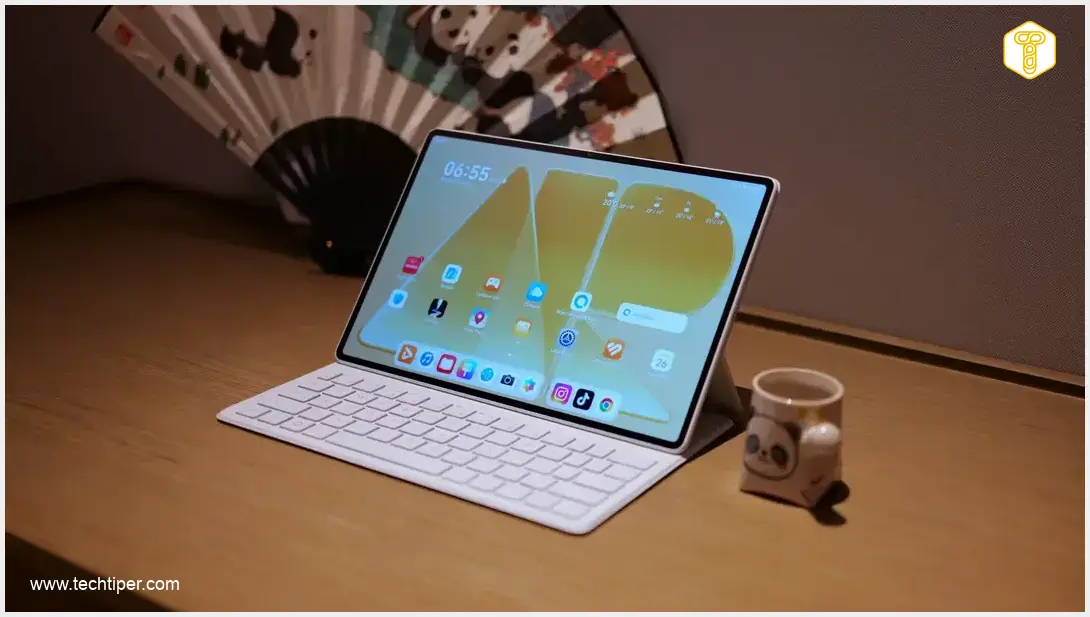
HUAWEI MatePad Air Review
-
Design & Portability
-
Display Quality
-
Audio & Multimedia
-
Battery Life & Charging
-
Software & Ecosystem
-
Performance
Premium Hardware, Productivity Powerhouse with Software Hurdles
The HUAWEI MatePad Air shines with its exceptional PaperMatte OLED display, premium lightweight design, and phenomenal audio, making it a stellar device for multimedia and productivity. While navigating Google services requires workarounds and performance is mid-range, its impressive battery life and valuable accessories solidify its position as a strong portable computing companion.
Advantages
- Premium, slim, and lightweight design for excellent portability.
- Outstanding PaperMatte OLED display with high resolution, 144Hz refresh rate, and superb outdoor visibility.
- Phenomenal audio experience with six transducers, delivering rich and loud sound.
- Impressive battery life (up to 3 days moderate use) and fast 66W charging.
- Highly functional optional accessories (Smart Magnetic Keyboard, M-Pencil Pro) enhance versatility.
- Capable as a laptop replacement for daily productivity tasks and travel.
- Aesthetically pleasing and customizable HarmonyOS.
Disadvantages
- Challenging access to Google Mobile Services (requires third-party solutions).
- Performance aligns with mid-range smartphones, not suitable for demanding power users.
- Some popular apps like Netflix are difficult to install directly.
- Unclear long-term software support commitment.
- Price might be considered high for the performance level if not bundled with accessories.
Contents
HUAWEI MatePad Air Review: My Solo Companion on a Chinese Business Trip
Huawei recently launched two new tablets, and I had the opportunity to test the more affordably priced model. This HUAWEI MatePad Air review will examine its real-world performance. It was the sole computing device I relied on during a business trip to China. Did the MatePad Air meet expectations for multimedia consumption and daily productivity?
Key Features and Design Overview
The HUAWEI MatePad Air aims to impress with its design and functionality. This review delves into its key attributes, including:
- Premium Build Quality
- Vibrant Display Technology
- Long-lasting Battery Performance
- Camera Capabilities
- HarmonyOS Software Experience
- Detailed Specifications and Pricing
Unboxing the HUAWEI MatePad Air
Huawei is known for its generous retail packages, and the MatePad Air is no exception. The elegant box contains the tablet itself, a quick start guide, a USB-C charging cable, and a screen cleaning cloth. While a charging adapter isn’t included, this has become a common practice among manufacturers.
Optional Accessories for Enhanced Productivity
Depending on the chosen variant, additional accessories may be included. On Huawei’s official website, the white version I tested is often bundled with the Smart Magnetic Keyboard. The blue and pink versions, available directly from Huawei’s store, typically come with the M-Pencil Pro stylus. Of course, users can purchase both accessories separately to maximize the tablet’s versatility.
Smart Magnetic Keyboard – A Laptop Alternative
If you intend for your tablet to replace a laptop, the Smart Magnetic Keyboard is an essential accessory. This keyboard appears largely unchanged from previous Huawei tablet iterations, and that’s a good thing. It performs exceptionally well in practice; I wrote several lengthy texts on the MatePad Air using this keyboard.
The accessory resembles a book cover. One part magnetically attaches to the MatePad Air’s rear panel, while the other, housing the keyboard, protects the screen when closed. When open, users can position the screen at two different angles. The keys are adequately sized, and the typing experience is highly satisfying.
M-Pencil Pro Stylus – Precision and Innovation
I also received the refreshed M-Pencil Pro stylus for review. This pen is comfortable to hold and offers excellent precision. The accessory charges magnetically on the tablet’s edge. A mere 3 minutes of charging provides approximately 15% battery life for the M-Pencil Pro, so battery concerns are minimal.

Beyond new color options, a notable innovation is the ‘mouse mode.’ When activated, you can remotely control presentations, such as switching slides. The stylus can also function as a pointer, enhancing its utility.
Design and Build Quality of the HUAWEI MatePad Air
The HUAWEI MatePad Air is available in three colors. I tested the more conservative white variant, which is also the safest choice. It’s worth considering your color preference carefully, as the colored edges are subtly visible even when viewing the MatePad Air from the front.
The device effectively hides fingerprints. The white version features a delicate, shimmering glitter effect that beautifully complements the glossy Huawei logo and the bezel around the camera module. This module highlights a single 50 MP lens, a considerable resolution for a tablet, accompanied by a dual LED flash.
The camera module protrudes noticeably, but due to the tablet’s large surface area, it remains stable on flat surfaces. The rear panel also features contact pins for keyboard communication, along with model designations and certifications.
Despite its large 12-inch screen, the tablet’s narrow bezels make it comfortable to hold. Its low weight (509g / 1.12 lbs) and slim profile (5.3 mm) enhance portability and ease of use.
I brought this device, along with its keyboard, on a business trip, where it successfully replaced my 16-inch laptop. The MatePad Air’s lightweight design meant it didn’t feel cumbersome even when exploring new cities. Its mobility is truly exceptional.
Audio Experience and Ergonomics
The white-finished edges are ergonomically rounded. The top edge houses two speaker grilles and the power/lock button. On the right side, you’ll find the volume controls, two microphone openings, and the magnetic charging area for the stylus. The left side is devoid of any elements. The bottom features two more speaker grilles and a USB-C charging port.
The entire audio system comprises six transducers. In this case, quantity translates directly into quality. The HUAWEI MatePad Air delivers phenomenal sound. The audio, for such a slim device, is remarkably rich and deep. The tablet also produces very loud sound, making it a fantastic device for watching movies and and TV shows.
Display of the HUAWEI MatePad Air
In my opinion, the most outstanding feature of the HUAWEI MatePad Air is its display. The panel, as mentioned, has a matte (PaperMatte) finish. This is also the first Huawei tablet I’ve reviewed with OLED technology, and the results are phenomenal.
The panel boasts a refresh rate of up to 144 Hz and a high resolution of 2800 × 1840 pixels. This translates to a productivity-friendly aspect ratio close to 3:2, making split-screen applications highly usable. The colors and viewing angles are excellent, and blacks are incredibly deep.
While a peak brightness of 1200 nits might not seem groundbreaking, the PaperMatte surface comes to the rescue. Visibility in direct sunlight is simply incredible. During my tests, I frequently took the MatePad Air onto my terrace to watch sports outdoors. I also effortlessly worked on the device during train rides, even when the sun directly hit the display.
Battery Life and Charging
The MatePad Air is equipped with a 10,100 mAh battery. Battery life varies depending on usage intensity. For activities like watching videos and working on documents, you can expect a full day of use.
With moderate content consumption (2-3 hours daily), the device can last up to 3 days. Gaming or video editing will, naturally, drain the battery much faster. Overall, the battery performance on a single charge is very impressive.
Energy replenishment occurs at a maximum of 66 watts. I observed the first 50% charge in approximately 34 minutes, with a full charge taking exactly 90 minutes. For a tablet of this size, these charging speeds are impressive, though it’s worth noting that the flagship HUAWEI MatePad Pro Max charges fully in less than an hour.
Camera Capabilities
The camera module on the rear features a single 50 MP sensor with an f/1.8 aperture and a wide field of view. The front-facing camera is a 12 MP unit with an f/2.4 aperture.
This setup is fairly basic, but for a tablet, it’s more than sufficient. The MatePad Air allows you to snap photos of notes, scan QR codes, and conduct video calls. The camera application itself is straightforward and functional.
Image Quality
Photos taken in good lighting conditions are decent. The high resolution of the sensor allows for effective digital zoom. While the results might not rival even mid-range smartphones, I believe a large tablet doesn’t need to excel in photography. After all, taking photos with a dedicated camera, even a bulky one, is often less cumbersome than using a device like the HUAWEI MatePad Air.
HarmonyOS Software Experience
The MatePad Air runs on HarmonyOS 4.3, an open-source Android derivative. Huawei is diligent with updates; at the time of this review’s publication, the tablet had the latest security patches. However, the long-term support commitment remains unclear.
The user interface is aesthetically pleasing, and Huawei offers extensive customization options. The built-in applications are also well-polished. Users have access to an advanced drawing application, various notepads, a browser, and a weather application.
From a user perspective, installing applications is the only slightly more demanding aspect. Some apps are available in the Huawei AppGallery, while others are “sourced” via the Petal Search engine. Most results are conveniently presented within a single application, so it’s not overly complicated. App updates were also surprisingly seamless; apps from various sources could be updated with a single click.
Personally, I rely heavily on Google services. After installing and logging into microG and GBox, I was able to use most Google applications. I downloaded essential apps like Gmail, Drive, Chrome, the Workspace suite, Gemini, and YouTube. All these applications functioned without any issues. During my business trip, I had access to messaging apps and necessary text editors. For my needs, the MatePad Air was entirely sufficient.
For content consumption, the biggest omission was Netflix, as it didn’t appear in the Huawei AppGallery search results. However, I easily installed Prime Video, HBO Max, and Disney+. Downloading content for offline viewing also worked flawlessly, making the device an excellent multimedia hub during my long flight from Warsaw to Beijing.
Performance and Specifications
Powering the device is the Maleoon 935B processor, paired with 8 GB of RAM and 256 GB of internal storage in the tested configuration. Performance has improved over previous generations of Huawei tablets, though it generally aligns with that of mid-range smartphones.
The interface operates smoothly, and the HUAWEI MatePad Air is perfectly capable of handling games and editing vacation videos. However, it may not be the ideal choice for power users demanding top-tier performance.
Performance Benchmarks
While not the most powerful device on the market, its operational efficiency is excellent. Even during benchmarks, the tablet’s casing only became mildly warm. After a 10-minute AnTuTu stress test, the hottest spot measured 41°C (106°F), while the center remained at a comfortable 35°C (95°F). In everyday use, the casing remains cool.
HUAWEI MatePad Air Specifications
| Component | Details |
|---|---|
| System | HarmonyOS 4.3 |
| Display | 12-inch, OLED PaperMatte, 2800 × 1840 pixels, up to 144 Hz refresh rate, 1200 nits peak brightness, 3:2 aspect ratio |
| Processor | Maleoon 935B |
| RAM | 8/12 GB |
| Internal Storage | 256 GB |
| Cameras | Rear: 50 MP main (f/1.8) Front: 12 MP (f/2.4) |
| Connectivity | NearLink, Wi-Fi, Bluetooth 6.0 |
| Other | 6 speakers |
| Battery | 10,100 mAh, 66 W wired charging |
| Dimensions | 271.6 × 182.9 x 5.3 mm |
| Weight | 509 g (1.12 lbs) |
Pricing
The HUAWEI MatePad Air, in the 8GB RAM / 256GB storage configuration I tested, was launched at a price of around $875. While this isn’t a low figure, this price (when purchased from the manufacturer’s website) often includes the keyboard. Launch promotions sometimes reduce the price further to around $750.
HUAWEI MatePad Air Review: Summary and Final Opinion
The HUAWEI MatePad Air is a near-perfect tablet. Its build quality is top-tier, and its slimness and light weight make it incredibly easy to use and carry. The speakers are phenomenal, and the PaperMatte OLED screen is simply outstanding. Both content consumption and productivity tasks, such as document work, are a pure pleasure. The impressive battery life and fast charging are also significant advantages. The well-designed and genuinely useful accessories further enhance its appeal.
The primary drawback might be the somewhat challenging access to Google services. For informed users, this might not be an issue, but functionally, the HUAWEI MatePad Air does lag behind Android devices with Google Mobile Services (GMS) and iPadOS. At its regular price point of over $750, one might also expect slightly higher performance.
Nevertheless, the MatePad Air is a fantastic piece of hardware. If its limitations don’t deter you, Huawei’s tablet could be an excellent choice.
Frequently Asked Questions (FAQ)
While the HUAWEI MatePad Air runs HarmonyOS and lacks native Google Play Services, users can often access most Google applications by installing third-party solutions like microG and GBox. This allows for the use of essential apps such as Gmail, Google Drive, Chrome, and YouTube, which typically function without issues. However, some apps, like Netflix, might still be difficult to install directly from the Huawei AppGallery.
Yes, the HUAWEI MatePad Air is highly capable as a laptop replacement, especially when paired with its optional Smart Magnetic Keyboard. Its lightweight design (509g / 1.12 lbs) and slim profile (5.3 mm) make it exceptionally portable. The large 12-inch PaperMatte OLED display with a 3:2 aspect ratio is excellent for productivity tasks, and the comfortable keyboard allows for extensive typing. While its performance aligns with mid-range smartphones rather than high-end laptops, it’s perfectly sufficient for document work, emails, presentations, and content consumption, as proven during a business trip where it replaced a 16-inch laptop.
The MatePad Air boasts an outstanding 12-inch PaperMatte OLED display with a high resolution of 2800 × 1840 pixels and a refresh rate of up to 144 Hz. Its matte finish significantly enhances visibility in bright sunlight, making it ideal for outdoor use. Colors are vibrant, viewing angles are excellent, and blacks are deep. Complementing this visual experience is a phenomenal audio system featuring six transducers, delivering rich, deep, and loud sound. This combination makes the MatePad Air an excellent device for both media consumption and professional tasks.
Source: “Krzysztof Wilamowski” & Opening photo: “Krzysztof Wilamowski”
About Post Author
