

Contents
Nothing OS 5.0 Debuts: A Deep Dive into Android 17-Powered Innovations
Nothing has officially unveiled Nothing OS 5.0, the highly anticipated next major iteration of its custom Android operating system. This significant update, built upon the foundation of Android 17, promises a comprehensive overhaul. Users can look forward to a thoroughly refreshed user interface, extensive new personalization options, considerable performance enhancements, and a suite of expanded artificial intelligence features that aim to make the smartphone experience more intuitive and powerful.
The journey for Nothing OS 5.0 begins with its first open beta, slated to launch on August 26th. Initially, this beta will be exclusively available for the Nothing Phone (3), with support for other Nothing devices, including the original Nothing Phone (1) and Phone (2), rolling out in the subsequent months. The full public release of Nothing OS 5.0 is expected to commence for users starting in October.
A Fresh Look: Nothing OS 5.0’s Visual Transformation
One of the most immediate and noticeable changes in Nothing OS 5.0 is its updated graphical presentation. Nothing has meticulously refined various visual elements to deliver a more cohesive and modern aesthetic:
- Typography: The system will adopt a new proprietary typeface called ‘Geist’. This font is designed to significantly improve readability across the entire interface and standardize the visual language of the OS.
- Icons, Spacing, and Animations: Expect subtle yet impactful modifications to app icons, the spacing between UI elements, and system-wide animations, contributing to a smoother and more polished user experience.
Key Interface Redesigns:
- System Applications: Core applications and sections such as Settings, the status bar, the camera interface, and the gallery are all undergoing significant redesigns.
- Camera Enhancements: The camera app will feature improved functionality, including easier QR code scanning. Once a QR code is detected, its results will remain consistently displayed in a fixed position on the screen for convenience.
- Dynamic Home Screen Theme: A new optional home screen theme will introduce transparent elements and colors that intelligently adapt to your chosen wallpaper. This dynamic theming will extend to icons and widgets, offering a more integrated and aesthetically pleasing look. Importantly, this new style remains optional, allowing users to retain the current Nothing OS appearance if they prefer.
Unleash Your Style: Enhanced Personalization Features
Nothing OS 5.0 significantly expands the ways users can customize their devices to match their personal preferences:
Lock Screen Innovations:
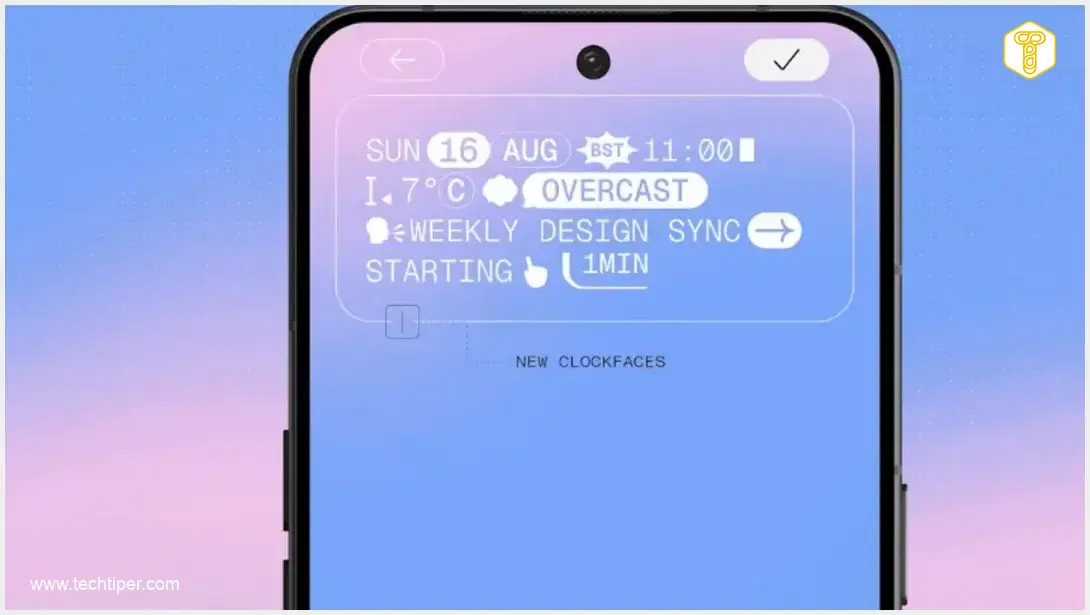
- New Clock Styles: Two distinctive new lock screen clock styles, “Gooey” and “Micrographics,” will be introduced, offering fresh aesthetic choices.
- Color Customization: Users will be able to match the lock screen clock’s color to their wallpaper, creating a more harmonious visual.
- Advanced Wallpaper Control: Take advantage of a new depth effect feature, allowing for more flexible and creative placement of your chosen lock screen wallpaper.
Home Screen Management:
- Group Editing: A highly practical improvement is the ability to edit the home screen in groups. Instead of individually moving each icon or widget, users can now select multiple elements and move them simultaneously, even across different home screens.
- New Widgets:
- Away Time: This widget provides insights into your digital well-being by showing how much time you spend away from your phone.
- Collector: A visual organization tool, Collector allows users to create curated collections of photos based on selected items or themes.
Smarter Than Ever: Expanding AI Capabilities
A substantial portion of the Nothing OS 5.0 update is dedicated to augmenting the Essential AI suite, bringing more intelligent and integrated features to your daily smartphone use:
Essential Voice Enhancements:
- Faster Transcriptions: Essential Voice will deliver quicker and more accurate transcriptions.
- Improved Structure Recognition: The system will be better at understanding the structure of spoken content, making transcriptions more organized.
- Live Text Display: Users will see live text appear on screen as they speak.
- Real-time Conversation Translation: Later this year, Essential Voice is slated to receive a highly anticipated real-time conversation translation feature, breaking down language barriers effortlessly.
Essential Space Innovations:
- Smart Collections: This new feature will intelligently analyze saved materials (documents, images, links) and suggest assigning them to relevant, pre-existing collections or propose creating new thematic groups based on content analysis.
- Model Context Protocol Support: Nothing OS 5.0 introduces support for the Model Context Protocol. This enables compatible AI tools to securely search and read selected information stored within Essential Space. Initially, this access will be read-only, prioritizing user privacy and data security.
Essential Apps Builder (Beta):
A revolutionary addition, the Essential Apps Builder empowers users to create custom tools without any coding knowledge. Simply describe the desired application or widget in natural language, preview the result, and place the newly generated app or widget directly onto your home screen. This feature is currently in beta, inviting users to explore its potential.
Streamlined Interactions: Notifications and Quick Settings
Nothing OS 5.0 introduces a flexible approach to managing notifications and quick settings:
- Separated Panels: Users will now have the option to separate the notification panel from quick settings. A swipe down from the left side of the screen will open notifications, while a swipe from the right will reveal quick settings.
- Combined Layout Option: For those who prefer it, the traditional combined layout will still be available, ensuring user familiarity and choice.
Advanced Sharing with Quick Share:
The Quick Share functionality is also receiving an upgrade. The system will be able to generate a QR code that links to a secure, temporary file link. This innovative approach allows users to share files seamlessly with iPhone users or other devices without requiring any additional application installations on the recipient’s end, greatly enhancing cross-platform sharing capabilities.
Enhanced Transparency: New Privacy Indicators
To provide users with greater awareness and control over their data, Nothing OS 5.0 introduces a new three-color privacy indicator system:

- Green: Indicates access to sensitive system resources (e.g., microphone, camera).
- Blue: Signifies that location data is being shared.
- Yellow: Alerts the user that data is being processed by AI functions.
Other Noteworthy Improvements
Beyond the major highlights, Nothing OS 5.0 includes a host of other refinements and new features:
- Live Updates on Status Bar: Get real-time information directly on your status bar.
- Extended Dark Mode: A more comprehensive dark mode implementation for better eye comfort and battery saving.
- Separate Assistant Volume: Finer control over audio, allowing independent volume adjustment for your voice assistant.
- Improved HDR Display: Enhanced high dynamic range rendering for more vibrant and detailed visuals.
- Redesigned Recent Apps Screen: A fresh look for multitasking, making it easier to switch between applications.
The full version of Nothing OS 5.0 is scheduled to begin rolling out to users starting in October. This release will also bring elements that might be absent in the initial beta, such as a completely redesigned launcher and the sophisticated Micrographics clock style.
Frequently Asked Questions (FAQ)
The first open beta for Nothing OS 5.0 is launching on August 26th, exclusively for the Nothing Phone (3). Other Nothing devices are expected to receive the beta in subsequent months. The full public release for all compatible devices is anticipated to begin in October.
Yes, Nothing OS 5.0 is built on the latest version of Android, Android 17, bringing all its underlying improvements and new features alongside Nothing’s custom enhancements.
Absolutely. While Nothing OS 5.0 introduces an optional new home screen theme with transparent elements and wallpaper-matched colors, this new style is entirely optional. You will have the choice to retain the current, familiar appearance of Nothing OS if you prefer.
Nothing OS 5.0 introduces a new three-color privacy indicator system to keep you informed. A green indicator means sensitive resources (like the microphone or camera) are in use, blue indicates location sharing, and yellow signals data processing by AI functions. This provides clearer real-time feedback on app permissions and data usage.
The Essential Apps Builder is a groundbreaking new feature (currently in beta) that allows users to create custom applications or widgets using natural language descriptions, without needing to write any code. You simply describe the tool you need, preview the result, and add it directly to your home screen, democratizing app development for everyday users.
Source: Nothing Community. Opening photo: Nothing Community / Screenshot
About Post Author
