

Contents

Quick Share is Expanding to More Android Smartphones: Bridging the Gap with AirDrop
The days of struggling to share files between Android and iPhone devices are becoming a distant memory. Google is making significant strides with Quick Share, extending its compatibility to enable seamless file transfers that mirror the simplicity and speed of Apple’s AirDrop. This crucial development means that quick, effortless file exchange is no longer an exclusive feature for specific flagship phones or limited to a single ecosystem.

The Evolution of File Sharing: Quick Share Meets AirDrop
For years, AirDrop was a compelling reason for many users to remain within the Apple ecosystem. Its ability to facilitate fast, hassle-free transfers between Apple devices was a major convenience, a feature that Android users found difficult to replicate with comparable ease. While Android has had various sharing solutions, none achieved the universal recognition and seamless integration that AirDrop offered across Apple’s hardware.
Thanks to the expanded Quick Share functionality, Android users now have a truly straightforward method to exchange photos, videos, and other files with iPhones. This integration is designed to replicate the intuitive user experience and convenience that AirDrop users have long enjoyed, effectively bridging a significant gap between the two dominant mobile platforms.
How Quick Share and AirDrop Work Together Seamlessly
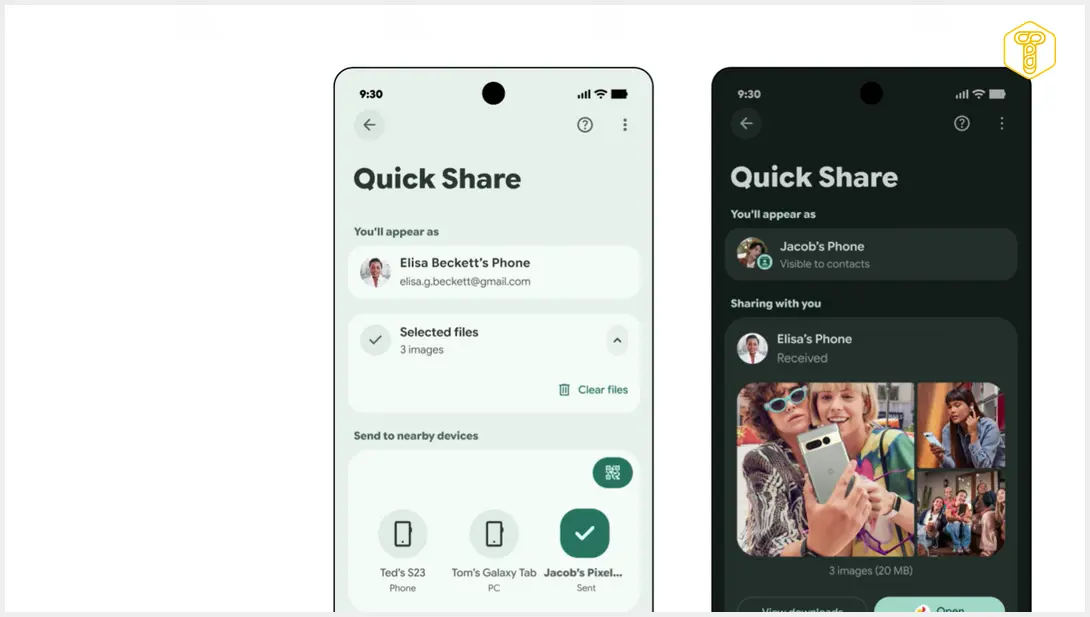
The process of transferring files from an Android device to an iPhone via Quick Share is remarkably user-friendly and designed for efficiency. It ensures that both Android and iPhone users can engage in quick transfers with minimal setup.
- For iPhone Users: To receive files, an iPhone user simply needs to adjust their AirDrop settings. Navigate to the Control Center and set AirDrop visibility to “Everyone for 10 minutes.” This temporary setting allows nearby compatible Android devices to discover and initiate transfers to your iPhone.
- For Android Users: To send files, an Android user will select the content they wish to share, then choose the Quick Share option from their system’s sharing menu. From the list of nearby devices, they can then select the iPhone they wish to send files to. This streamlined approach minimizes friction, making the transfer feel as natural as if both devices were within the same ecosystem. For detailed instructions on setting up Quick Share on your Samsung Galaxy device, refer to our guide: How to Enable Quick Share on Samsung Galaxy for Apple Devices.
Alternatively, for scenarios where direct device visibility might be an issue or for enhanced privacy, Quick Share offers a QR code method. An Android device can generate a unique QR code. The iPhone user simply scans this code with their camera, which then directs them to a secure browser page to download the transferred files. This versatility ensures that regardless of the user’s preference or situation, a convenient file transfer method is available.
Which Smartphones Support AirDrop via Quick Share?
The expansion of Quick Share to support AirDrop integration is a significant step towards universal file sharing. Google has announced that the list of compatible Android devices is continually growing, extending far beyond the initial Pixel series. This means more users can benefit from this seamless connectivity.
Currently, the enhanced Quick Share functionality with AirDrop integration is supported on a wide array of smartphones, with Google steadily expanding its reach. Here’s an overview of devices confirmed to support this feature:
Google Pixel Series:
- Pixel 10, 10 Pro, 10 Pro XL, 10 Pro Fold, 10a
- Pixel 9, 9 Pro, 9 Pro XL, 9 Pro Fold, 9a
- Pixel 8a
Samsung Galaxy Series:
The list includes many flagship Samsung models, including foldables, and is not limited to only the very latest releases:
- Galaxy S26, S26+, S26 Ultra
- Galaxy S25, S25+, S25 Ultra, S25 Edge
- Galaxy S24, S24+, S24 Ultra
- Galaxy Z Flip7 / Galaxy Z Fold7
- Galaxy Z Flip6 / Galaxy Z Fold6 / Galaxy Z Fold6 (Special Edition)
- Galaxy Z TriFold
For a comprehensive and frequently updated list of supported Samsung Galaxy smartphones, including models that might not yet be widely publicized, check out our dedicated resource: AirDrop for Samsung Galaxy: Leaked List of Supported Smartphones.
Other Leading Android Brands:
Google has also extended support to numerous other popular Android manufacturers, broadening the accessibility of Quick Share:
- Xiaomi 17T Pro
- OnePlus 15
- OPPO Find X9 (X9, X9 Pro, X9 Ultra, X9s)
- OPPO Find N6
- Vivo X300, X300 Pro, X300 Ultra
- HONOR Magic V6
Furthermore, Google has indicated plans to add support for additional models in the near future, including the Motorola razr fold 2026, the OPPO Find X8 series, and the HONOR Magic8 Pro. This ongoing expansion ensures that more users across different brands will soon be able to take advantage of this convenient cross-platform file sharing solution.
Frequently Asked Questions (FAQ)
Quick Share is Google’s proprietary file-sharing technology for Android devices, similar to Apple’s AirDrop. Recently, Google expanded Quick Share’s capabilities to allow seamless file transfers directly between Android phones and iPhones, mirroring the ease of use and speed that AirDrop offers within the Apple ecosystem. It acts as a bridge, making cross-platform file sharing much more straightforward.
Yes, while Google is expanding support, not all Android phones or iPhones are currently compatible. Android phones need to be on the growing list of supported devices (which includes various Pixel, Samsung Galaxy, Xiaomi, OnePlus, OPPO, Vivo, and HONOR models). For iPhones, the functionality relies on AirDrop, so any iPhone capable of using AirDrop (which includes most modern iPhones) can receive files via Quick Share once AirDrop is set to “Everyone for 10 minutes.”
Generally, the process is designed to be seamless for standard file types like photos and videos. However, extremely large files might take longer to transfer, and some proprietary file formats or specific app-generated data might not transfer perfectly without the respective app on the receiving device. Also, the iPhone user needs to manually accept each transfer, and AirDrop visibility must be set to “Everyone for 10 minutes” for discovery.
When sending, only share with trusted nearby devices. When receiving on an iPhone, ensure your AirDrop visibility is set to “Everyone for 10 minutes” only when actively expecting a transfer, and switch it back to “Contacts Only” or “Receiving Off” afterward. Both Quick Share and AirDrop require proximity, adding a layer of physical security. The QR code sharing option also provides a more private way to share, as it doesn’t require device discovery.
Source: Google blog, Android.com, MacRumors, Mashable. Opening photo: Google / press materials
About Post Author
