

Contents
Google Meet Unveils a Major Interface Overhaul for Desktop Users
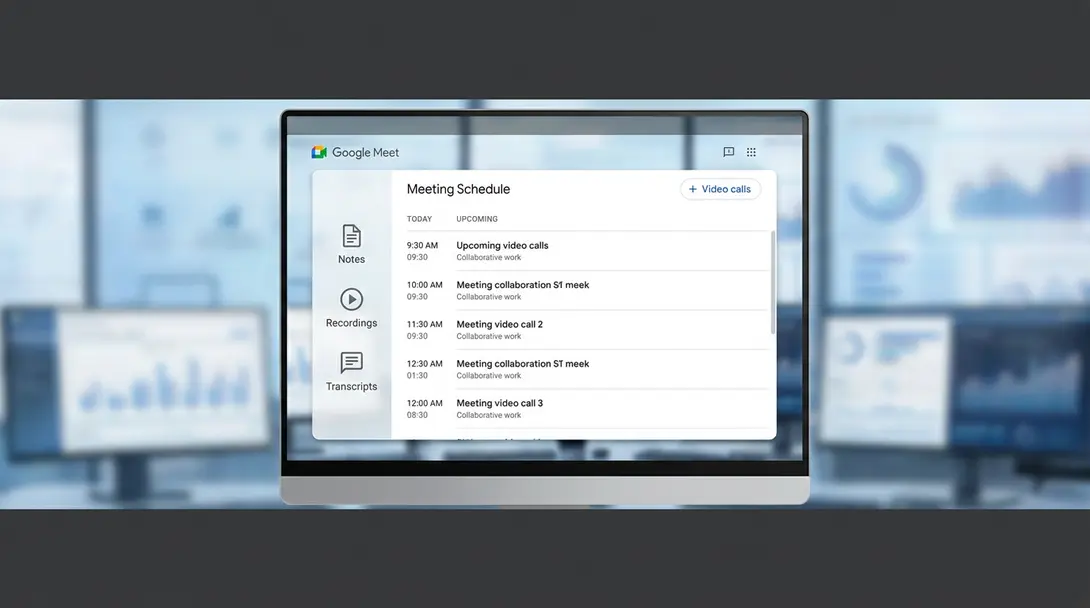
Google Meet, the popular video conferencing platform, has rolled out a significant visual update to its browser-based interface, bringing a fresh and more intuitive experience to its users. This modernization is specifically designed for Google Workspace subscribers, aiming to streamline workflow and enhance productivity. The gradual rollout is underway and is expected to be completed by early September.
A Fresh Look for Enhanced Productivity
Google officially announced this substantial update on its blog, highlighting the comprehensive redesign of the Google Meet browser experience. At the heart of this refresh is a new, centralized focus on meeting schedules and associated materials, making it easier than ever to manage your virtual conferences.
The updated interface introduces several key improvements aimed at boosting user efficiency:
- Faster Access: Quickly jump to crucial information such as meeting descriptions, notes, recordings, and transcripts directly from the main screen.
- Simplified Scheduling: Effortlessly plan and organize upcoming online conferences with a more intuitive scheduling flow.
- Integrated Workflow: The redesigned layout ensures that all your meeting essentials are at your fingertips, reducing the need to navigate through multiple tabs or applications.
This initiative aligns with Google’s broader efforts to unify and enhance its Workspace applications, much like the recent revamp of Gmail’s browser interface, creating a cohesive and efficient ecosystem for professionals.
Desktop Exclusive: Rollout Details and Eligibility
It’s important to note that this extensive redesign primarily targets the desktop version of Google Meet. The mobile application’s design will retain its current look and functionality for the time being.
The deployment of this new update is staggered, depending on your organization’s release track:
- Rapid Release Domains: Users on rapid release tracks began receiving the update as early as July 21.
- Scheduled Release Domains: For those on scheduled release tracks, the rollout commenced on August 17.
The patch is being distributed gradually over a 15-day period to ensure a smooth transition. All Google Workspace customers and Workspace Individual subscribers are eligible to receive and benefit from these new enhancements.
Beyond the Interface: Live Translation in Mobile Meet
While the desktop interface is undergoing its transformation, Google Meet’s mobile application also received a critical upgrade earlier this year. In early February, Google introduced a groundbreaking live translation feature to its mobile app, a functionality first teased during last year’s I/O event.
This innovative feature enables real-time translation of conversations into an impressive 70 different languages, bridging communication gaps in global teams and diverse communities. The rollout of this live translation capability occurred in early June, coinciding with the integration of the Gemini 3.5 Live Translate tool onto both Android and iOS devices, showcasing Google’s commitment to leveraging advanced AI for practical, everyday solutions.

Frequently Asked Questions (FAQ)
The new visual update for Google Meet’s browser interface is available to all Google Workspace customers and Workspace Individual subscribers. It’s designed to enhance the experience for those utilizing Google’s suite of productivity tools.
The rollout of the new interface is gradual. For organizations on rapid release tracks, it began on July 21. For scheduled release tracks, it started on August 17. The full deployment is expected to be completed by early September. You might see the update appear in your Google Meet browser interface anytime within this period, depending on your domain’s release schedule.
No, this specific interface redesign applies only to the desktop (browser) version of Google Meet. The mobile application’s design and user experience will remain unchanged with this particular update. However, the mobile app did receive a significant live translation feature earlier this year.
The updated Google Meet interface centralizes access to all meeting-related resources. This means users can more quickly find and reference meeting descriptions, notes, recordings, and even transcripts directly from the main screen. This streamlined access significantly simplifies both pre-meeting preparation and post-meeting follow-up, ensuring all essential information is readily available.
Source: Google Workspace Updates. Opening photo: Gemini
About Post Author
