

Contents
Google Finally Solves One of Android Auto’s Most Frustrating Flaws
Android Auto is a highly acclaimed application that has completely transformed how drivers interact with modern vehicle infotainment systems. By projecting your smartphone’s interface onto your car’s dashboard screen, it provides seamless access to navigation, media, and communication.
However, despite its massive popularity, the system is not without its flaws. For nearly a decade, one of the most glaring omissions has been the inability to dismiss a smartphone alarm directly from the car’s display. Fortunately, recent software code analyses suggest this is about to change.
A Decade-Old Safety Hazard: The Unstoppable Alarm
Since its inception, Android Auto has connected phones to car displays via wired or wireless connections, offering a safer alternative to handling a mobile device while driving. Yet, it has continually struggled with one specific feature: syncing smartphone alarm controls.
When an alarm triggered on a connected smartphone, drivers could not turn it off using the car’s touchscreen. Instead, they were forced to physically pick up their smartphone or navigate their smartwatch to dismiss the alert. This limitation forced drivers to take their eyes off the road, creating a significant safety hazard.
While users have recently praised updates where Android Auto finally fixed a persistent connectivity issue, this specific alarm flaw remained an unchecked frustration for years.
The Solution: “Snooze” and “Stop” Buttons Arriving Soon
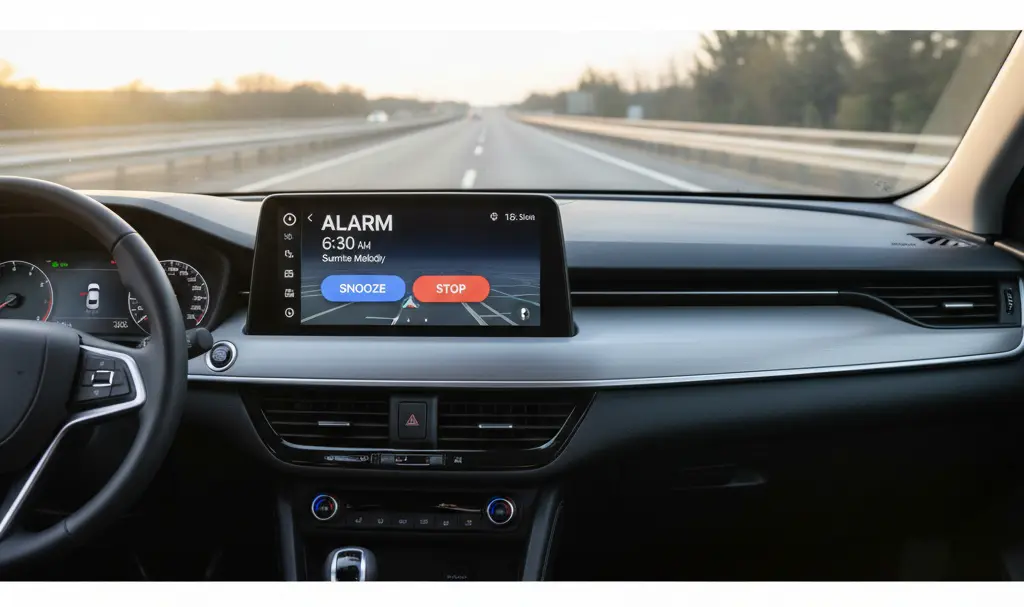
Relief is finally on the horizon for drivers. A recent application teardown—a process where developers analyze the code of an unreleased software update—revealed upcoming interface changes. Specifically, an analysis of Android Auto version 16.8.161804 by Android Authority highlighted the addition of two highly requested UI elements.
Here is what drivers can expect in the upcoming update:
- On-Screen Prompts: Alarm notifications will now appear directly on the vehicle’s infotainment display.
- Dedicated Buttons: Drivers will see clear “Snooze” and “Stop” buttons, mirroring the traditional smartphone alarm experience.
- Improved Safety: Drivers will no longer need to reach for their physical devices, drastically reducing cabin distractions.
This is fantastic news for users who have been begging for this basic functionality for almost 10 years. While the exact deployment date for the broader public remains a secret, its presence in the current test build indicates a rollout is imminent.
Gemini Integration: A New Assistant Bringing New Headaches
While the alarm fix is a welcome addition, other recent changes to the Android Auto ecosystem have been met with mixed reviews. Google recently rolled out a major update that replaced the legacy Google Assistant with its new artificial intelligence model, Gemini.

With the dawn of advanced AI, the broader ChatGPT, Apple CarPlay, and Android Auto Gemini integration promised to revolutionize in-car voice commands. The tool was designed to offer smarter, more conversational interactions. Unfortunately, early adoption has proven rocky.
Drivers have heavily criticized the new Gemini assistant for several reasons:
- Excessive Verbosity: Gemini tends to give long, drawn-out answers, which is highly distracting when driving.
- Basic Command Failures: Users report that the AI frequently struggles to execute simple tasks, such as making a quick phone call or changing a music track.
- Slower Processing: The complex AI models sometimes result in higher latency compared to the older, more straightforward Google Assistant.
As with all major software transitions, users are hopeful that these are merely growing pains. With future updates and machine learning refinements, Gemini’s responses should become more concise, accurate, and natural for an automotive environment.
Frequently Asked Questions (FAQ)
Why did it take nearly 10 years for Google to add an alarm dismissal feature to Android Auto?
While Google has not explicitly stated the reason for the delay, bridging the gap between a smartphone’s core system clock and a secondary projection screen often involves complex permissions. Google traditionally prioritizes strict safety protocols, and creating an overlay that safely overrides system-level alarms while driving likely required extensive software restructuring.
Will the new “Snooze” and “Stop” buttons work on both wired and wireless Android Auto connections?
Yes. Once the update is fully rolled out, the alarm notification overlay is expected to function uniformly regardless of whether your smartphone is connected to the car’s infotainment system via a USB cable or a wireless adapter.
Can I switch back to the classic Google Assistant if Gemini is too distracting?
Currently, Google is aggressively pushing Gemini as the default assistant across its ecosystem. While some users have found workarounds by altering their smartphone’s default digital assistant settings, Google intends to phase out the legacy Assistant entirely. Future updates are expected to streamline Gemini specifically for safer, less verbose driving interactions.
Source: Android Authority. Opening photo: Gemini
About Post Author
