

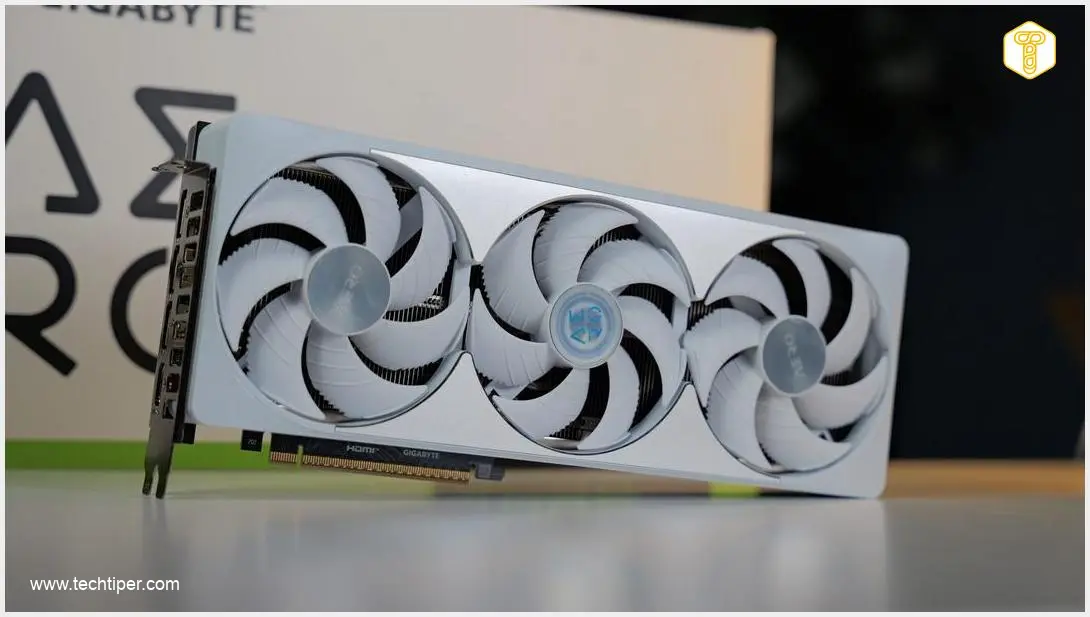
GIGABYTE GeForce RTX 5080 AERO OC Review

-
Cooling & Thermals
-
Design & Aesthetics
-
1440p Gaming Performance
-
4K Path Tracing Performance
-
Features & Technology

An Enthusiast’s Dream Card
The GIGABYTE GeForce RTX 5080 AERO OC is a visually striking powerhouse that seamlessly bridges the gap between high-end gaming and demanding professional workloads. Its top-tier vapor chamber cooling effortlessly handles heavy ray tracing and path tracing tasks without sacrificing acoustics, while DLSS 4.5 and Multi Frame Generation deliver flawless 4K experiences. Although pushing absolute maximums in 4K native settings remains a challenge, its suite of advanced rendering tech and elegant design makes it an undeniable hit for modern PC builds.
Advantages
- Exceptional thermal performance with temperatures staying under 70°C.
- Whisper-quiet operation with a physical DUAL BIOS switch.
- Incredible 1440p and 4K performance utilizing DLSS 4.5 and MFG.
- Sleek, three-slot design fits comfortably in standard mid-tower cases.
- Includes necessary power cables and an anti-sag support bracket.
Disadvantages
- Native 4K with Path Tracing is too demanding without DLSS enabled.
- Activating Multi Frame Generation (MFG) X4 results in slightly reduced 1% low stability.
Contents
Achieving Ultimate Gaming Performance: GIGABYTE GeForce RTX 5080 AERO OC Meets Resident Evil Requiem
A high-performance graphics card with excellent thermal management is an absolute necessity for any serious gamer’s workstation. The GIGABYTE GeForce RTX 5080 AERO OC is a perfect answer to these enthusiast demands. This GPU is not only highly capable for professional workloads but also guarantees high frame rates in the most demanding modern titles—including Resident Evil Requiem, a visual masterpiece that heavily utilizes path tracing.
GIGABYTE GeForce RTX 5080 AERO OC: Design and Cooling
The GIGABYTE GeForce RTX 5080 AERO OC arrives as an elegant and surprisingly sleek graphics card. Measuring approximately three slots in thickness, this layout ensures it will comfortably fit into most mid-tower desktop cases. Alongside the RTX GPU, the packaging includes the necessary power cables and support brackets to prevent GPU sag.
Despite its relatively compact footprint, thermal performance is exceptional. The Windforce cooling system, which features three large fans and a high-efficiency vapor chamber covering the GPU core, quietly and effectively dissipates heat. During our intensive stress testing, the core temperature never exceeded 70 degrees Celsius.
Visually, the card stands out with an illuminated AERO logo and a stylized backplate cutout for improved airflow. It also features a physical DUAL BIOS switch, allowing users to effortlessly toggle between a high-performance profile and a silent operation mode. For our performance testing in Capcom’s phenomenal Resident Evil Requiem, we paired the GPU with 32 GB of RAM and an AMD Ryzen 9 9950X processor. (Note: CPUs equipped with 3D V-Cache would likely push these frame rates even higher).
1440p Gaming is No Challenge for the RTX 5080
We conducted our initial benchmarks in the game’s opening location, where the protagonist navigates a densely crowded street. This scenario is incredibly taxing on hardware; the opening seconds involve pushing through dense NPC crowds while parked vehicles and building windows dynamically reflect various light sources.
Starting at a resolution of 2560 × 1440 pixels (1440p), we first tested standard rasterization without ray tracing, and then moved on to the advanced rendering features exclusive to the newest RTX architectures.
The Power of Advanced Upscaling and Frame Generation
NVIDIA’s DLSS (Deep Learning Super Sampling) 4.5 is a remarkable image reconstruction technology. It utilizes AI models based on the Transformer 2.0 architecture to enhance visual sharpness and stability. This allows the GPU to render the game at a lower internal resolution while outputting an image that looks native, or even better. Multi Frame Generation (MFG) takes this a step further by generating entirely new frames between the traditionally rendered ones, dramatically boosting animation fluidity. These innovations are reshaping the industry, sparking conversations much like the recent NVIDIA DLSS 5 generative AI gaming controversy.
Furthermore, path tracing represents the pinnacle of current rendering techniques. By simulating the true physical behavior of light—calculating the full trajectory of rays to map accurate reflections, refractions, and global illumination—it delivers an unmatched level of realism. For an even closer look at how this impacts visuals, you can explore our detailed Resident Evil Requiem RTX 5080 path tracing performance analysis.
1440p Benchmark Results
In standard rasterization, the GIGABYTE GeForce RTX 5080 AERO OC proved it has massive headroom at 1440p. Even on the highest graphics preset, the card easily averaged over 149 FPS. Moving to High detail settings provided the best balance for our ray tracing tests:
- Rasterization (High Settings): Average FPS: 151.8 | 1% Low: 95.4
- High Ray Tracing (Native): Average FPS: 89.0 | 1% Low: 69.2
- High Ray Tracing + DLSS Quality: Average FPS: 115.1 | 1% Low: 75.6
- Path Tracing + DLSS Quality: Average FPS: 72.0 | 1% Low: 54.9
These results are phenomenal. The game looks spectacular, and the gameplay remains flawlessly smooth. Notably, the 1% and 0.1% low metrics remain very high, resulting in a perfectly flat frametime graph with zero noticeable stuttering.
Resident Evil Requiem Looks Phenomenal in 4K (2160p)
The true test for the GIGABYTE RTX 5080 AERO OC is at 3840 × 2160 pixels (4K). With path tracing enabled, the horror atmosphere is deeply immersive and visually breathtaking.
Playing in native 4K with High Ray Tracing is remarkably viable, maintaining an average of around 47 FPS, with 0.1% lows staying safely above 30 FPS. However, activating DLSS 4.5 on the Quality profile drastically improves the experience, pushing average frame rates up to 77 FPS.
Tackling 4K Path Tracing with Multi Frame Generation
Path tracing at 4K is notoriously demanding. Without frame generation, DLSS Quality mode averages around 38.8 FPS—playable, but borderline for PC gaming standards. This is where Multi Frame Generation (MFG) becomes essential:
- Path Tracing + DLSS Quality (No MFG): Average FPS: 38.8 | 1% Low: 34.8
- Path Tracing + DLSS Quality + MFG X2: Average FPS: 72.8 | 1% Low: 33.9
- Path Tracing + DLSS Quality + MFG X4: Average FPS: 130.2 | 1% Low: 30.9
For the ultimate playthrough, enabling Path Tracing alongside DLSS 4.5 Quality and MFG X2 offers the “sweet spot.” You achieve over 70 FPS on average while retaining excellent image quality and stability. Pushing to MFG X4 offers incredible smoothness, though you do sacrifice slight stability in the 1% lows.
The Perfect Companion for Work and Entertainment
Just a few minutes with the GIGABYTE GeForce RTX 5080 AERO OC in Resident Evil Requiem is enough to draw a clear conclusion. The game’s optimization, combined with cutting-edge technologies like path tracing and MFG, makes Capcom’s dark world incredibly gripping.
This experience is made entirely possible by the RTX 5080’s architectural brilliance. GIGABYTE has delivered a card that is surprisingly sleek while offering top-tier cooling, whisper-quiet acoustics, and a stunning aesthetic that looks incredible in any PC build. If you are looking for a powerful, future-proof GPU that easily handles the most demanding creative workloads and cutting-edge gaming titles, the RTX 5080 AERO OC hits the bullseye.
Frequently Asked Questions (FAQ)
Why is Path Tracing in Resident Evil Requiem so demanding on a graphics card?
Path tracing simulates the physical behavior of light by calculating real-time global illumination, infinite bounces, accurate reflections, and dynamic soft shadows. This requires immense computational power. The RTX 5080 manages this workload efficiently by leveraging dedicated Ray Tracing (RT) cores and DLSS 4.5 AI reconstruction.
Does the GIGABYTE RTX 5080 AERO OC fit into standard mid-tower PC cases?
Yes, despite its powerful cooling array, the AERO OC features a relatively slim three-slot design, making it highly compatible with most standard ATX mid-tower cases. However, users should always measure their case clearance to accommodate the card’s length and the required power cables.
What is the benefit of the DUAL BIOS switch on the RTX 5080 AERO OC?
The DUAL BIOS switch allows users to easily toggle between two hardware-level fan profiles. “Performance Mode” utilizes a more aggressive fan curve to maximize cooling and boost clocks during heavy gaming, while “Silent Mode” relaxes the fans for a quieter acoustic experience during lighter tasks or media consumption.
Source: Own elaboration. Opening photo: Krzysztof Wilamowski
About Post Author
