

Contents
Googlebook Unveiled: The Dawn of Google’s Premium AI Laptops
Google has officially announced the successor to its long-running line of Chromebooks. Enter the Googlebook—a brand-new category of premium laptops running on the tech giant’s proprietary operating system. Designed from the ground up for the modern era, these new devices will feature deep, hardware-level integration with Google’s advanced AI tool, Gemini Intelligence.
Google Introduces the Googlebook Ecosystem
During the highly anticipated Android Show I/O 2026 conference, Google showcased a variety of innovations across its software and hardware ecosystems. Alongside numerous system upgrades and a more tightly integrated Gemini Intelligence platform, the tech giant revealed broader updates, including the next generation of Android Auto. However, the true showstopper was the announcement of the Googlebook.
This new category of premium hardware is set to officially replace Chromebooks, a budget-friendly laptop line that first debuted 15 years ago. According to Google, this next generation of portable computers has been explicitly engineered around artificial intelligence, featuring an array of innovative solutions powered by Gemini.
Key Features and Cross-Device Compatibility
The Googlebook is built to seamlessly bridge the gap between mobile and desktop experiences. Here are some of the standout capabilities users can expect:
- Full Play Store Compatibility: Users will have unrestricted access to millions of Android applications natively on their laptops.
- Smartphone App Mirroring: Googlebooks can launch apps from a paired smartphone in an isolated, dedicated window. This means you can comfortably complete a quick lesson on Duolingo to maintain your streak without ever needing to unlock or pick up your phone.
- Wireless Quick Share: The laptops will be fully compatible with Google’s Quick Share framework for rapid, seamless file transfers across devices.
The “Magic Pointer” and Nano Banana AI
Google is completely rethinking fundamental user interface elements for the AI age. The traditional mouse cursor has been redesigned and rebranded as the Magic Pointer. Deeply integrated with Gemini, users can simply “shake” the cursor to summon the AI assistant and receive context-aware suggestions.
For example, hovering the Magic Pointer over a specific date in an email will automatically prompt Gemini to add an event to your calendar. Additionally, the system introduces a new feature called Nano Banana, which allows the AI to seamlessly edit, generate, and merge images on the fly. Similar to the latest mobile Android updates, the Googlebook OS will also allow users to generate highly personalized, prompt-based widgets directly on their desktops.
Hardware Design and Anticipated Release Date
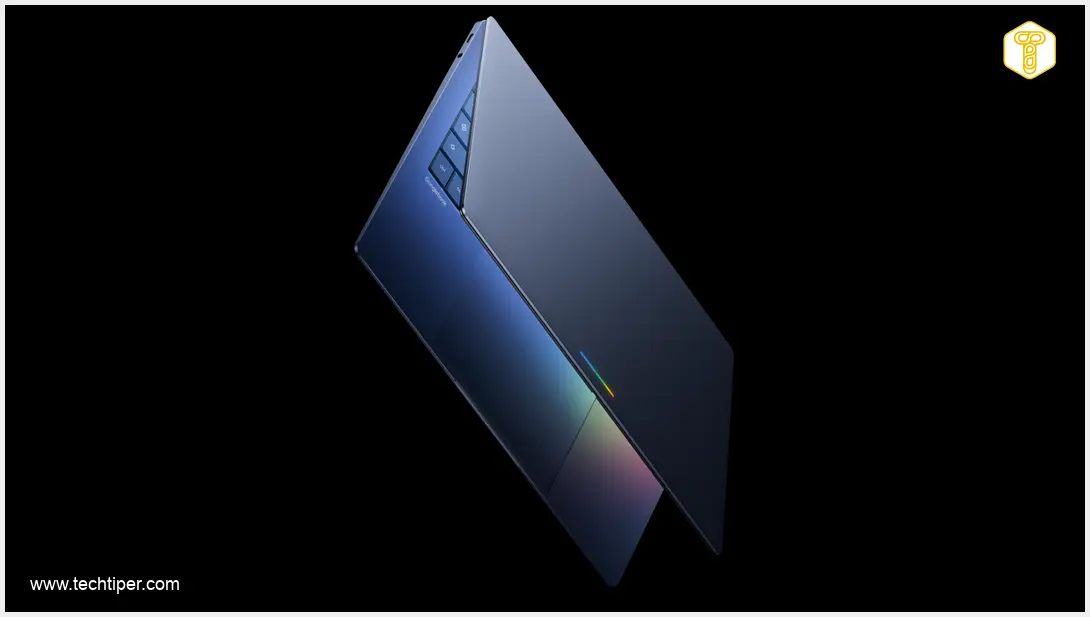
While specific technical specifications are still under wraps, Google did share a few exciting hardware details. A signature characteristic of the new chassis will be the Glowbar—an illuminated strip located on the outer lid. Beyond serving as a sleek visual aesthetic, the Glowbar will function as a practical tool, likely for notifications or AI status indications. The iconic Googlebook logo will also be prominently displayed near the keyboard.
Google emphasized that the Googlebook segment will strictly feature premium tier computers. To bring this vision to life, the Mountain View giant is collaborating with industry-leading manufacturers, including Acer, ASUS, Dell, HP, and Lenovo.
The first wave of Googlebook laptops is officially slated to hit the market in the fall of 2026.

Frequently Asked Questions (FAQ)
What is the main difference between a Chromebook and a Googlebook?
While Chromebooks were traditionally designed as budget-friendly, cloud-first devices primarily aimed at education and basic computing, Googlebooks are premium laptops. They feature high-end hardware, native integration with Gemini Intelligence, and advanced cross-device capabilities.
Can I run my current smartphone apps on a Googlebook?
Yes. In addition to full native support for apps via the Google Play Store, Googlebooks allow you to directly mirror and interact with applications from your paired smartphone in a dedicated desktop window.
What is the Magic Pointer?
The Magic Pointer is Google’s reimagined mouse cursor. It is integrated directly with Gemini AI, allowing users to shake the cursor to pull up contextual assistance, or hover over text like dates to execute quick actions like scheduling calendar events.
When will Googlebooks be available to buy?
The first Googlebook laptops, manufactured by partners like ASUS, HP, Dell, and Lenovo, are scheduled to be released in the fall of 2026.
Source: Google. Opening photo: Google press materials.
About Post Author
