

Contents
Understanding Your TV’s HDMI Ports: Why It Matters More Than You Think
HDMI has long been considered a universal connector, but in practice, there are several versions and standards to distinguish. Modern televisions utilize different variants of this ubiquitous port, each with distinct functions and limitations. Consequently, where you connect your game console, soundbar, or set-top box can significantly impact your equipment’s performance and your overall viewing experience.
Not All HDMI Ports on Your TV Are Identical
The HDMI port is a crucial component of any television. It can even transform an older device into a next-generation smart TV. However, before plugging in a cable or a streaming device, such as an Amazon or Xiaomi streaming stick, it’s essential to understand that not every HDMI port on your TV is the same.
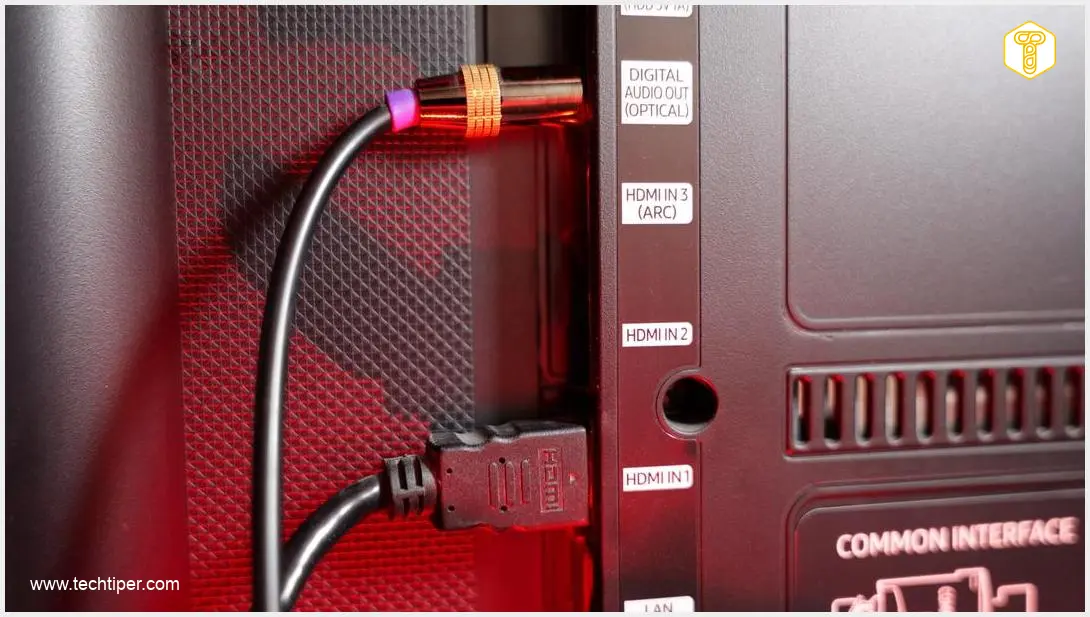
Contemporary televisions often feature several types of HDMI connections, which vary in functionality. The most common distinction is between standard ports for video sources and a specifically designated HDMI ARC or eARC port.
HDMI ARC and eARC: The Audio Return Channel
This standard is dedicated to returning audio to external sound systems. ARC (Audio Return Channel) and its newer, enhanced version, eARC (Enhanced Audio Return Channel), enable the transmission of audio signals from your television to a soundbar or AV receiver using a single cable. In practical terms, this means only the designated ARC or eARC port provides full integration with your audio system, including support for high-quality audio formats and synchronization with your TV remote control. Using the correct port ensures you get the best possible sound experience, often supporting advanced audio formats like Dolby Atmos and DTS:X with eARC.
HDMI 2.1: The Gateway to Next-Gen Gaming and High Resolutions
Next-generation game consoles, such as the PlayStation 5 and Xbox Series X, frequently leverage the HDMI 2.1 standard. This port offers significantly higher bandwidth, allowing for high frame rates at resolutions like 4K and even 8K. For instance, connecting a PlayStation 5 to an older HDMI 1.4 port would display a 4K image, but only at a limited 30 frames per second. With HDMI 2.1, you can enjoy fluid gameplay at 4K resolution with 120 frames per second (or even 8K at 60Hz), along with other advanced features like Variable Refresh Rate (VRR) and Auto Low Latency Mode (ALLM), crucial for serious gamers.
The rapid evolution of display technology, including advancements in wireless transmission, suggests an interesting future for how we connect our devices. While HDMI 2.1 offers cutting-edge capabilities, some experts ponder if we are heading towards a decline of the HDMI era for certain applications, with wireless 4K transmissions becoming preferred.
Choosing the Right HDMI Port for Your Devices
Selecting the appropriate HDMI port depends on the function of your device, not just the cable itself.
* For a Soundbar: Always connect your soundbar to the port labeled HDMI ARC or eARC. This is because only these ports support the audio return channel, which is essential for sending audio from your TV back to the soundbar. Identifying this port on your television is usually straightforward, as it’s typically clearly marked.
* For Next-Generation Game Consoles: For optimal performance with devices like PlayStation 5 or Xbox Series X, it’s crucial to use an HDMI port with the highest possible bandwidth, typically HDMI 2.1 or one specifically marked as 4K/120 Hz. While HDMI 2.1 ports may be labeled, it’s always best to consult your TV’s manual or the manufacturer’s website to verify the standard of each numbered HDMI port before connecting. This ensures you unlock features like 4K@120Hz and VRR for the best gaming experience. Modern TVs, such as those from LG, often incorporate advanced AI and OLED technologies specifically designed to enhance gaming, as seen in their new smart TVs with AI, micro RGB, OLED, and gaming features.
* For Standard Devices (e.g., Set-Top Boxes, Blu-ray Players): Standard set-top boxes, DVD players, or other media streaming devices generally do not require high bandwidth ports. These devices can function perfectly well when connected to any available standard HDMI port on your TV.
Understanding HDMI Cables
It’s also worth noting that when it comes to HDMI cables, a higher price does not necessarily guarantee better performance. For most applications, a certified High-Speed HDMI cable will suffice. For HDMI 2.1 features, ensure you use an Ultra High-Speed HDMI cable. Always check the cable’s specifications to ensure it matches the requirements of your devices and TV ports.

Frequently Asked Questions (FAQ)
What happens if I connect my soundbar to a regular HDMI port instead of ARC/eARC?
If you connect your soundbar to a standard HDMI port, you will likely only get audio from the soundbar when watching content from a device *connected directly to the soundbar*. The TV won’t be able to send its internal audio (from built-in apps, antenna, or other non-soundbar-connected sources) to the soundbar through that single HDMI cable. You would typically need an additional optical audio cable or analog cables to send TV audio to the soundbar, defeating the simplicity and advanced features of ARC/eARC.
Can I use an HDMI 2.1 cable with an older HDMI 1.4 port?
Yes, HDMI cables are generally backward compatible. An HDMI 2.1 (Ultra High-Speed) cable will work with an HDMI 1.4 port. However, you will only get the features and performance capabilities of the HDMI 1.4 standard. The advanced features and higher bandwidth of the HDMI 2.1 cable will not be utilized unless both your display and source device support HDMI 2.1.
How can I identify which HDMI version my TV ports support?
The best way to determine the HDMI version of your TV’s ports is to consult your television’s user manual or visit the manufacturer’s official website. Many TVs also label the ports directly (e.g., “HDMI ARC,” “HDMI 2.1,” “4K 120Hz”). If a port isn’t specifically labeled, it often defaults to a common standard like HDMI 1.4 or 2.0.
Source: ZDNet, original research. Opening photo: Gemini
About Post Author
