

Contents
Google Enhances Gmail’s ‘Help Me Write’ with Granular AI Control
Google is rolling out significant advancements to its artificial intelligence capabilities within Gmail, introducing a powerful new feature that grants users much greater control over how their email messages are drafted and edited. This update allows for precise instructions, enabling the AI to make specific, user-defined changes to prepared email drafts, transforming the way we compose professional and personal communications.
Unprecedented Control Over Your Email Drafts
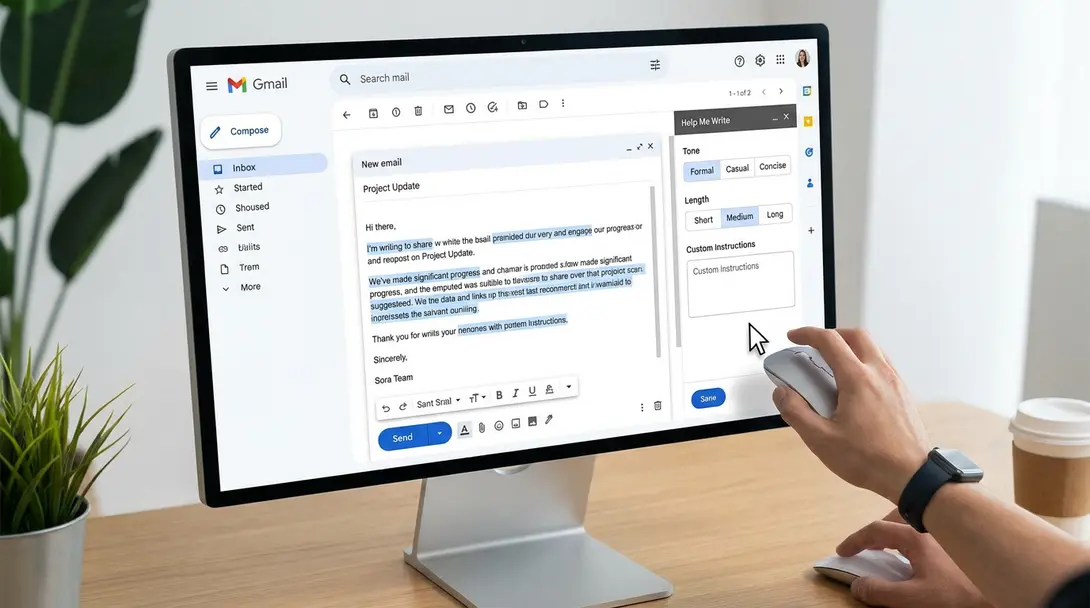
Google has officially announced an expansion of the “Help Me Write” feature, an AI-powered assistant within Gmail designed to help users compose and refine emails using the advanced Gemini model. Previously, this tool could generate an initial draft based on a brief prompt, but its functionality was largely confined to a set of predefined editing scenarios.
Now, users are empowered to input their own detailed instructions, guiding the AI on specific modifications required for their text. This moves beyond merely selecting from a few generic options, allowing for a truly customized editing experience. Examples of the precise control users can now exert include:
- Adding crucial missing information or context.
- Integrating specific details, such as a project deadline or meeting time.
- Changing the tone of a selected fragment of text to be more formal, friendly, or concise.
- Rewriting entire sentences or paragraphs to improve clarity or impact.
Furthermore, Google has integrated intuitive undo and redo functionalities, giving users complete command over the AI-generated modifications. This iterative process ensures that the final output perfectly aligns with the user’s intentions. For those managing complex schedules, this granular control can even extend to tasks like composing emails to schedule multi-person meetings with greater ease and precision.
Moving Beyond Predefined Templates: A Smarter AI Assistant
Prior to this update, “Help Me Write” primarily offered a limited set of predefined editing modes. Users could, for example, choose to make a message more formal, adopt a friendlier tone, or simply shorten its content. While convenient for quick adjustments, this approach often fell short when users had specific, nuanced expectations for the outcome.
The previous limitation was the inability to articulate personal expectations and custom requirements directly to the AI. The new enhancement addresses this by allowing natural language instructions, enabling the Gemini-powered assistant to act as a truly intelligent co-writer rather than just a template applicator. This deeper interaction with AI, where systems like Gemini leverage memory and context, signifies a leap in AI-assisted productivity.
Who Gets Access? Rollout Details for Enhanced Gmail AI
The innovative new feature is currently being rolled out to a select group of users. This includes individuals subscribed to Google AI Plus, Pro, and Ultra plans. The update will also extend to enterprise clients utilizing Google Workspace Business and Enterprise packages, as well as users enrolled in Google AI Pro for Education and Frontier Plus programs. According to official announcements from Google, the complete implementation of these new features is anticipated to be finalized by July 20th.
Why This Matters for Your Productivity
This update marks a significant step forward in making AI-powered email composition more personal and efficient. By giving users direct control over AI edits, Google is not just automating tasks but empowering individuals to craft perfectly tailored messages with unprecedented speed and accuracy. This reduces the time spent on manual edits, ensures clearer communication, and ultimately boosts overall productivity for both individual users and organizations.
Frequently Asked Questions (FAQ)
“Help Me Write” is an AI-powered assistant within Gmail, driven by the Google Gemini model. It helps users compose, draft, and refine email messages, offering suggestions and making edits to improve clarity, tone, and content.

Previously, “Help Me Write” primarily offered predefined editing modes (e.g., make formal, shorten). The new update allows users to provide specific, custom instructions to the AI (e.g., “add project deadline,” “rephrase this paragraph to be more direct”), giving much more granular and personalized control over the editing process.
The enhanced AI control is being rolled out to users with Google AI Plus, Pro, and Ultra plans, as well as business customers on Google Workspace Business and Enterprise packages, and users of Google AI Pro for Education and Frontier Plus.
Yes, Google has incorporated intuitive undo and redo functionalities, allowing users to easily revert or reapply any modifications suggested or implemented by the AI assistant.
Source: Android Authority, Independent Analysis. & Opening photo: Kos-51 / Magnific
About Post Author
