

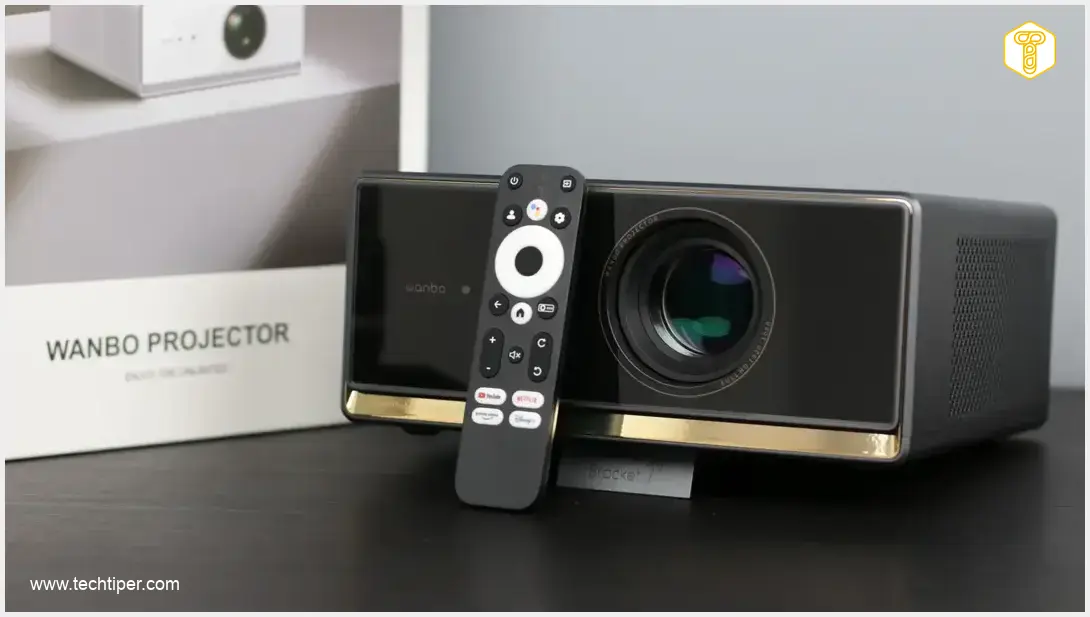
Wanbo X5 Pro Review
-
Value for Money
-
Design & Build Quality
-
Smart Features & User Experience
-
Audio Quality & Noise
-
Image Quality & Gaming
Affordable Home Cinema for Evening Viewers
The Wanbo X5 Pro delivers a compelling home cinema experience with its elegant design, integrated Google TV, and effective automatic image adjustments. While its real-world brightness is lower than advertised and color accuracy isn’t perfect, it offers significant value for evening movie nights, making it a strong contender for casual home entertainment.
Advantages
- Affordable price point with integrated smart features
- Elegant design and thoughtful build quality
- Full Google TV integration for streaming
- Excellent automatic image correction system
- Commendable contrast ratio
- Convenient built-in kickstand for easy angle adjustment
Disadvantages
- Real-world brightness lower than advertised
- Not ideal for bright daytime viewing
- Noticeable fan noise during operation
- Inaccurate color reproduction
- High input lag, unsuitable for serious gaming
- Some UI translation inconsistencies and remote limitations
Contents
Wanbo X5 Pro: Your Gateway to Affordable Home Cinema
Welcome to our comprehensive review of the Wanbo X5 Pro. At first glance, this elegantly designed projector appears to be a straightforward, budget-friendly device specifically crafted for home entertainment. Our in-depth analysis will uncover its strengths and weaknesses, helping you decide if this projector is the right choice for your cinematic evenings. Let’s dive in!
Unboxing, Specifications, and Value Proposition
The Wanbo X5 Pro arrives in a thoughtful dual-layer packaging: an outer carton for transport protection and an inner box that highlights the product’s key features. Inside, you’ll find the essentials: the projector itself, a power cable, and a remote control. Batteries for the remote are not included, so remember to purchase two AAA batteries separately.
Priced at approximately $420 USD (at the time of this review), the Wanbo X5 Pro positions itself as an accessible option for home users. This refreshed model, potentially for the 2025 lineup, has already seen several promotional offers since its release. Prospective buyers are encouraged to monitor retailers for potential discounts. For instance, manufacturer promotions have sometimes reduced the price by over $75 USD with specific discount codes.
Technical Specifications: Wanbo X5 Pro
- Lamp Type: LCD
- Brightness: 1100 ANSI Lumens (advertised)
- Contrast Ratio: 3000:1
- Lamp Lifespan: 20,000 hours
- Projection Resolution: Full HD (16:9 aspect ratio, supports 4K sources)
- HDR Support: HDR10 (decoding only)
- Projection Size: 40-140 inches
- Projection Distance: 1 – 3.4 meters (throw ratio: 1.25)
- Connectivity: Wi-Fi, Bluetooth
- Ports: HDMI 2.0 (with CEC), 2x USB-A, 3.5mm audio jack
- Smart Features: Automatic image adjustment (keystone correction, brightness, focus, obstacle avoidance)
- Audio: 10W Stereo Speakers
- Memory: 2 GB RAM, 16 GB Internal Storage
- Operating System: Google TV
- Dimensions: 252×246×115 mm
- Weight: 2.7 kg
Considering these specifications, the Wanbo X5 Pro aligns well within its price category. It’s worth noting that while some competitors might offer higher brightness at a similar price point, they often lack the integrated smart features like Google TV, which is a significant advantage for the X5 Pro.
Design and Build Quality
Upon unboxing, the Wanbo X5 Pro makes a positive first impression with its sophisticated and elegant design. The matte finish, which effectively mimics metal, complements the glossy front panel. While the glossy surface adds a touch of class, it is prone to collecting fingerprints.
The front of the Wanbo X5 Pro features a minimalist design, subtly interrupted by a gold accent bearing the device’s branding. Hidden within the glossy black panel are not only the Wanbo logo but also a suite of sensors crucial for the automatic image correction system. The lens itself is mechanically retractable, with all adjustments managed digitally through the software rather than manually.
The sides of the projector house mesh grilles that serve a dual purpose: heat dissipation and housing the stereo speakers. On the right side, an accessible filter can be easily removed, simplifying the cleaning process for the ventilation system.

At the rear, the Wanbo X5 Pro features its sole physical button – the power switch. All other controls are managed via the remote. Adjacent to the power button, you’ll find all the necessary ports: an HDMI 2.0 input for external video sources, two USB-A ports for storage devices, and a 3.5mm audio jack for connecting external speakers.
The bottom of the projector includes standard feet and a tripod mounting thread. Additionally, Wanbo has integrated a built-in kickstand, allowing the X5 Pro to be angled at 7 degrees. This convenient feature greatly simplifies image positioning, enhancing user experience. For those looking for complementary portable display solutions, you might be interested in our review of a portable monitor like the ASUS ZenScreen OLED MQ16FC, offering a different take on flexible viewing.
The Wanbo X5 Pro Remote Control
The remote control for the Wanbo X5 Pro is typical for smart projectors. It’s constructed from matte plastic, which feels average in quality, and requires two AAA batteries for operation. The rubberized buttons offer a tactile, pleasant click feedback.
Crucially, Wanbo has incorporated a microphone into the remote for voice control. Although it includes an infrared transmitter, you don’t necessarily need to point it directly at the X5 Pro for basic functions, as communication can occur wirelessly (Bluetooth for Google TV specific functions).
User Experience: Software and Performance
Upon its first activation, the Wanbo X5 Pro guides users through a straightforward setup process. This includes configuring Google TV settings, familiarizing users with the remote’s buttons, and allowing adjustments for projector placement (e.g., ceiling mount). The entire setup typically takes under fifteen minutes, depending on the number of applications you choose to install.
The integrated Google TV experience is standard and acts as a core module within the Wanbo X5 Pro, even identifying itself in settings as a “4K Stick.” The system’s performance is generally acceptable; while occasional slowdowns may occur when the device downloads additional content, navigating the interface remains reasonably fluid.
Layered over Google TV is Wanbo’s proprietary software interface. While translated into English, some minor grammatical inconsistencies may be present. It’s important to note that operating this custom overlay requires pointing the remote directly at the projector, as Bluetooth connectivity is primarily for the Google TV system.
Within Wanbo’s menu, users can comprehensively adjust image and sound quality, select input sources, and configure secondary options such as HDMI settings. The abundance of customizable switches, particularly for projection correction, is commendable. However, the options for color adjustment are relatively basic.
Audio Quality and Noise Levels
After setting up the system, configuring your preferences, and logging into your favorite streaming services, it’s time to enjoy the show. But first, let’s consider the audio performance of the Wanbo X5 Pro.
While expectations for built-in projector speakers in this class are generally modest, the X5 Pro’s audio output should satisfy most users. Each frequency band delivers acceptable sound quality, albeit with a somewhat flat profile. Low tones are present and avoid sounding boomy, though they lack significant depth. The maximum volume is ample for typical home use. For enhanced audio, remember the projector offers both Bluetooth connectivity and a 3.5mm audio jack for external speakers or sound systems.
It’s also important to acknowledge that the Wanbo X5 Pro is not passively cooled; thus, the internal fan will be audible. Once the device warms up during operation, expect a fan noise level of approximately 40 dB when seated about 1.5 meters (5 feet) away from the projector. While not irritating, this sound is noticeable. Fortunately, it tends to fade into the background once a movie or series begins playing.
Image Quality: Brightness, Contrast, and Color Accuracy
Finally, let’s examine the image quality, which you’ll initially want to fine-tune to your viewing environment. This is where the automatic correction features—keystone, focus, and brightness adjustment—truly shine. The system can even automatically detect and avoid obstacles like vases or speakers. This entire process works exceptionally well, often eliminating the need for manual adjustments.
The projection aspect ratios are fairly standard. You’ll need approximately 1 meter (3.3 feet) of distance to achieve a sharp 40-inch image. For the maximum 140-inch display, the Wanbo X5 Pro needs to be positioned about 3.5 meters (11.5 feet) from the wall or projection screen.
When it comes to brightness, the real-world measurements diverge from the advertised 1100 lumens. At the minimum projection distance and with brightness settings maximized, our tests showed approximately 800 lumens. This value is satisfactory, but when projecting an 80-inch image, it drops to around 500 lumens. Consequently, while content might be visible on sunny days, the Wanbo X5 Pro truly excels in the evening. During night sessions, you can comfortably enjoy movies or series on screens larger than 100 inches, where brightness typically hovers around 300 lumens.
It’s also worth noting that the light uniformity isn’t perfectly consistent. Brightness tends to decrease towards the edges (in a curved fashion), although this is primarily noticeable on static images. During video playback, this minor inconsistency is unlikely to be an issue, especially considering its price point. On the positive side, the contrast ratio (around 1400:1) is commendable and sufficient even for viewing dark scenes with good detail.
Now for colors. At first glance, they might appear pleasing, and most home cinema users may not find much to complain about. However, closer inspection and measurement reveal notable inaccuracies. Furthermore, while HDR10 is decoded, its real-world impact on the displayed image is minimal.
The Wanbo X5 Pro covers approximately 65% of the RGB color gamut, with color errors (Delta E) sometimes exceeding 10. The color balance shows a clear bias towards blue, causing yellows to lean towards green. With careful adjustments in the settings, it’s possible to achieve better results (Delta E around 6), significantly reducing the blue tint.
Finally, it’s important to understand that this projector is not designed for serious gaming. The input lag is relatively high, approximately 70 ms, making the Wanbo X5 Pro suitable only for casual or simple recreational games, even when a “game mode” is activated. For a broader perspective on innovative tech, explore our ranking of technology gadgets that sound like a joke but are real.
Conclusion: Is the Wanbo X5 Pro Right for You?
Our review concludes with the understanding that the Wanbo X5 Pro effectively fulfills its primary purpose: providing an enjoyable home cinema experience. Watching movies and series in a home setting is seamlessly integrated with a full-fledged Google TV system. Users won’t need to fret over image adjustments, as the automatic software handles it commendably, delivering satisfying results. Additionally, the projector’s simple yet elegant design is a definite plus.
Undoubtedly, the most significant drawback of the Wanbo X5 Pro is its real-world brightness, which falls short of the manufacturer’s declared values. Nevertheless, it proves perfectly adequate for evening viewing sessions, though perhaps not for enthusiasts who demand perfectly accurate color reproduction. Overall, for its price and feature set, the Wanbo X5 Pro offers a compelling package for casual home entertainment.
Frequently Asked Questions (FAQ)
Yes, the Wanbo X5 Pro comes with full Google TV integration, providing access to popular streaming services and a familiar smart interface.
While content may be visible during the day, the Wanbo X5 Pro’s actual brightness (around 500 lumens for an 80-inch image) means it performs best in darker environments. For optimal viewing and a true cinematic experience, evening sessions are recommended.
The Wanbo X5 Pro has a relatively high input lag of approximately 70ms. This makes it less ideal for fast-paced or competitive gaming but suitable for casual or simple recreational games.
To project a 140-inch image, the Wanbo X5 Pro needs to be positioned about 3.5 meters (11.5 feet) from your wall or projection screen. For a smaller 40-inch image, approximately 1 meter (3.3 feet) is sufficient.
Key advantages include its elegant design, integrated Google TV with streaming certifications, excellent automatic image correction features, and a competitive price point for a smart home projector.
Source: Original analysis. Opening photo: Lukasz Pajak.
About Post Author
