

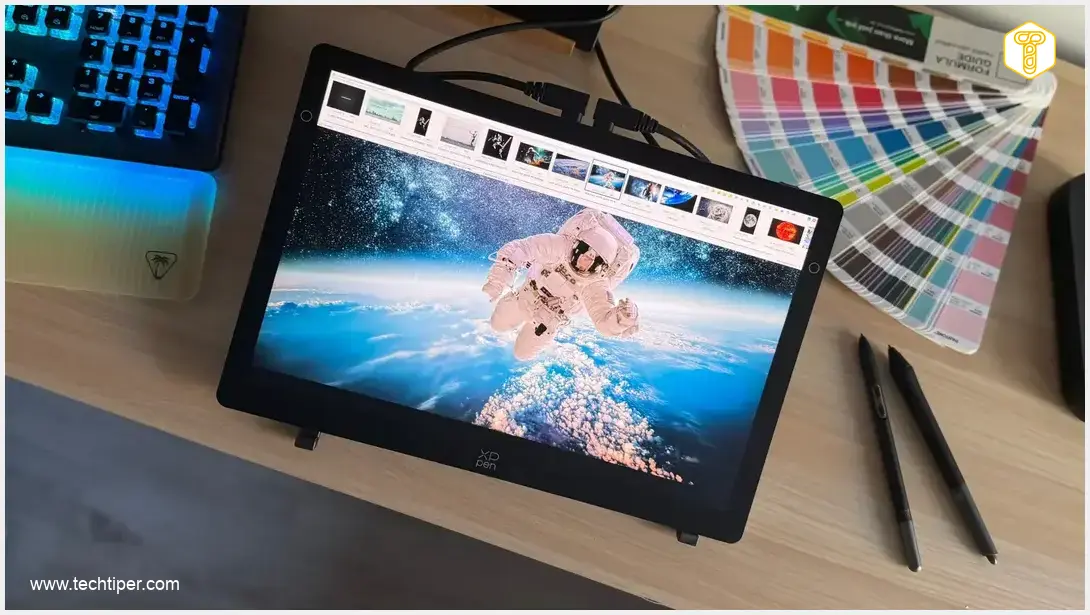
XPPen Artist Ultra 14 Review
-
Design and Build Quality
-
Display Quality (Screen & Color Accuracy)
-
Stylus Performance
-
Portability & Ergonomics
-
Accessories & Connectivity
-
Software & Customization
XPPen Artist Ultra 14: A Portable Powerhouse for Digital Artists
The XPPen Artist Ultra 14 is an exceptionally well-designed and powerful pen display perfect for artists needing a portable yet capable tool. Its stunning 2.8K AMOLED screen, revolutionary X3 Pro stylus performance, and thoughtful design make it ideal for daily drawing, sketching, and creative work on the go, offering professional-grade features in a compact form factor.
Advantages
- Compact, portable design and robust build quality.
- High-quality 14-inch 2.8K AMOLED screen with excellent color accuracy and anti-glare finish.
- Revolutionary X3 Pro stylus performance (16,384 pressure levels, low IAF, tilt support).
- Full lamination for a natural, parallax-free drawing experience.
- Generous accessory bundle, including X-Remote and two styluses.
- Intuitive and customizable XPPen drivers with app-specific shortcuts.
- Versatile USB-C connectivity and broad compatibility.
Disadvantages
- Basic foldable stand offers only one fixed position.
- XPPen application might not be available in all languages.
- Requires a connected computer to function (not a standalone device).
- Optimal single-cable connection requires computer support for DisplayPort Alt Mode.
Contents
XPPen Artist Ultra 14: The Portable Powerhouse for Digital Artists
The XPPen Artist Ultra 14 immediately impresses with its design and build quality. From the moment you unbox it, you’ll notice its compact form factor, robust construction, and meticulous attention to detail. XPPen has crafted this pen display for mobility, offering an attractive solution for illustrators, designers, and digital creators who often work from home, while traveling, or in more confined desk spaces.
Compact Design, Expansive Capabilities
One of the XPPen Artist Ultra 14’s most significant advantages is its ability to combine a sensible size with excellent ergonomics. The 14-inch screen, featuring a 16:10 aspect ratio, provides noticeably more workspace compared to typical 16:9 panels. This wider aspect ratio makes drawing and navigating interfaces in creative applications like Photoshop, GIMP, or Krita significantly more comfortable, especially when working remotely or on the move.
Its size is never overwhelming; the device doesn’t dominate your workspace, yet it still offers ample room for comfortable graphic design work. For those who require a capable device for regular creative tasks but don’t need an enormous drawing area, the XPPen Artist Ultra 14 strikes an excellent balance between portability, convenience, and drawing quality. For artists looking for alternatives, comparing it with devices like the Huion Kamvas Pro 16 could be beneficial, or for those considering a tablet for general use and creative work, a Microsoft Surface Pro 8 review might offer insights.
Unboxing: What’s Inside the Box?
As expected from XPPen, the Artist Ultra 14 comes with a generous array of accessories, a strong selling point for this 14-inch pen display. The package includes not just the tablet itself, but also:
- The X-Remote / ACK05 remote control
- A pen case with spare nibs
- A drawing glove
- A cleaning cloth
- All necessary cables for setup
Additionally, a foldable stand is included, providing a basic viewing angle. While it offers only one fixed position, which might not suit all working postures, its inclusion means the product is essentially ready to use right out of the box, without requiring any additional purchases.
Premium Build and Thoughtful Design
In terms of build quality, the XPPen Artist Ultra 14 is robust, precisely assembled, and free of unnecessary frills. The front features a matte screen framed by moderately thick bezels (14.5 mm), along with two touch-sensitive buttons and the manufacturer’s logo. The left button (a circular control on the bezel) activates a floating menu, while the right button displays a window for controlling connected displays.
Key design highlights include its metallic back, stable construction, slim 6 mm profile, and refined details such as clever cable routing and the placement of both physical and touch buttons. All essential controls are conveniently located on the top edge, including the power button, brightness adjustment, and a button to switch the touch layer (allowing it to react exclusively to the stylus and not to finger input). Two full-featured USB-C ports provide power and connectivity to a computer, functioning as an additional monitor.

For a seamless setup, your computer should ideally have a USB-C port that supports DisplayPort Alt Mode (DP Alt Mode), enabling direct connection with a single cable. Otherwise, additional cables (which are thoughtfully included in the box) will be required.
A Drawing Experience as Natural as Paper
The tablet offers a comfortable workspace on its 14-inch 2.8K (2880 x 1800 pixels) OLED screen. This AMOLED panel delivers outstanding colors, sharp clarity, and high responsiveness (under 1 ms), featuring a 100,000:1 contrast ratio and a 90 Hz refresh rate.
Color accuracy is a top priority for XPPen. Each pen display typically comes with a Calman calibration report, confirming its color precision. According to XPPen, the screen covers 99% of the Adobe RGB, sRGB, and DCI-P3 color gamuts. While initial tests with a colorimeter might show slightly lower results at default settings, fine-tuning the display can achieve optimal color quality. Rest assured, the XPPen Artist Ultra 14’s screen is exceptionally high-quality.
The screen is protected by a matte anti-glare glass with a nanoscopic texture. This innovative surface effectively eliminates reflections and mirror effects without compromising image quality. The glass etching process creates microscopic, imperceptible irregularities on the surface. When light hits such a screen, it’s diffused in multiple directions rather than reflecting directly into your eyes, ensuring a clearer view of your work.
Revolutionary Stylus Performance
The full lamination of the screen significantly enhances the daily drawing experience. This technology minimizes the distance between the pen tip and the cursor, virtually eliminating parallax. This precise alignment is crucial for a natural feel, as users don’t perceive their lines forming beneath a layer of glass. The result is highly accurate cursor positioning and remarkably responsive pen performance.
XPPen includes two exceptional styluses with the Artist Ultra 14: the X3 Pro Smart Chip Stylus and the X3 Pro Slim Stylus. These are truly among the device’s strongest features. XPPen states 16,384 pressure levels, low initial activation force, and tilt support, and practical use confirms their exceptional sensitivity and predictability.
It’s not just about the specifications; the real-world performance of the pen tips is outstanding. Strokes are fluid, and transitions between thin and thick lines appear natural. Experienced users of pen displays will undoubtedly appreciate this aspect of the Artist Ultra 14.
Unlock Full Potential with XPPen Drivers
The XPPen software is essential for harnessing the tablet and its accessories’ full capabilities. Without it, you cannot customize shortcuts on the remote control or floating menu, nor can you fine-tune the stylus or adjust the working area. A valuable feature is the ability to modify shortcuts based on the application you’re using, further enhancing workflow comfort.
The tablet also supports standard multi-touch gestures like pinching and dragging, and you can configure more advanced combinations using three, four, or five fingers. Although the XPPen application may not be available in all languages, it is intuitive, stable, and significantly improves the overall tablet experience. Its extensive customization options and numerous settings genuinely enhance productivity and reduce the need to reach for your keyboard.
XPPen Artist Ultra 14: Specifications, Pricing, and Availability
Based on manufacturer information, here are the specifications for the XPPen Artist Ultra 14:
- Device: XPPen Artist Ultra 14 (Model: MD140QH)
- Color: Frost Silver
- Dimensions: 330.4 × 221.6 × 8.0 mm
- Net Weight: 720 g (approximately 1.59 lbs)
- Active Area: 301.8 × 188.6 mm
- Screen Type: AMOLED
- Screen Size: 14 inches
- Aspect Ratio: 16:10
- Resolution: 2880 × 1800 pixels (2.8K)
- Refresh Rate: 90 Hz
- Lamination: Full Lamination
- Color Gamut Coverage (Typical): 99% Adobe RGB, 99% sRGB, 99% DCI-P3
- Display Colors: 1.07 billion (typical)
- Brightness: 350 nits (typical)
- Viewing Angle: 178°
- Touch Panel: 10-point touch, Anti-glare glass, Anti-fingerprint coating
- Stylus: X3 Pro Smart Chip Stylus (PD21D), X3 Pro Slim Stylus (PD51B)
- Technology: X3 Chip powered EMR (Electromagnetic Resonance)
- Pressure Levels: 16384
- Initial Activation Force: 3 g
- Accuracy: ±0.4 mm (center)
- Reading Height: 10 mm (center)
- Pen Resolution: 5080 LPI (Lines Per Inch)
- Power Input: 100-240 V
- Power Output: 12 V ⎓ 2.5 A
- Connectivity: 2 x Full-featured USB-C
- Compatibility:
- Windows 7 or later (touch function from Windows 10+)
- macOS 12 or later
- Android 10.0 or later (requires USB 3.1 with DP1.2 support)
- ChromeOS 88 or later
- Linux (touch function supported only on Ubuntu 20.04 LTS or later)
The Artist Ultra 14 has been available for purchase since August 17, 2026, through the XPPen store. It is offered at a competitive price. While the initial listed price was around 3,499 Polish Zloty (approximately 870 USD/800 EUR), it has been reduced to 2,399 Polish Zloty (approximately 600 USD/550 EUR). Additionally, customers can often apply discount codes, such as “AN120” for an extra 120 Polish Zloty (approximately 30 USD/27 EUR) off orders above 2,199 Polish Zloty (approximately 550 USD/500 EUR), bringing the final price down to approximately 2,279 Polish Zloty (around 570 USD/520 EUR). For the most current pricing and promotional details, it is recommended to visit the official product page.
Conclusion and Our Verdict
The XPPen Artist Ultra 14 is a highly successful pen display for anyone seeking a compact, yet serious and well-refined creative tool. It’s particularly well-suited for illustrators, graphic designers, creative arts students, and digital creators who desire a convenient device for daily drawing, sketching, and working on the go. If mobility, exceptional stylus performance, and the comfort of a 14-inch form factor are your priorities, this device is definitely worth considering.
Frequently Asked Questions (FAQ)
Yes, with its 2.8K AMOLED screen, 99% Adobe RGB color coverage, 16,384 pressure levels, and responsive X3 Pro styluses, the XPPen Artist Ultra 14 offers professional-grade features suitable for illustrators, graphic designers, and other digital artists requiring high precision and color accuracy.
No, the XPPen Artist Ultra 14 is a pen display, meaning it requires connection to a computer (Windows, macOS, Linux, ChromeOS, or Android device with DP Alt Mode) to function as a drawing tablet with a screen. It extends your computer’s display and allows you to draw directly on the screen.
The Artist Ultra 14 features a matte anti-glare glass with a nanoscopic texture. This specially treated surface diffuses light, effectively eliminating reflections and mirror effects, allowing for a clearer view of your artwork even in brightly lit environments without compromising image quality.
Source: Internal review, XPPen
Opening photo: Jolanta Szczepaniak
About Post Author
