

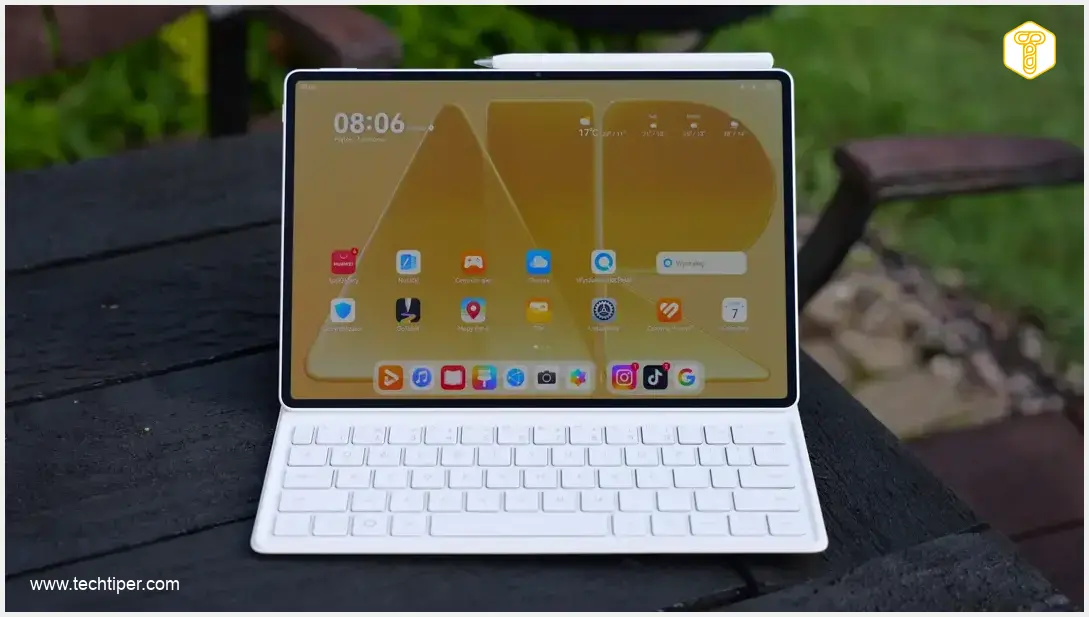
HUAWEI MatePad Air Review
-
Design & Mobility
-
Display Quality
-
Performance
-
Battery Life
-
Accessories & Sound
Masterpiece for Mobility and Productivity
The HUAWEI MatePad Air is an exceptionally sleek and lightweight tablet designed for ultimate mobility and productivity. It boasts a stunning PaperMatte OLED display, robust performance, and excellent battery life, making it a compelling laptop alternative when paired with its versatile accessories.
Advantages
- Extremely thin (5.3mm) and lightweight (509g) design, offering exceptional portability.
- Premium construction with eye-catching aesthetics.
- Excellent battery life (full day of use) with rapid 66W fast charging.
- Phenomenal PaperMatte OLED display with high resolution, 1200 nits brightness, and anti-reflection coating.
- Strong performance, handling all applications and even video editing smoothly.
- Versatile and comfortable included keyboard accessory, enabling laptop-like productivity.
- Immersive quad-speaker system delivering superior sound quality.
Disadvantages
- M-Pencil Pro stylus is an optional accessory, not included with all versions.
- Requires manual installation of Google ecosystem apps for full integration for long-time Google users.
Contents
HUAWEI MatePad Air Review: A Masterpiece for Mobility and Productivity
Huawei has recently unveiled two compelling options for individuals seeking a complete tablet experience. Among them, I had the opportunity to test the HUAWEI MatePad Air for three weeks. This exceptionally sleek and lightweight device truly captivated me with its impressive array of features. Throughout my testing, I put it through various real-world scenarios. How did the MatePad Air perform? Let’s dive into the details.
The HUAWEI MatePad Air: Designed for Travel
My first encounter with the MatePad Air came after returning from a business trip to San Francisco, where I was reliant on a substantial 16-inch laptop. While the comfort of working on a large computer is undeniable, it consumes a significant amount of precious carry-on space. Upon unboxing the HUAWEI MatePad Air, its compact size immediately made a huge impression. I almost instantly regretted not having it with me on my journey to America.
The MatePad Air measures a mere 5.3 mm in thickness, a measurement that almost undersells Huawei’s latest innovation. This device is thinner than many of the slimmest smartphones currently available. Furthermore, the tablet itself is narrower than the dedicated M-Pencil Pro stylus, showcasing its incredibly svelte profile. This experience is further enhanced by its weight. At just 509 grams (approximately 1.12 pounds), the MatePad Air weighs about the same as a half-liter bottle of water. Even when paired with its keyboard accessory, bringing the total weight to 817 grams (about 1.8 pounds), the device remains virtually unnoticeable when carried in a bag. I often found myself instinctively checking my backpack to ensure the tablet was still there.
Despite its slim design, the MatePad Air doesn’t compromise on durability. The HUAWEI MatePad Air boasts a truly premium construction, utilizing top-tier materials that contribute to its minimalist yet appealing design. While the blue and pink variants are eye-catching, I personally favor the white version, whose subtle glitter effect shimmers beautifully in bright light.
Such a thin profile might raise concerns about battery life and operational longevity. However, the MatePad Air’s battery capacity is twice that of a typical smartphone. This translates into many hours of entertainment or productivity. This was a critical feature I missed in the laptop I used in San Francisco. On a single charge, I consistently achieved an entire day of use without issue. Less demanding users will find themselves reaching for the charger even less frequently. Should you eventually deplete the battery, the rapid 66-watt fast charging quickly replenishes the power, getting you back to work or play in no time.
Excellent Accessories
One of the key factors enabling the HUAWEI MatePad Air to serve as a laptop replacement for me during travel is its comprehensive range of well-designed accessories. On train journeys, the keyboard proved indispensable and is thoughtfully included with every version of the MatePad Air.
Primarily, the keyboard greatly simplifies text entry. The vast majority of this article was drafted directly on the HUAWEI MatePad Air. The key travel is comfortable, the stabilization is robust, and the overall typing experience is remarkably close to that of a laptop. Beyond typing, the keyboard also functions as a protective case and offers a built-in stand. Users can choose between two comfortable viewing angles, which proved more than adequate for various tasks.

For an enhanced experience, the improved M-Pencil Pro stylus is an optional add-on that is definitely worth considering. Now available in a new pink color, the stylus can transform into a full-fledged presentation remote in mouse mode. You can effortlessly advance slides with a fingertip or control an on-screen cursor by squeezing the stylus body. Beyond these innovative features, it offers excellent pressure detection, outstanding precision, and an ergonomic design for comfortable use. For more insights into e-reader capabilities, you might find our Huawei MatePad Paper E-Reader review insightful.
A Phenomenal Screen Unafraid of Reflections
In any tablet, the display is arguably the most crucial component, and in this category, Huawei has truly excelled. The manufacturer has demonstrated significant expertise in producing matte PaperMatte panels, and the screen on the MatePad Air is simply brilliant.
The display features OLED technology combined with a high resolution. This results in visually appealing, saturated colors, deep blacks, and exceptional sharpness for all displayed content. Furthermore, Huawei opted for a practical 3:2 aspect ratio. This means the screen is slightly taller than a typical widescreen television, which significantly aids in multitasking. Browsers, document software, and split-screen applications can display substantially more content, enhancing productivity and readability.
Equally important is the matte coating, which effectively eliminates a significant portion of light reflections. This treatment not only reduces eye strain but also dramatically improves visibility in challenging lighting conditions. The screen boasts a maximum brightness of 1200 nits. This combination ensures that the device can be used comfortably outdoors, even at midday, without visibility issues.
While I’m not one for sunbathing, enjoying an evening football match on the terrace proved to be a highly pleasant experience. The quad-speaker system greatly enhances the stadium atmosphere. These speakers deliver loud, immersive audio with a spatial effect and genuine depth. I must admit, the sound quality surpasses that of the vast majority of laptops I’ve tested, even those costing thousands of dollars.
Performance That Handles Any Task
Huawei claims that the device offers 10% greater performance than the MatePad Pro 13.2”. In my three weeks of testing, I never encountered any performance bottlenecks. All applications ran smoothly and efficiently. The tablet comes equipped with excellent built-in applications for documents, note-taking, and even drawing, offering a multitude of possibilities for various tasks.
As a long-time user of the Google ecosystem, I easily installed Chrome browser, YouTube, Maps, as well as Google Drive and Google Docs. This allowed me to seamlessly work on the same files while traveling as I would in my office, maintaining consistent productivity.
The HUAWEI MatePad Air is also compatible with video editing applications. Simple yet intuitive apps like CapCut work well, as do more advanced software options like Filmora. With up to 256 GB of internal storage, I was able to transfer several recordings from my America trip and quickly edit a memorable video.
The Tablet, Alongside the Pro Max Variant, Enters the Launch Offer
The HUAWEI MatePad Pro Max also enjoyed a successful debut. This device is a true multimedia powerhouse, but like the MatePad Air, it is also highly capable for work. The Pro Max variant is even slimmer and features an even brighter PaperMatte screen. Both new tablets have recently launched, and the initial promotional offer is exceptionally attractive.
From August 18th to October 5th, all versions of the HUAWEI MatePad Air are available with approximately a $125 discount. This means the device, including the bundled keyboard, starts at around $750. For the top-specced 12GB RAM / 256GB storage version with the additional M-Pencil Pro stylus, the price is approximately $875. The same $125 discount is also applicable to the MatePad Pro Max during this period. Huawei’s most advanced tablet can be purchased starting from around $1175.
It’s also worth checking out offers on other Huawei models, as “Back to School” (BTS) promotions have just begun. There’s certainly a wide selection to choose from. The affordably priced HUAWEI WATCH FIT 5 smartwatch, for example, stands out as particularly good value, now discounted by approximately $37, and it’s not the only sports watch on sale. Those looking for budget-friendly audio should explore the HUAWEI FreeBuds 6i earbuds. Discounts also extend to other tablets, such as the versatile HUAWEI MatePad 12 X 2025 model. For photography enthusiasts, smartphones like the HUAWEI Pura 80 Ultra or HUAWEI Mate X7 could be ideal, with some of the most impressive price reductions in this category of devices.
Frequently Asked Questions (FAQ)
Based on three weeks of testing, the MatePad Air demonstrated strong performance, handling all applications smoothly. With its excellent built-in document, note-taking, and drawing apps, along with compatibility for Google Workspace and video editing software like CapCut and Filmora, it’s well-equipped for both professional productivity and creative tasks, making it a viable laptop alternative, especially when paired with its keyboard accessory.
The MatePad Air’s PaperMatte screen features a matte coating that significantly reduces light reflections. This not only decreases eye strain during extended use but also vastly improves visibility in bright environments, including direct sunlight. Combined with its high resolution OLED display and 1200 nits brightness, it offers a brilliant, clear, and comfortable viewing experience under various conditions.
The M-Pencil Pro goes beyond typical stylus functions. In addition to pressure detection, precision, and an ergonomic design for drawing and note-taking, it can also act as a presentation remote in ‘mouse mode.’ Users can advance slides with a fingertip or control an on-screen cursor by squeezing its body, enhancing its utility for business and creative professionals.
The reviewer found the MatePad Air to be a strong contender for replacing a laptop during travel due to its extremely slim and lightweight design (509g for the tablet, 817g with keyboard), excellent battery life (an entire day of use), and versatile accessories like the included keyboard and M-Pencil Pro. Its ability to run productivity apps and handle multitasking, combined with rapid 66-watt charging, makes it highly suitable for on-the-go work and entertainment.
Source: Internal research. Opening photo: Krzysztof Wilamowski
About Post Author
