

ASUS RT-BE58 Go Review
-
Design & Portability
-
Wi-Fi 7 Performance
-
Power Flexibility
-
Features & Security
-
Setup & App Management
The Ultimate Wi-Fi 7 Travel Companion
The ASUS RT-BE58 Go provides phenomenal flexibility, top-tier Wi-Fi 7 speeds, and incredible practicality for digital nomads. With smart features like USB-C power delivery, WISP mode, and native VPN support, it effortlessly delivers secure and reliable internet access anywhere in an ultra-compact footprint.
Advantages
- Ultra-compact and lightweight (232g), easily fits in luggage
- Cutting-edge Wi-Fi 7 performance with fast wireless transfers
- Flexible USB-C power delivery (works with standard power banks)
- Public Wi-Fi (WISP) mode effortlessly bypasses hotel device limits
- Built-in VPN support and USB smartphone tethering for secure connections
Disadvantages
- Lacks a built-in battery (requires an external power source to operate)
- Only one LAN port available for wired devices
Stable internet access is essential, even when you are on vacation or traveling for business. The ASUS RT-BE58 Go is a compact yet highly practical networking device designed to guarantee a stable connection while taking up barely any space in your luggage. So, what makes this pocket-sized Wi-Fi 7 router stand out?

Contents
ASUS RT-BE58 Go Review: The Ultimate Travel Router with Wi-Fi 7
Everything You Need in the Box
The ASUS RT-BE58 Go arrives in a relatively small but well-equipped package. Right out of the box, you receive everything required to set up and start using your network immediately. The contents include:
- The ASUS RT-BE58 Go travel router
- A power adapter featuring a conveniently long USB-C cable
- A 1-meter (approx. 3 feet) RJ-45 Ethernet cable
- A complete set of user manuals and quick-start guides
Ultra-Compact Design Built for Globetrotters
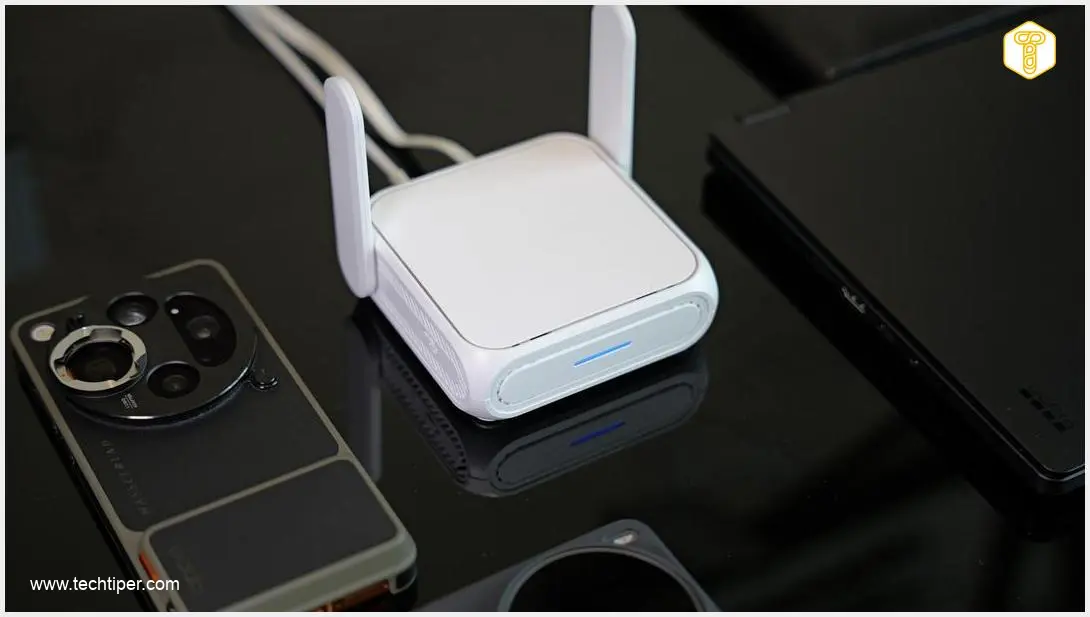
This model is arguably one of the smallest travel routers currently on the market. The compact chassis is constructed from high-quality plastic with a sleek matte finish that effectively resists and masks fingerprints. Its dimensions are so travel-friendly that I easily slipped it into the smallest front pocket of my backpack.
During my testing over a two-week period, I took the router on six flights and three train rides. Weighing in at just 232 grams (about 8.2 ounces), the device is virtually unnoticeable in a carry-on bag. Furthermore, because it does not contain a built-in battery, it complies with strict airline regulations and can safely be packed in checked luggage without any issues.
Hardware, Ports, and Flexible Power Options
Despite its small footprint, the hardware is surprisingly robust. The design incorporates two movable external antennas and a highly practical programmable physical switch on the side. This switch can be customized via the app to trigger specific actions—such as instantly activating your VPN—without needing to unlock your phone. A subtle front LED keeps you informed of the network status.
The back of the router is packed with connectivity options, including:
- One 1 Gbps LAN port
- One ultra-fast 2.5 Gbps WAN port
- A dedicated reset button
- A USB-C port exclusively for power
- A USB-A 3.0 port for data and tethering
One of my favorite features is its low power consumption. Thanks to the USB-C power delivery, you are not strictly tied to the included wall adapter. The router can be powered by any standard 18W (9V/2A) charger, a laptop’s USB port, or even a standard power bank. This makes the ASUS RT-BE58 Go capable of operating quite literally anywhere—whether you are working from a remote cafe or setting up a mobile workstation, which pairs exceptionally well if you are using high-end portable tech like the one we covered in our ASUS ZenScreen OLED MQ16FC review.
Travel-Friendly Features and Advanced Connectivity
The model that accompanied me on my international trip is primarily defined by its cutting-edge Wi-Fi 7 capabilities. It supports blazing-fast wireless transfers of up to 2882 Mbps on the 5 GHz band and up to 688 Mbps on the 2.4 GHz frequency. These bandwidth limits ensure that data transmission speeds are more than sufficient for 4K streaming, large file transfers, and video conferencing.
Hotels frequently implement strict limits on the number of devices you can connect to their Wi-Fi networks. The ASUS RT-BE58 Go solves this frustration effortlessly by operating in Public Wi-Fi (WISP) mode. You connect the router to the hotel network once, and then connect all your devices securely to your personal router. This was invaluable during my trip, as I needed to maintain a connection for a laptop and three smartphones simultaneously.
Built-In VPN and USB Tethering
Security on public networks is a major concern, making the router’s native support for over 30 VPN providers a fantastic addition. While riding a train to the airport, I was able to encrypt my public internet connection through a Virtual Private Network running directly on the router hardware. This means every device connected to your network is automatically protected without needing a VPN app installed on each one.
When traveling to regions that block certain websites with strict firewalls, standard VPNs can sometimes struggle to connect. The ASUS RT-BE58 Go has an ace up its sleeve: USB tethering. By plugging my smartphone directly into the router’s USB-A port, I could share my phone’s cellular data (using an international eSIM) across all my devices. If you are looking for alternative ways to manage mobile data, you might also be interested in learning how to turn an old phone into a WiFi hotspot extender. USB tethering is highly advantageous because it consumes significantly less battery power from your smartphone compared to running a standard mobile wireless hotspot.
When your travels conclude, there is no need to toss this device into a desk drawer. With its dual-band Wi-Fi 7 performance and AiMesh compatibility, it functions perfectly as an everyday mesh node or secondary access point in your home network. It handled heavy file uploads and downloads from a connected desktop PC without breaking a sweat.
Intuitive Mobile App Management
Initial setup and ongoing management are handled through a highly polished dedicated mobile app available for both iOS and Android. The user interface is clean, modern, and highly intuitive. The main dashboard provides an immediate overview of real-time network traffic and connected clients.
Through the software, users can easily configure VPN profiles, spin up isolated guest networks, or establish strict parental controls. It is also where you customize the action of the physical side switch and toggle the LED lights on or off—a crucial feature when sleeping in a dark hotel room.
Key Technical Specifications
For such a compact networking tool, the hardware specifications are genuinely impressive:
- Network Standards: IPv4, IPv6, Wi-Fi 7 (802.11be)
- Maximum Wi-Fi Data Rates: Up to 2882 Mbps (5 GHz) and up to 688 Mbps (2.4 GHz)
- Processor: Quad-core clocked at 2.0 GHz
- Memory: 1 GB DDR4 RAM; 256 MB Flash storage
- Operating Modes: Public Wi-Fi (WISP), Repeater, Media Bridge, Access Point, Range Extender, AiMesh Node, and standard Wireless Router
- Ports: 1x 2.5 Gbps WAN, 1x 1 Gbps LAN, 1x USB-A (for mobile data tethering), 1x USB-C (for power delivery)
- Weight: 232 g (approx. 8.2 oz)
- Dimensions: 99 x 111 x 36 mm (3.9 x 4.4 x 1.4 inches)
Conclusion: The Perfect Travel Companion
The networking gear that accompanied me abroad constantly surprised me with its immense practicality. The ASUS RT-BE58 Go literally fits anywhere and provides phenomenal flexibility for digital nomads and vacationers alike. Whether you are working on a high-speed train or navigating internet restrictions overseas, the built-in VPN support, USB tethering, and power bank compatibility ensure you maintain a fast, secure, and reliable internet connection absolutely anywhere.
Frequently Asked Questions (FAQ)
Does the ASUS RT-BE58 Go require a dedicated wall outlet to function?
No, one of its best features is its USB-C power delivery. It requires only an 18W (9V/2A) input, meaning you can easily power the router using a standard smartphone power bank, a laptop’s USB port, or a high-quality travel adapter, making it highly versatile for trains, airports, or remote work setups.
How does the Public Wi-Fi (WISP) mode help when staying in a hotel?
Hotels often limit the number of devices you can connect to their network, or they require you to log into a captive portal. In WISP mode, the router connects to the hotel’s Wi-Fi as a single device, bypassing device limits. It then broadcasts your own private, secure network that all your personal devices (laptops, phones, tablets) can connect to simultaneously.
Can I route my smartphone’s cellular data through the ASUS RT-BE58 Go?
Yes, the router is equipped with a USB-A port that fully supports mobile tethering. You can plug your smartphone directly into the router with a USB cable, allowing the router to broadcast your phone’s cellular data connection via high-speed Wi-Fi 7 to all your connected network devices while simultaneously keeping your phone charged.
Source: Own elaboration. Opening photo: Krzysztof Wilamowski
About Post Author
